--
:
--
:
--
MariaDB部署-yum方式
最后更新于:
实战:MariaDB部署(yum方式)-2024.3.28(测试成功)
目录
[toc]
环境
1centos7.9 2001
2mariadb-server 10.5.24
无实验软件
须知
centos6:默认仓库有mysql-server v5.1.73版本包
yum info mariadb-server
centos7:默认仓库有mariadb-server v5.5.65版本包
yum info mariadb-server
centos8上默认仓库有mysql 8.0.17,mariadb 10.3.17版本包
部署
情况1:默认版本
默认yum直接部署会安装centos仓库自带的mariadb-server v5.5.65版本包:
1yum install mariadb-server -y
 1[root@linux ~]# ss -ntl
 2State       Recv-Q Send-Q                      Local Address:Port                                     Peer Address:Port
 3LISTEN      0      128                                     *:22                                                  *:*
 4LISTEN      0      5                                       *:8730                                                *:*
 5LISTEN      0      128                                     *:443                                                 *:*
 6LISTEN      0      128                                     *:80                                                  *:*
 7LISTEN      0      5                                    [::]:8730                                             [::]:*
 8LISTEN      0      128                                  [::]:443                                              [::]:*
 9[root@linux ~]# systemctl enable --now mariadb
10Created symlink from /etc/systemd/system/multi-user.target.wants/mariadb.service to /usr/lib/systemd/system/mariadb.service.
11[root@linux ~]# systemctl status mariadb
12● mariadb.service - MariaDB database server
13   Loaded: loaded (/usr/lib/systemd/system/mariadb.service; enabled; vendor preset: disabled)
14   Active: active (running) since Thu 2024-03-28 14:30:23 CST; 16s ago
15  Process: 24929 ExecStartPost=/usr/libexec/mariadb-wait-ready $MAINPID (code=exited, status=0/SUCCESS)
16  Process: 24844 ExecStartPre=/usr/libexec/mariadb-prepare-db-dir %n (code=exited, status=0/SUCCESS)
17 Main PID: 24927 (mysqld_safe)
18    Tasks: 20
19   Memory: 102.9M
20   CGroup: /system.slice/mariadb.service
21           ├─24927 /bin/sh /usr/bin/mysqld_safe --basedir=/usr
22           └─25093 /usr/libexec/mysqld --basedir=/usr --datadir=/var/lib/mysql --plugin-dir=/usr/lib64/mysql/plugin --log-error=/var...
23
24Mar 28 14:30:21 linux mariadb-prepare-db-dir[24844]: MySQL manual for more instructions.
25Mar 28 14:30:21 linux mariadb-prepare-db-dir[24844]: Please report any problems at http://mariadb.org/jira
26Mar 28 14:30:21 linux mariadb-prepare-db-dir[24844]: The latest information about MariaDB is available at http://mariadb.org/.
27Mar 28 14:30:21 linux mariadb-prepare-db-dir[24844]: You can find additional information about the MySQL part at:
28Mar 28 14:30:21 linux mariadb-prepare-db-dir[24844]: http://dev.mysql.com
29Mar 28 14:30:21 linux mariadb-prepare-db-dir[24844]: Consider joining MariaDB's strong and vibrant community:
30Mar 28 14:30:21 linux mariadb-prepare-db-dir[24844]: https://mariadb.org/get-involved/
31Mar 28 14:30:21 linux mysqld_safe[24927]: 240328 14:30:21 mysqld_safe Logging to '/var/log/mariadb/mariadb.log'.
32Mar 28 14:30:21 linux mysqld_safe[24927]: 240328 14:30:21 mysqld_safe Starting mysqld daemon with databases from /var/lib/mysql
33Mar 28 14:30:23 linux systemd[1]: Started MariaDB database server.
34[root@linux ~]#
35[root@linux ~]# ss -ntl
36State       Recv-Q Send-Q                      Local Address:Port                                     Peer Address:Port
37LISTEN      0      128                                     *:22                                                  *:*
38LISTEN      0      5                                       *:8730                                                *:*
39LISTEN      0      128                                     *:443                                                 *:*
40LISTEN      0      50                                      *:3306                                                *:*
41LISTEN      0      128                                     *:80                                                  *:*
42LISTEN      0      5                                    [::]:8730                                             [::]:*
43LISTEN      0      128                                  [::]:443                                              [::]:*
44[root@linux ~]#
45#*:3306 这里的*代表任意地址的3306都可以访问。
46
47[root@linux ~]# mysql
48Welcome to the MariaDB monitor.  Commands end with ; or \g.
49Your MariaDB connection id is 2
50Server version: 5.5.68-MariaDB MariaDB Server
51
52Copyright (c) 2000, 2018, Oracle, MariaDB Corporation Ab and others.
53
54Type 'help;' or '\h' for help. Type '\c' to clear the current input statement.
55
56MariaDB [(none)]>
情况2:配置mariadb官方镜像仓库
老版本:
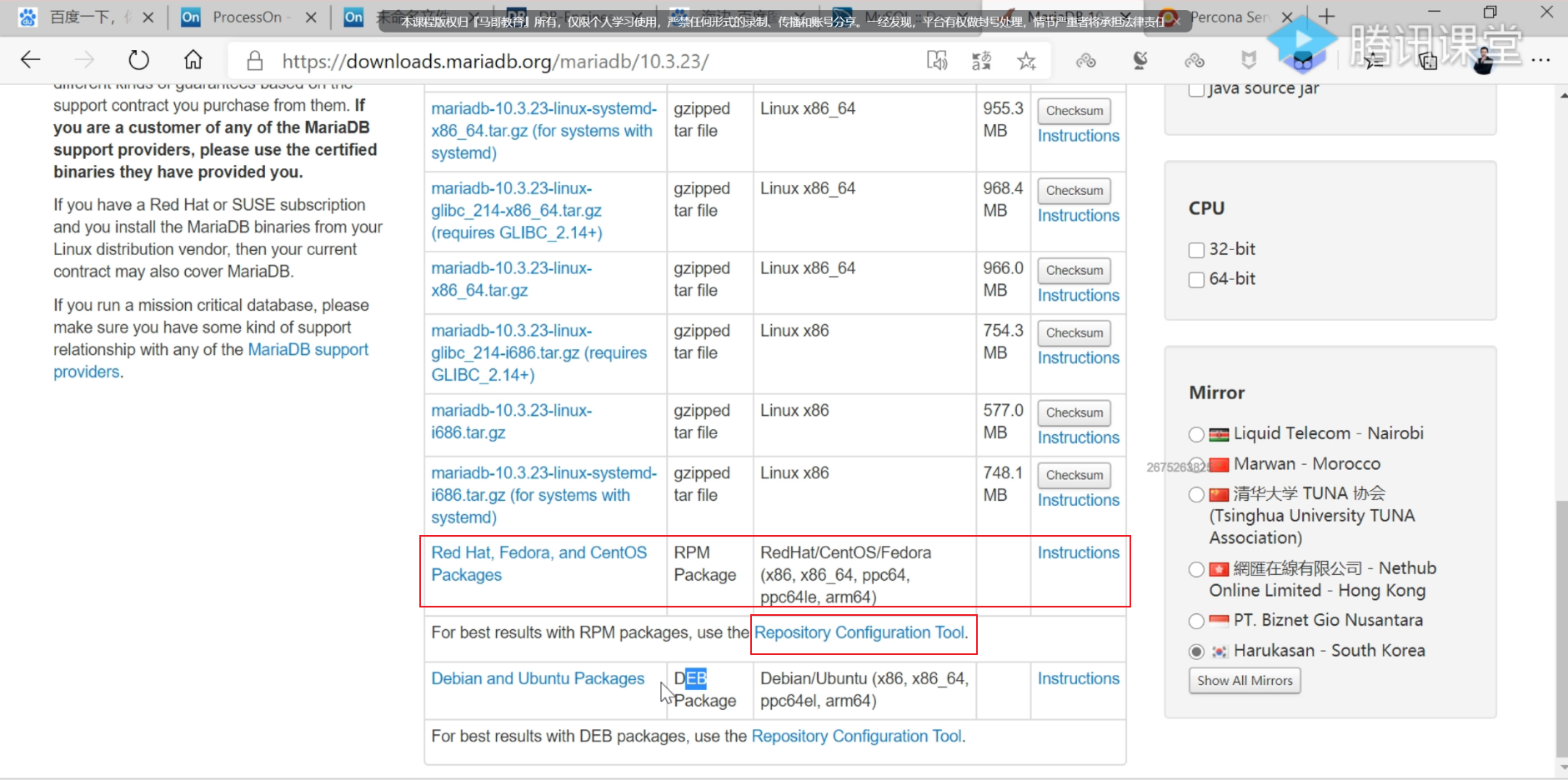
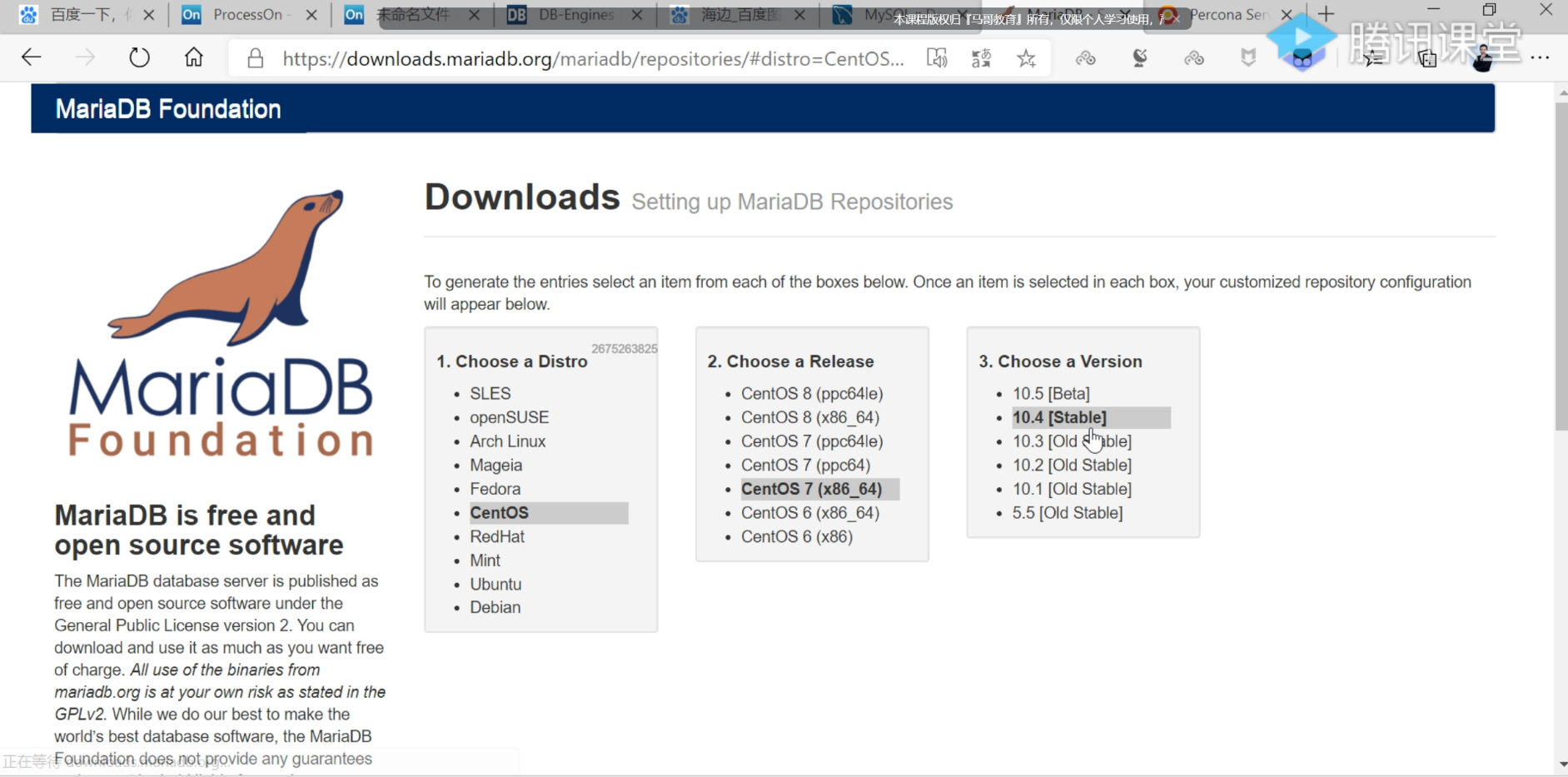
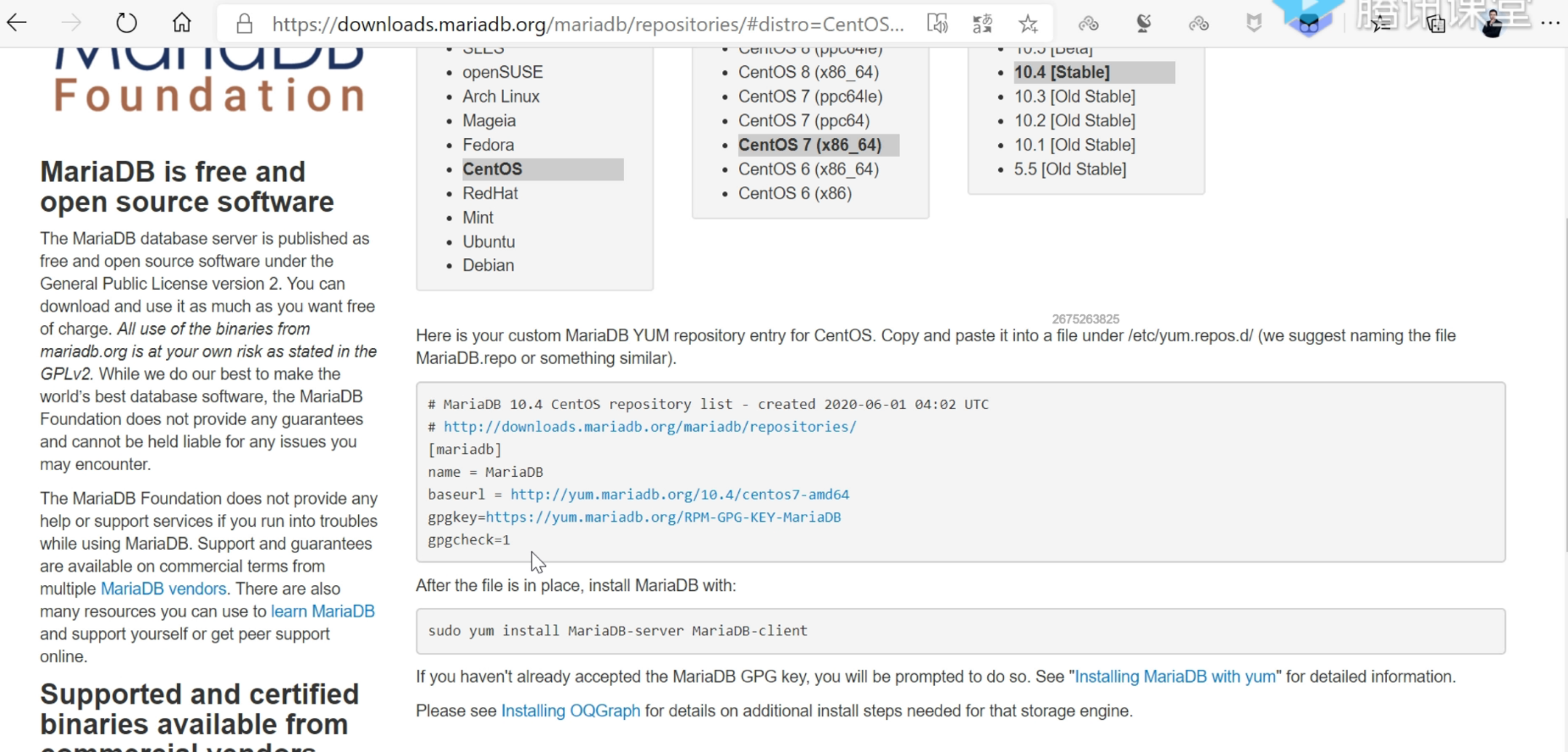
 1# MariaDB 10.5 CentOS repository list - created 2024-03-28 06:37 UTC
 2# https://mariadb.org/download/
 3[mariadb]
 4name = MariaDB
 5# rpm.mariadb.org is a dynamic mirror if your preferred mirror goes offline. See https://mariadb.org/mirrorbits/ for details.
 6# baseurl = https://rpm.mariadb.org/10.5/centos/$releasever/$basearch
 7baseurl = https://download.nus.edu.sg/mirror/mariadb/yum/10.5/centos/$releasever/$basearch
 8module_hotfixes = 1
 9# gpgkey = https://rpm.mariadb.org/RPM-GPG-KEY-MariaDB
10gpgkey = https://download.nus.edu.sg/mirror/mariadb/yum/RPM-GPG-KEY-MariaDB
11gpgcheck = 1
使用清华源:
https://mirrors.tuna.tsinghua.edu.cn/mariadb/yum/
https://mirrors.tuna.tsinghua.edu.cn/mariadb/yum/10.5.24/centos7-amd64/
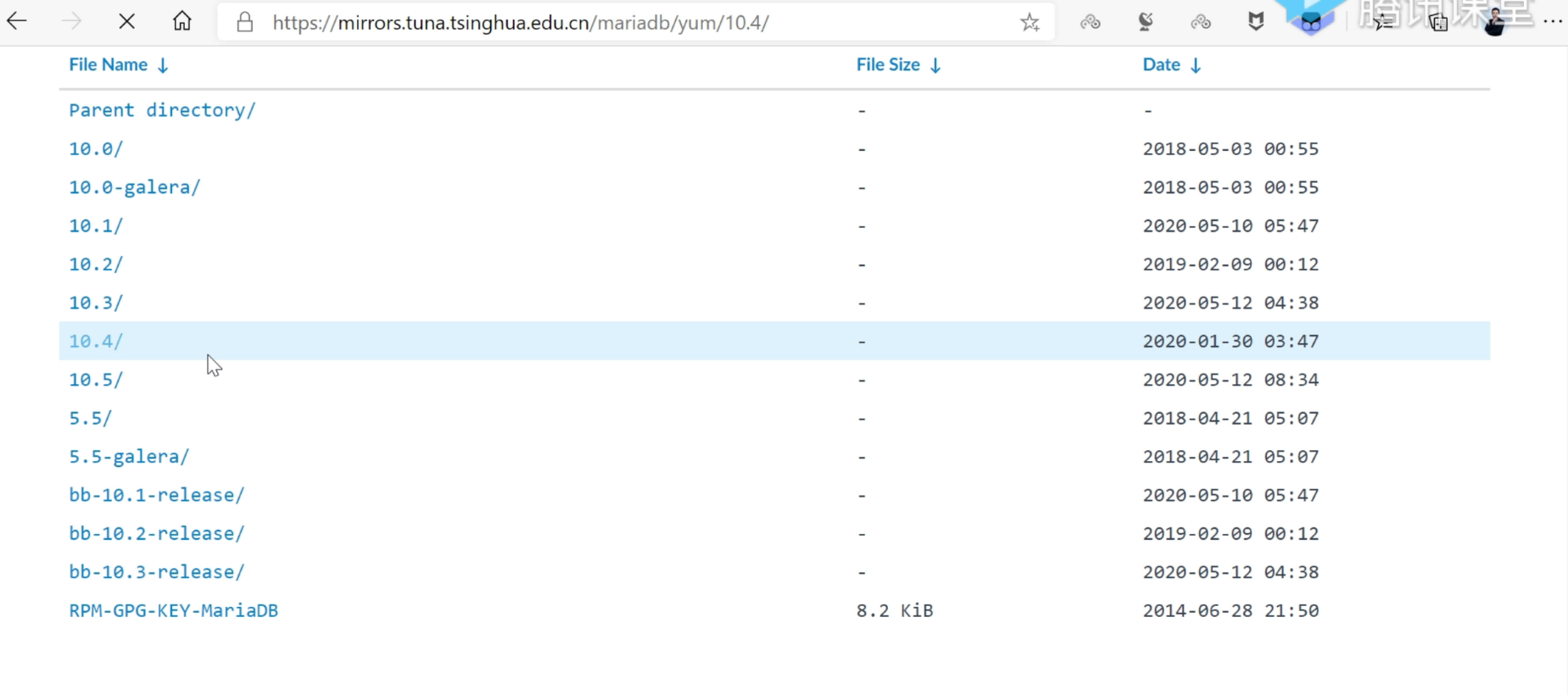
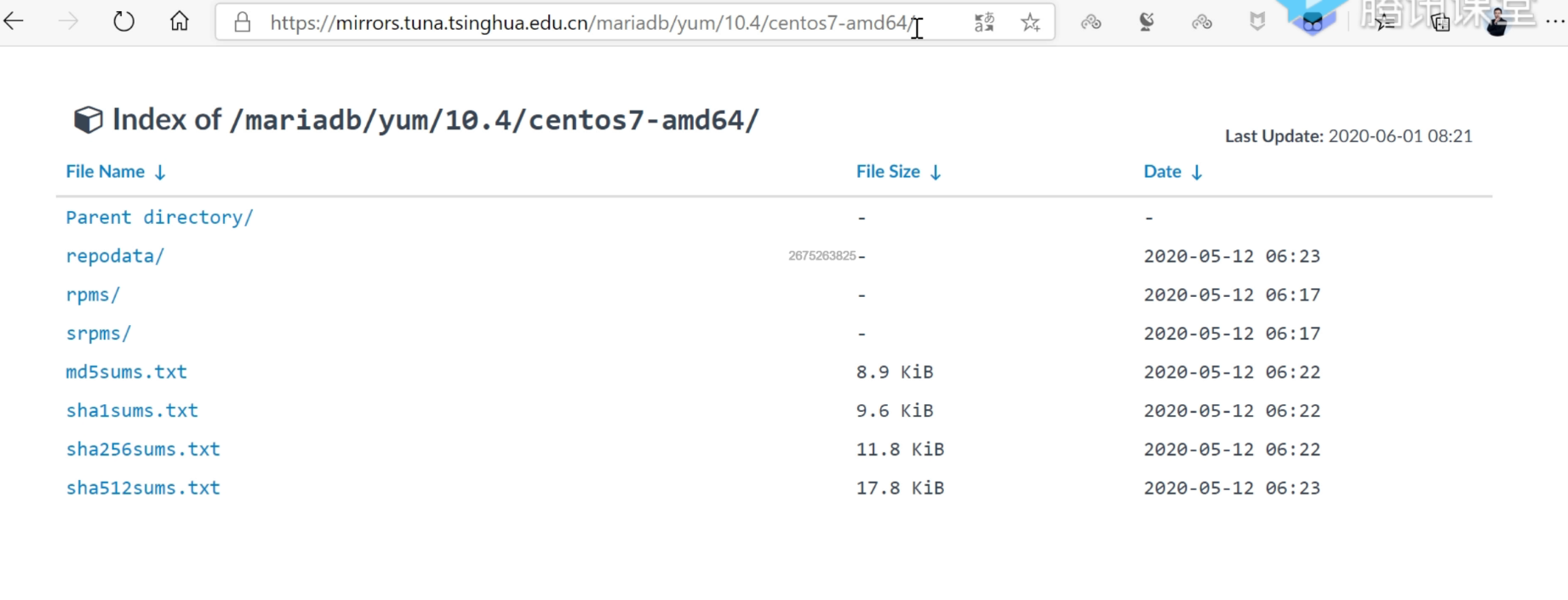
这里把gpgcheck=0设置为0就好。
 1# vim /etc/yum.repos.d/mariadb.repo
 2[mariadb]
 3name = MariaDB
 4baseurl = https://mirrors.tuna.tsinghua.edu.cn/mariadb/yum/10.5.24/centos7-amd64/
 5gpgcheck = 0
 6
 7
 8
 9
10#2024年5月27日 更新
11# vim /etc/yum.repos.d/mariadb.repo
12[mariadb]
13name = MariaDB
14baseurl = https://mirrors.tuna.tsinghua.edu.cn/mariadb/yum/10.5.25/centos7-amd64/
15gpgcheck = 0
16
17
18#2024年6月13日 更新
19# vim /etc/yum.repos.d/mariadb.repo
20[mariadb]
21name = MariaDB
22baseurl = https://mirrors.tuna.tsinghua.edu.cn/mariadb/yum/10.5.25/centos8-amd64/
23gpgcheck = 0
清理缓存,查看仓库:
 1[root@linux ~]# yum clean all
 2[root@linux ~]# yum repolist mariadb
 3Loaded plugins: fastestmirror
 4Loading mirror speeds from cached hostfile
 5 * base: mirrors.cloud.aliyuncs.com
 6 * extras: mirrors.cloud.aliyuncs.com
 7 * updates: mirrors.cloud.aliyuncs.com
 8repo id                                                         repo name                                                        status
 9mariadb                                                         MariaDB                                                          103
10repolist: 103
11[root@linux ~]#
部署
安装:
 1[root@linux ~]# yum install  mariadb-server -y --disableexcludes=MariaDB
 2……
 3Installed:
 4  MariaDB-client.x86_64 0:10.5.24-1.el7.centos                       MariaDB-compat.x86_64 0:10.5.24-1.el7.centos
 5  MariaDB-server.x86_64 0:10.5.24-1.el7.centos
 6
 7Dependency Installed:
 8  MariaDB-common.x86_64 0:10.5.24-1.el7.centos  boost-program-options.x86_64 0:1.53.0-28.el7  galera-4.x86_64 0:26.4.16-1.el7.centos
 9  lsof.x86_64 0:4.87-6.el7                      pcre2.x86_64 0:10.23-2.el7                    socat.x86_64 0:1.7.3.2-2.el7
10
11Replaced:
12  mariadb.x86_64 1:5.5.68-1.el7           mariadb-libs.x86_64 1:5.5.68-1.el7           mariadb-server.x86_64 1:5.5.68-1.el7
13
14Complete!
15
16[root@linux ~]# systemctl enable --now mariadb
17Created symlink from /etc/systemd/system/multi-user.target.wants/mariadb.service to /usr/lib/systemd/system/mariadb.service.
验证:
 1[root@linux ~]# mysql
 2Welcome to the MariaDB monitor.  Commands end with ; or \g.
 3Your MariaDB connection id is 3
 4Server version: 10.5.24-MariaDB MariaDB Server
 5
 6Copyright (c) 2000, 2018, Oracle, MariaDB Corporation Ab and others.
 7
 8Type 'help;' or '\h' for help. Type '\c' to clear the current input statement.
 9
10MariaDB [(none)]>
一键执行shell脚本
1wget -qO- https://onedayxyy.cn/scripts/mariadb_install/mariadb_install_yum.sh |bash
mariadb_install_yum.sh
 1##1、配置清华源镜像仓库
 2cat > /etc/yum.repos.d/mariadb.repo << EOF
 3[mariadb]
 4name = MariaDB
 5baseurl = https://mirrors.tuna.tsinghua.edu.cn/mariadb/yum/10.5.25/centos7-amd64/
 6gpgcheck = 0
 7EOF
 8
 9yum clean all
10yum makecache
11yum repolist all
12
13
14##2、部署
15yum install -y mariadb-server --disableexcludes=MariaDB
16systemctl enable --now mariadb
17
18##3、测试
19mysql
关于我
我的博客主旨:
- 排版美观,语言精炼;
- 文档即手册,步骤明细,拒绝埋坑,提供源码;
- 本人实战文档都是亲测成功的,各位小伙伴在实际操作过程中如有什么疑问,可随时联系本人帮您解决问题,让我们一起进步!
🍀 微信二维码
x2675263825 (舍得), qq:2675263825。

🍀 微信公众号
《云原生架构师实战》

🍀 个人博客站点

🍀 语雀
https://www.yuque.com/xyy-onlyone
🍀 csdn
https://blog.csdn.net/weixin_39246554?spm=1010.2135.3001.5421

🍀 知乎
https://www.zhihu.com/people/foryouone

最后
好了,关于本次就到这里了,感谢大家阅读,最后祝大家生活快乐,每天都过的有意义哦,我们下期见!

📡
推荐使用微信支付

推荐使用支付宝