--
:
--
:
--
配置站点信息
最后更新于:
配置站点信息

目录
[toc]
版权声明
:::warning
本着开源共享、共同学习的精神:
本文是在 博主《youngkbt》 文章:《本站 - 站点信息模块》https://notes.youngkbt.cn/about/website/info 基础上增加了一些自己的实际操作记录和修改,内容依旧属于原作者《youngkbt》 所有。转载无需和我联系,但请注明文章来源。如果侵权之处,请联系博主进行删除,谢谢~(这里万分感谢原作者的优质文章😜,感谢开源,拥抱开源💖)
:::
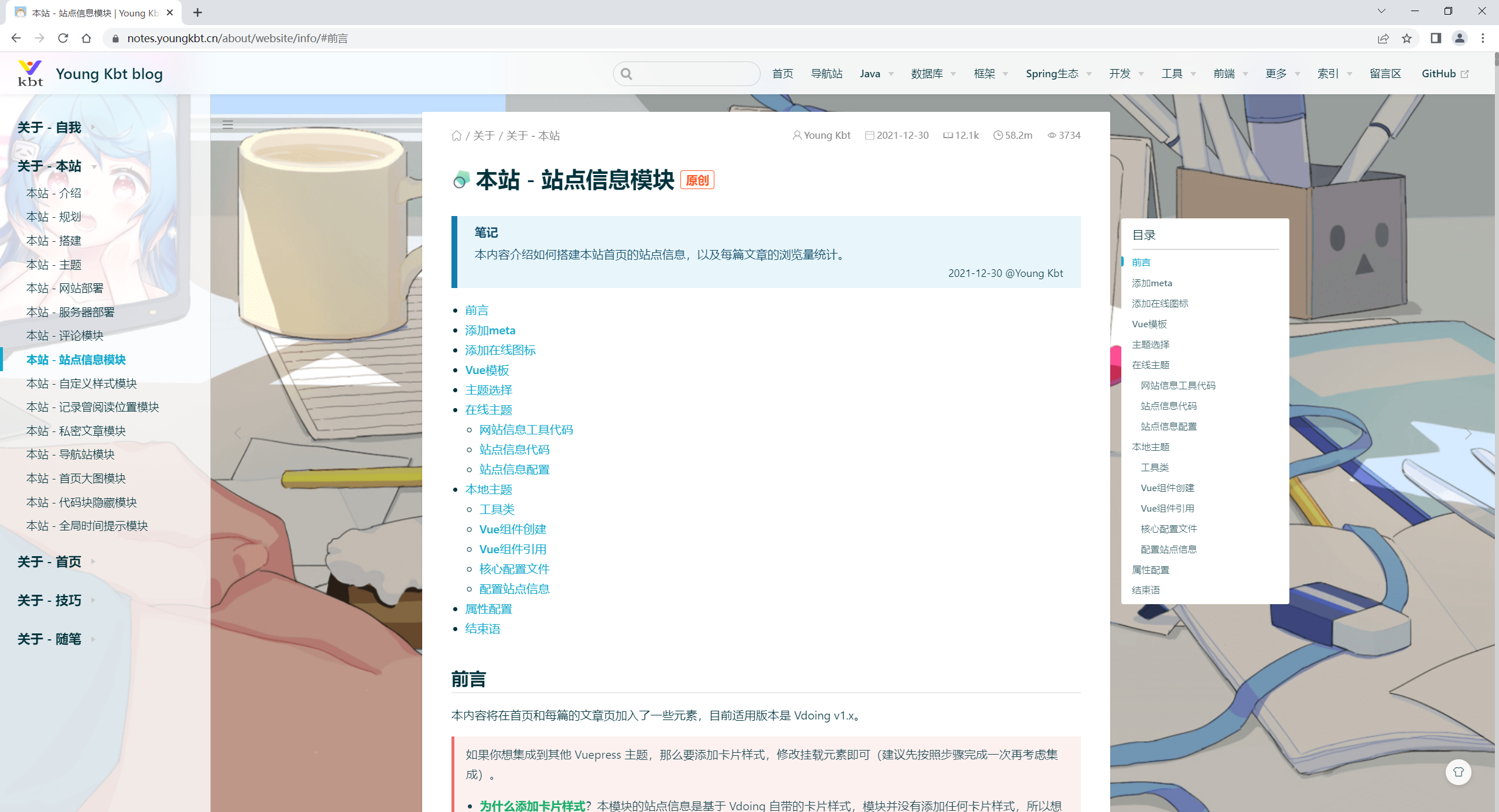
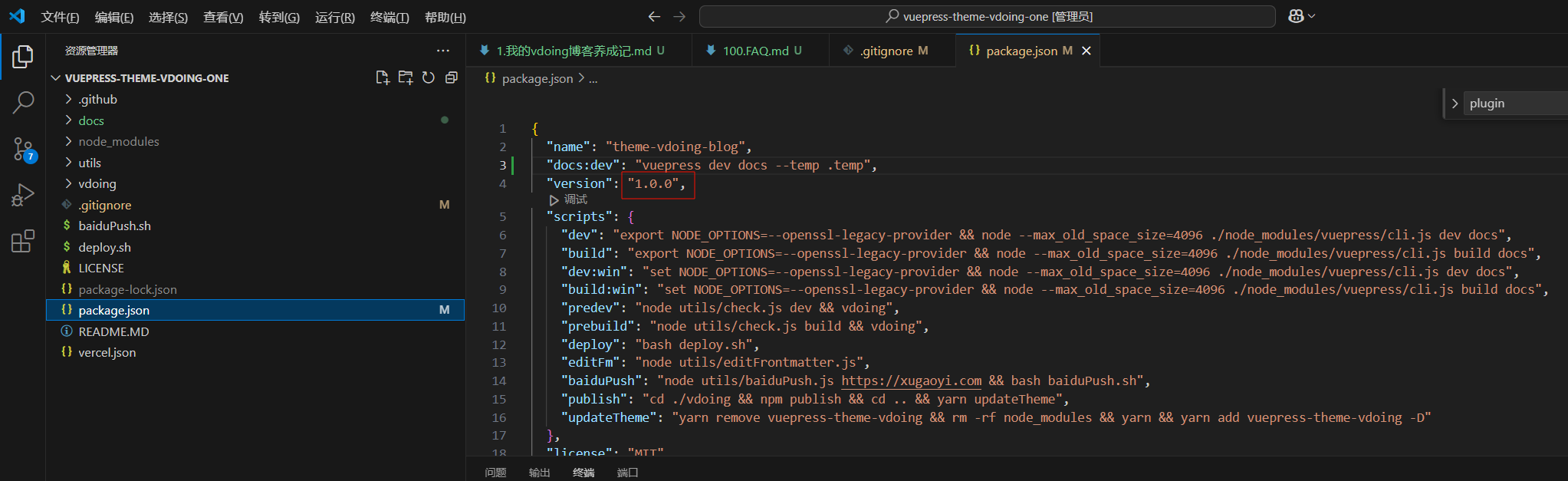
本人测试环境
2024年12月26日测试
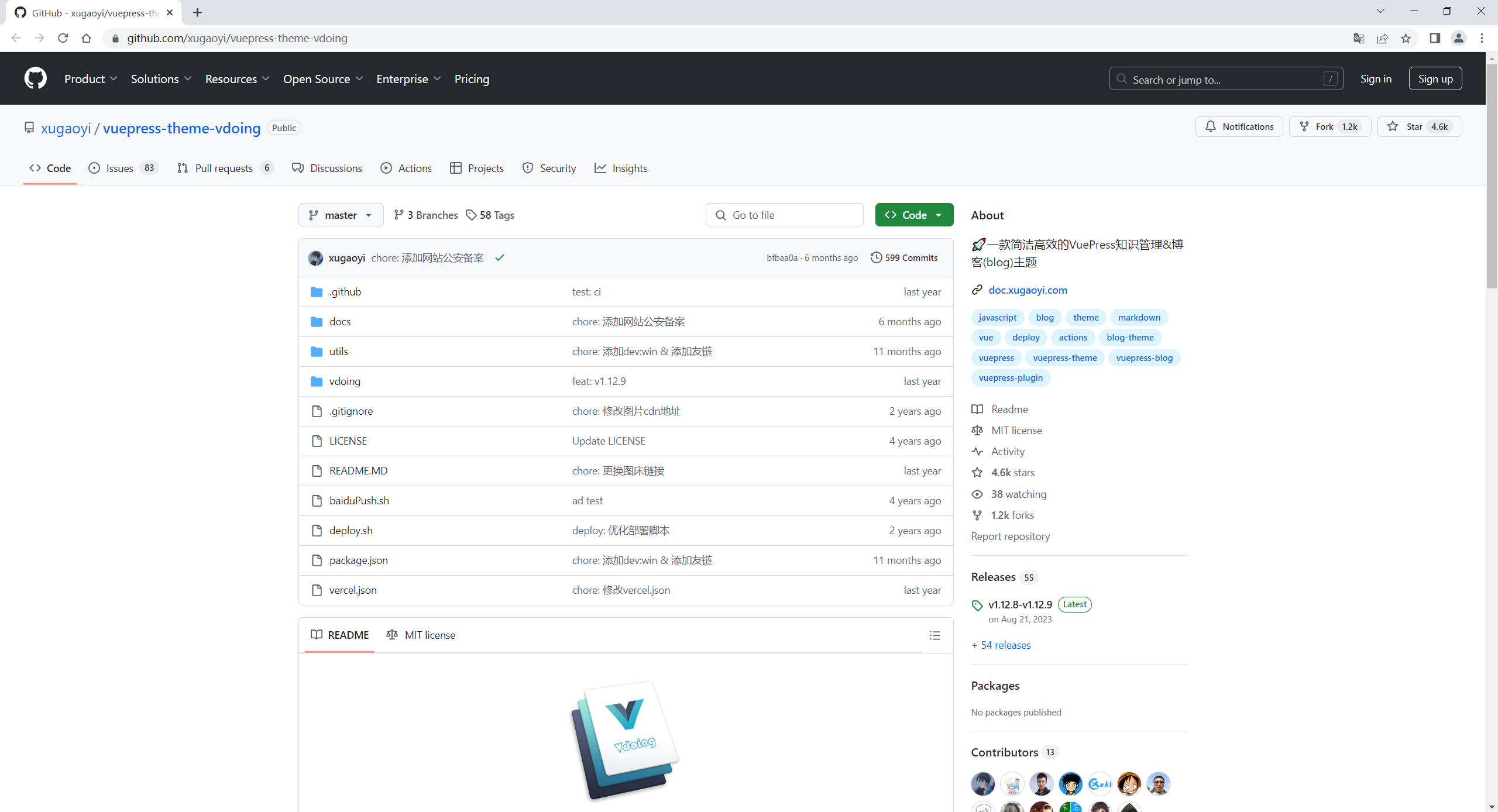
2024年12月23日从官方拉取的项目:
基于官方https://github.com/xugaoyi/vuepress-theme-vdoing搭建的仓库。
前言
本内容介绍如何搭建本站首页的站点信息,以及每篇文章的浏览量统计。
本内容将在首页和每篇的文章页加入了一些元素,目前适用版本是 Vdoing v1.x。
如果你想集成到其他 Vuepress 主题,那么要添加卡片样式,修改挂载元素即可(建议先按照步骤完成一次再考虑集成)。
- 为什么添加卡片样式?本模块的站点信息是基于 Vdoing 自带的卡片样式,模块并没有添加任何卡片样式,所以想集成到其他主题,则需要参考 Vdoing 卡片样式进行添加,或者按照自己喜欢的样式进行添加
- 为什么修改挂载元素?本模块的挂载元素是基于 Vdoing 标签提供的 class 或 id,而其他主题的标签不一样,所以自行进行调试
本模块的所有 功能 支持大部分 Vuepress 主题,但是如何将所有功能展示到其他主题页面合适的地方,以及展示的样式等 DOM 技术,需要自己适配。
效果如下:
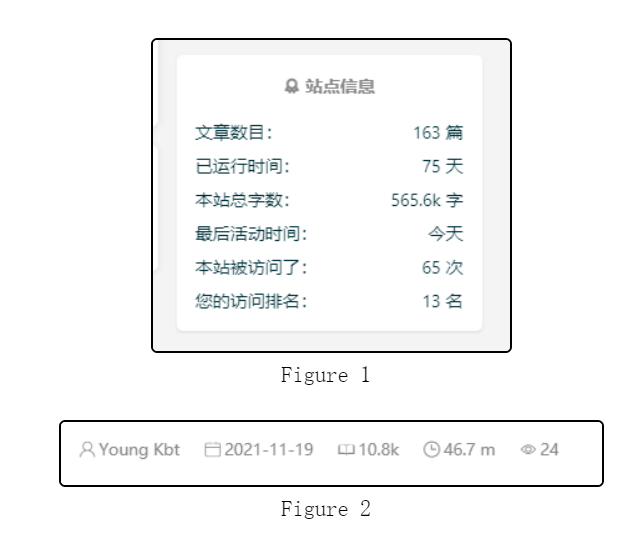
本站的访问量和文章的浏览量使用了 不蒜子,本地启动的 localhost 有很多人访问过,但无需担心实际部署后的访问量。
:::note
注意
问题:本模块目前有一个功能依赖于 git 的
lastUpdated功能,该功能已经内置 Vuepress,所以无需担心,唯一值得注意的是:在本地添加了新的文件,最后活动时间的数据可能为NaN(无法获取的意思)。解决:只需要在博客项目部署的过程中执行
git commit命令,因为该命令将会获取一个准确的时间代替NaN,给本模块使用。2022-01-17 @Young Kbt
:::
添加meta
为什么添加 meta 头信息呢,因为在 Chrome 85 版本中,为了保护用户的隐私,默认的 Referrer Policy 则变成了 strict-origin-when-cross-origin。
所以必须添加 meta,否则文章统计访问量的数据则不正确。
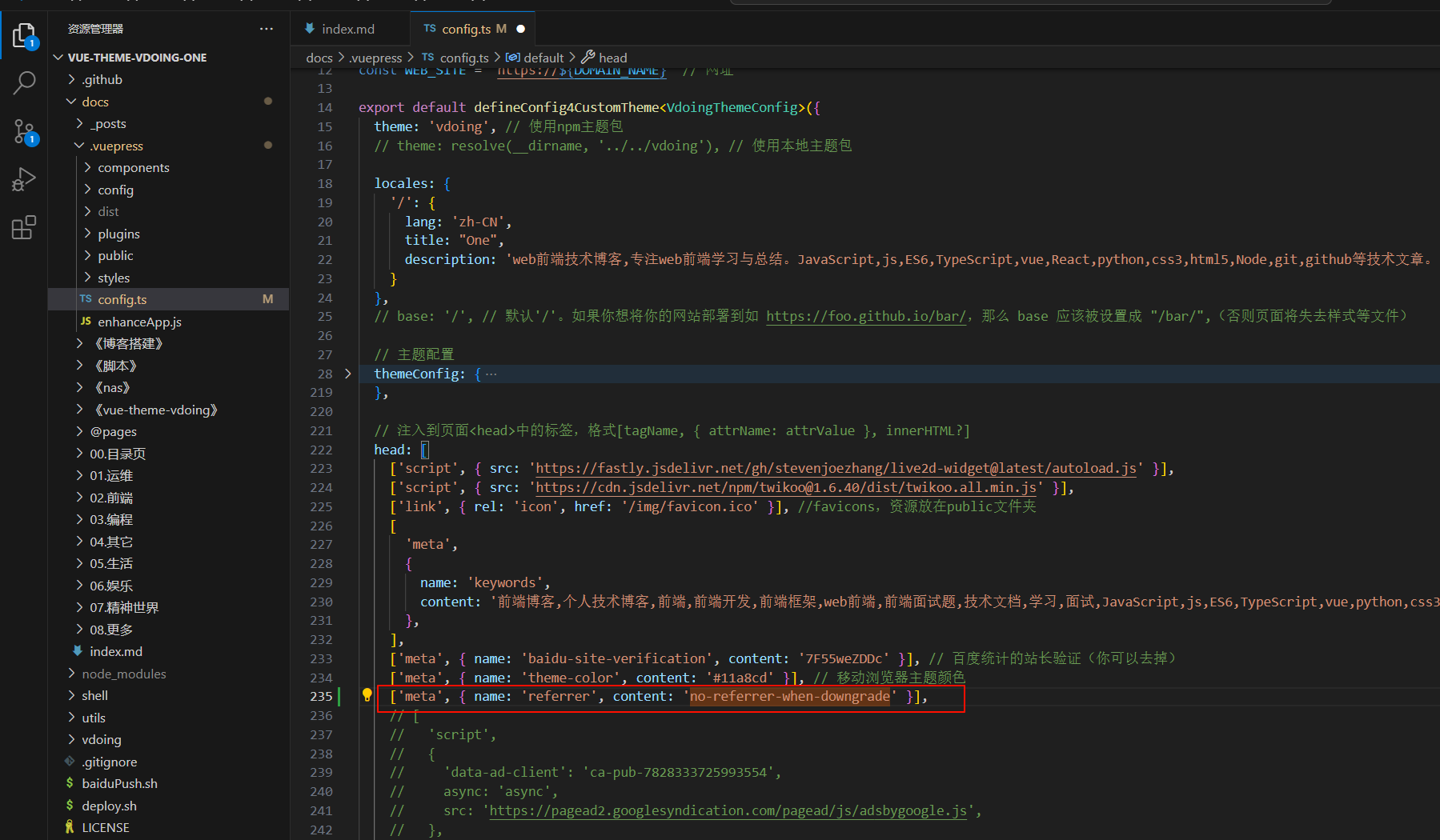
在 docs/.vuepress/config.js 下的 head 中添加如下内容:
1['meta', { name: 'referrer', content: 'no-referrer-when-downgrade' }],
如图:

自己配置:
添加在线图标
这里使用的是阿里矢量库。
地址:https://www.iconfont.cn/(opens new window)
添加了五个图标
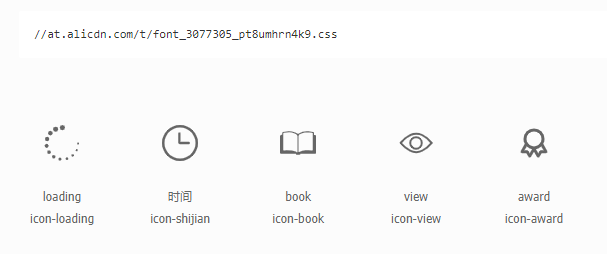
如果你不想使用自己的矢量库项目(不害怕我删图标跑路🤣),那么可以使用我的图标项目网址,当你发现图标失效了,就请来这里获取新的地址,如果还没有更新,请在评论区留言。
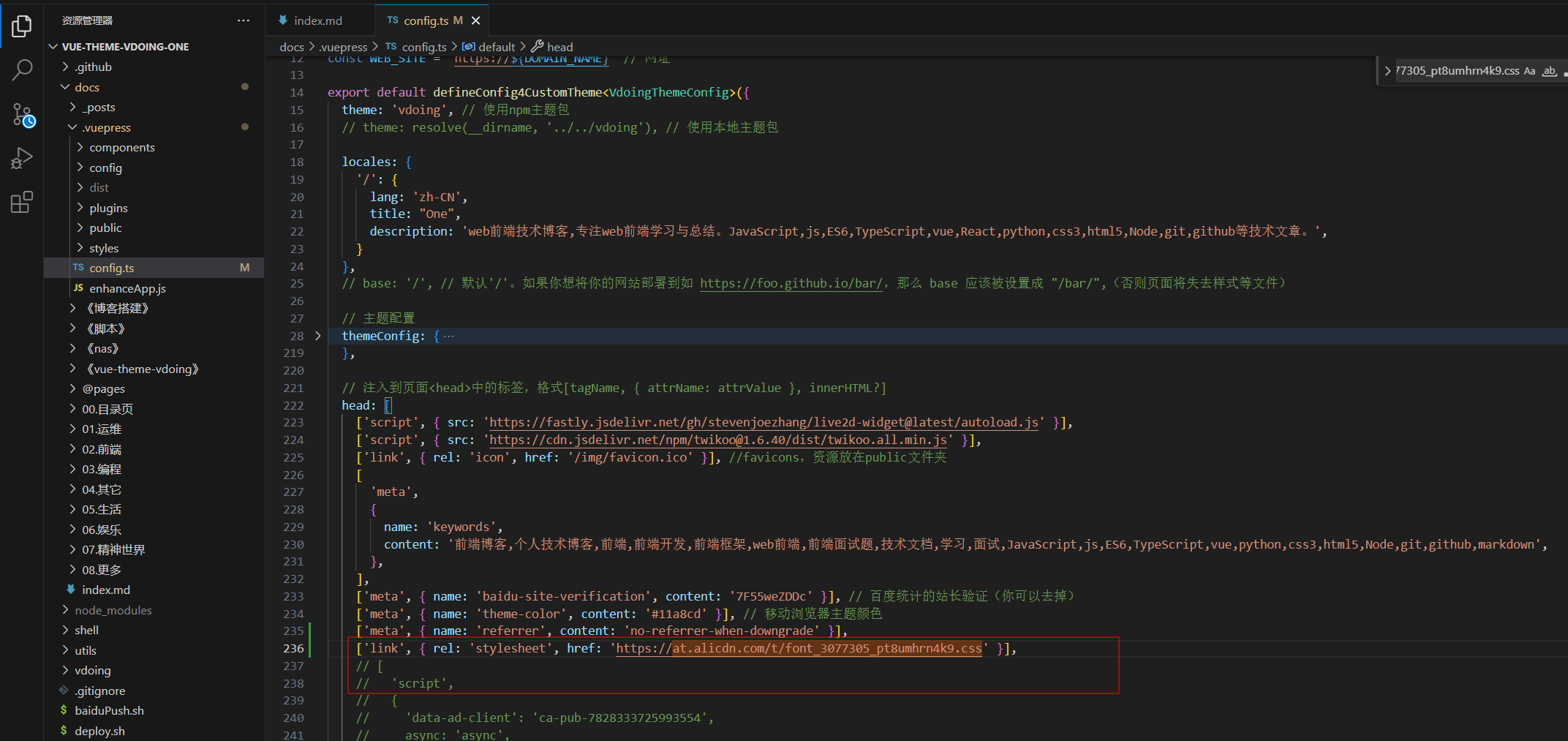
在 config.js 下的 head 中文件添加如下内容:
1['link', { rel: 'stylesheet', href: 'https://at.alicdn.com/t/font_3077305_pt8umhrn4k9.css' }]
如图:(图片的内容不一定是最新的,以上方代码块为准)

自己配置:
Vue模板
这里先提供一个在 Vue 里常用的模板代码,即通用代码(了解即可):
 1<template>
 2  <div class="busuanzi">
 3    <span id="busuanzi_container_site_pv" style="display:none">
 4      本站总访问量
 5      <span id="busuanzi_value_site_pv"></span>次
 6      <span class="post-meta-divider">|</span>
 7    </span>
 8    <span id="busuanzi_container_site_uv" style="display:none">
 9      本站访客数
10      <span id="busuanzi_value_site_uv"></span>人
11    </span>
12  </div>
13</template>
14
15<script>
16let script;
17export default {
18  mounted() {
19    script = require("busuanzi.pure.js");
20  },
21  // 监听,当路由发生变化的时候执行
22  watch: {
23    $route(to, from) {
24      if (to.path != from.path) {
25        script.fetch();
26      }
27    }
28  }
29};
30</script>
主题选择
下面有两种配置方式可以选,分别为:
- 在线主题:NPM 主题,采用监听路由、插入式的代码
- 本地主题:站点信息模块与页面一起渲染出来,没有延迟
本地主题不好的一点就是版本升级后曾修改的内容被重置,所以需要记好修改位置、备份,比较麻烦。好处是根据自己的需求在基础上拓展。
在线主题具有通用性,即在任意环境(如本地主题)都有效果。
本次个人使用在线主题配置方式。😜
在线主题
建议:本内容代码块比较长,可以点击代码块的右侧箭头来折叠,然后点击复制图标进行复制即可。
不管使不使用本地主题,都可以配置在线主题的站点模块。
网站信息工具代码
添加网站信息需要的计算代码、获取字数代码等工具类。
首先进入 docs/.vuepress 目录,创建 webSiteInfo 文件夹
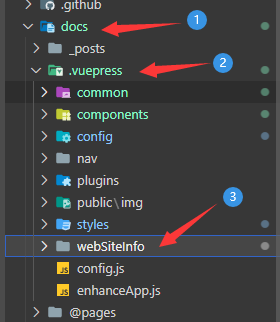
然后在 webSiteInfo 目录下创建 busuanzi.js 文件,这个文件用于 获取访问量。
  1var bszCaller, bszTag, scriptTag, ready;
  2
  3var t,
  4  e,
  5  n,
  6  a = !1,
  7  c = [];
  8
  9// 修复Node同构代码的问题
 10if (typeof document !== "undefined") {
 11  (ready = function (t) {
 12    return (
 13      a ||
 14      "interactive" === document.readyState ||
 15      "complete" === document.readyState
 16        ? t.call(document)
 17        : c.push(function () {
 18            return t.call(this);
 19          }),
 20      this
 21    );
 22  }),
 23    (e = function () {
 24      for (var t = 0, e = c.length; t < e; t++) c[t].apply(document);
 25      c = [];
 26    }),
 27    (n = function () {
 28      a ||
 29        ((a = !0),
 30        e.call(window),
 31        document.removeEventListener
 32          ? document.removeEventListener("DOMContentLoaded", n, !1)
 33          : document.attachEvent &&
 34            (document.detachEvent("onreadystatechange", n),
 35            window == window.top && (clearInterval(t), (t = null))));
 36    }),
 37    document.addEventListener
 38      ? document.addEventListener("DOMContentLoaded", n, !1)
 39      : document.attachEvent &&
 40        (document.attachEvent("onreadystatechange", function () {
 41          /loaded|complete/.test(document.readyState) && n();
 42        }),
 43        window == window.top &&
 44          (t = setInterval(function () {
 45            try {
 46              a || document.documentElement.doScroll("left");
 47            } catch (t) {
 48              return;
 49            }
 50            n();
 51          }, 5)));
 52}
 53
 54bszCaller = {
 55  fetch: function (t, e) {
 56    var n = "BusuanziCallback_" + Math.floor(1099511627776 * Math.random());
 57    t = t.replace("=BusuanziCallback", "=" + n);
 58    (scriptTag = document.createElement("SCRIPT")),
 59      (scriptTag.type = "text/javascript"),
 60      (scriptTag.defer = !0),
 61      (scriptTag.src = t),
 62      document.getElementsByTagName("HEAD")[0].appendChild(scriptTag);
 63    window[n] = this.evalCall(e);
 64  },
 65  evalCall: function (e) {
 66    return function (t) {
 67      ready(function () {
 68        try {
 69          e(t),
 70            scriptTag &&
 71              scriptTag.parentElement &&
 72              scriptTag.parentElement.removeChild &&
 73              scriptTag.parentElement.removeChild(scriptTag);
 74        } catch (t) {
 75          console.log(t), bszTag.hides();
 76        }
 77      });
 78    };
 79  },
 80};
 81
 82bszTag = {
 83  bszs: ["site_pv", "page_pv", "site_uv"],
 84  texts: function (n) {
 85    this.bszs.map(function (t) {
 86      var e = document.getElementById("busuanzi_value_" + t);
 87      e && (e.innerHTML = n[t]);
 88    });
 89  },
 90  hides: function () {
 91    this.bszs.map(function (t) {
 92      var e = document.getElementById("busuanzi_container_" + t);
 93      e && (e.style.display = "none");
 94    });
 95  },
 96  shows: function () {
 97    this.bszs.map(function (t) {
 98      var e = document.getElementById("busuanzi_container_" + t);
 99      e && (e.style.display = "inline");
100    });
101  },
102};
103
104export default () => {
105  bszTag && bszTag.hides();
106  bszCaller.fetch("//busuanzi.ibruce.info/busuanzi?jsonpCallback=BusuanziCallback", function (t) {
107    bszTag.texts(t), bszTag.shows();
108  })
109};
然后创建 readFile.js 或者 readFile.ts 文件,这个文件用于 统计文章数目 和 网站总字数 等。
添加如下内容:
注意:本次个人使用ts方式。
js
  1const fs = require('fs'); // 文件模块
  2const path = require('path'); // 路径模块
  3const matter = require('gray-matter'); // FrontMatter解析器 https://github.com/jonschlinkert/gray-matter
  4const chalk = require('chalk') // 命令行打印美化
  5const log = console.log
  6const docsRoot = path.join(__dirname, '..', '..', '..', 'docs'); // docs文件路径
  7
  8/**
  9 * 获取本站的文章数据
 10 * 获取所有的 md 文档,可以排除指定目录下的文档
 11 */
 12function readFileList(excludeFiles = [''], dir = docsRoot, filesList = []) {
 13  const files = fs.readdirSync(dir);
 14  files.forEach((item, index) => {
 15    let filePath = path.join(dir, item);
 16    const stat = fs.statSync(filePath);
 17    if (!(excludeFiles instanceof Array)) {
 18      log(chalk.yellow(`error: 传入的参数不是一个数组。`))
 19    }
 20    excludeFiles.forEach((excludeFile) => {
 21      if (stat.isDirectory() && item !== '.vuepress' && item !== '@pages' && item !== excludeFile) {
 22        readFileList(excludeFiles, path.join(dir, item), filesList);  //递归读取文件
 23      } else {
 24        if (path.basename(dir) !== 'docs') { // 过滤 docs目录级下的文件
 25
 26          const fileNameArr = path.basename(filePath).split('.')
 27          let name = null, type = null;
 28          if (fileNameArr.length === 2) { // 没有序号的文件
 29            name = fileNameArr[0]
 30            type = fileNameArr[1]
 31          } else if (fileNameArr.length === 3) { // 有序号的文件
 32            name = fileNameArr[1]
 33            type = fileNameArr[2]
 34          } else { // 超过两个‘.’的
 35            log(chalk.yellow(`warning: 该文件 "${filePath}" 没有按照约定命名,将忽略生成相应数据。`))
 36            return
 37          }
 38          if (type === 'md') { // 过滤非 md 文件
 39            filesList.push({
 40              name,
 41              filePath
 42            });
 43          }
 44        }
 45      }
 46    });
 47  });
 48  return filesList;
 49}
 50/**
 51 * 获取本站的文章总字数
 52 * 可以排除某个目录下的 md 文档字数
 53 */
 54function readTotalFileWords(excludeFiles = ['']) {
 55  const filesList = readFileList(excludeFiles);
 56  var wordCount = 0;
 57  filesList.forEach((item) => {
 58    const content = getContent(item.filePath);
 59    var len = counter(content);
 60    wordCount += len[0] + len[1];
 61  });
 62  if (wordCount < 1000) {
 63    return wordCount;
 64  }
 65  return Math.round(wordCount / 100) / 10 + 'k';
 66}
 67/**
 68 * 获取每一个文章的字数
 69 * 可以排除某个目录下的 md 文档字数
 70 */
 71function readEachFileWords(excludeFiles = [''], cn, en) {
 72  const filesListWords = [];
 73  const filesList = readFileList(excludeFiles);
 74  filesList.forEach((item) => {
 75    const content = getContent(item.filePath);
 76    var len = counter(content);
 77    // 计算预计的阅读时间
 78    var readingTime = readTime(len, cn, en);
 79    var wordsCount = 0;
 80    wordsCount = len[0] + len[1];
 81    if (wordsCount >= 1000) {
 82      wordsCount = Math.round(wordsCount / 100) / 10 + 'k';
 83    }
 84    // fileMatterObj => {content:'剔除frontmatter后的文件内容字符串', data:{<frontmatter对象>}, ...}
 85    const fileMatterObj = matter(content, {});
 86    const matterData = fileMatterObj.data;
 87    filesListWords.push({ ...item, wordsCount, readingTime, ...matterData });
 88  });
 89  return filesListWords;
 90}
 91
 92/**
 93 * 计算预计的阅读时间
 94 */
 95function readTime(len, cn = 300, en = 160) {
 96  var readingTime = len[0] / cn + len[1] / en;
 97  if (readingTime > 60 && readingTime < 60 * 24) {   // 大于一个小时,小于一天
 98    let hour = parseInt(readingTime / 60);
 99    let minute = parseInt((readingTime - hour * 60));
100    if (minute === 0) {
101      return hour + 'h';
102    }
103    return hour + 'h' + minute + 'm';
104  } else if (readingTime > 60 * 24) {      // 大于一天
105    let day = parseInt(readingTime / (60 * 24));
106    let hour = parseInt((readingTime - day * 24 * 60) / 60);
107    if (hour === 0) {
108      return day + 'd';
109    }
110    return day + 'd' + hour + 'h';
111  }
112  return readingTime < 1 ? '1' : parseInt((readingTime * 10)) / 10 + 'm';   // 取一位小数
113}
114
115/**
116 * 读取文件内容
117 */
118function getContent(filePath) {
119  return fs.readFileSync(filePath, 'utf8');
120}
121/**
122 * 获取文件内容的字数
123 * cn:中文
124 * en:一整句英文(没有空格隔开的英文为 1 个)
125 */
126function counter(content) {
127  const cn = (content.match(/[\u4E00-\u9FA5]/g) || []).length;
128  const en = (content.replace(/[\u4E00-\u9FA5]/g, '').match(/[a-zA-Z0-9_\u0392-\u03c9\u0400-\u04FF]+|[\u4E00-\u9FFF\u3400-\u4dbf\uf900-\ufaff\u3040-\u309f\uac00-\ud7af\u0400-\u04FF]+|[\u00E4\u00C4\u00E5\u00C5\u00F6\u00D6]+|\w+/g) || []).length;
129  return [cn, en];
130}
131
132module.exports = {
133  readFileList,
134  readTotalFileWords,
135  readEachFileWords,
136}
ts
  1import fs from 'fs'; // 文件模块
  2import path from 'path'; // 路径模块
  3import matter from 'gray-matter'; // FrontMatter解析器 https://github.com/jonschlinkert/gray-matter
  4import chalk from 'chalk' // 命令行打印美化
  5const log = console.log
  6const docsRoot = path.join(__dirname, '..', '..', '..', 'docs'); // docs文件路径
  7
  8/**
  9 * 获取本站的文章数据
 10 * 获取所有的 md 文档,可以排除指定目录下的文档
 11 */
 12function readFileList(excludeFiles: Array<string> = [''], dir: string = docsRoot, filesList: Array<Object> = []) {
 13  const files = fs.readdirSync(dir);
 14  files.forEach((item, index) => {
 15    let filePath = path.join(dir, item);
 16    const stat = fs.statSync(filePath);
 17    if (!(excludeFiles instanceof Array)) {
 18      log(chalk.yellow(`error: 传入的参数不是一个数组。`))
 19    }
 20    excludeFiles.forEach((excludeFile) => {
 21      if (stat.isDirectory() && item !== '.vuepress' && item !== '@pages' && item !== excludeFile) {
 22        readFileList(excludeFiles, path.join(dir, item), filesList);  //递归读取文件
 23      } else {
 24        if (path.basename(dir) !== 'docs') { // 过滤 docs目录级下的文件
 25
 26          const fileNameArr = path.basename(filePath).split('.')
 27          let name = null, type = null;
 28          if (fileNameArr.length === 2) { // 没有序号的文件
 29            name = fileNameArr[0]
 30            type = fileNameArr[1]
 31          } else if (fileNameArr.length === 3) { // 有序号的文件
 32            name = fileNameArr[1]
 33            type = fileNameArr[2]
 34          } else { // 超过两个‘.’的
 35            log(chalk.yellow(`warning: 该文件 "${filePath}" 没有按照约定命名,将忽略生成相应数据。`))
 36            return
 37          }
 38          if (type === 'md') { // 过滤非 md 文件
 39            filesList.push({
 40              name,
 41              filePath
 42            });
 43          }
 44        }
 45      }
 46    });
 47  });
 48  return filesList;
 49}
 50/**
 51 * 获取本站的文章总字数
 52 * 可以排除某个目录下的 md 文档字数
 53 */
 54function readTotalFileWords(excludeFiles = ['']) {
 55  const filesList = readFileList(excludeFiles);
 56  let wordCount = 0;
 57  filesList.forEach((item: any) => {
 58    const content = getContent(item.filePath);
 59    let len = counter(content);
 60    wordCount += len[0] + len[1];
 61  });
 62  if (wordCount < 1000) {
 63    return wordCount;
 64  }
 65  return Math.round(wordCount / 100) / 10 + 'k';
 66}
 67/**
 68 * 获取每一个文章的字数
 69 * 可以排除某个目录下的 md 文档字数
 70 */
 71function readEachFileWords(excludeFiles: Array<string> = [''], cn: number, en: number) {
 72  const filesListWords = [];
 73  const filesList = readFileList(excludeFiles);
 74  filesList.forEach((item: any) => {
 75    const content = getContent(item.filePath);
 76    let len = counter(content);
 77    // 计算预计的阅读时间
 78    let readingTime = readTime(len, cn, en);
 79    let wordsCount: any = 0;
 80    wordsCount = len[0] + len[1];
 81    if (wordsCount >= 1000) {
 82      wordsCount = Math.round(wordsCount / 100) / 10 + 'k';
 83    }
 84    // fileMatterObj => {content:'剔除frontmatter后的文件内容字符串', data:{<frontmatter对象>}, ...}
 85    const fileMatterObj = matter(content, {});
 86    const matterData = fileMatterObj.data;
 87    filesListWords.push({ ...item, wordsCount, readingTime, ...matterData });
 88  });
 89  return filesListWords;
 90}
 91
 92/**
 93 * 计算预计的阅读时间
 94 */
 95function readTime(len: Array<number>, cn: number = 300, en: number = 160) {
 96  let readingTime = len[0] / cn + len[1] / en;
 97  if (readingTime > 60 && readingTime < 60 * 24) {   // 大于一个小时,小于一天
 98    let hour = Math.trunc(readingTime / 60);
 99    let minute = Math.trunc(readingTime - hour * 60);
100    if (minute === 0) {
101      return hour + 'h';
102    }
103    return hour + 'h' + minute + 'm';
104  } else if (readingTime > 60 * 24) {      // 大于一天
105    let day = Math.trunc(readingTime / (60 * 24));
106    let hour = Math.trunc((readingTime - day * 24 * 60) / 60);
107    if (hour === 0) {
108      return day + 'd';
109    }
110    return day + 'd' + hour + 'h';
111  }
112  return readingTime < 1 ? '1' : Math.trunc(readingTime * 10) / 10 + 'm';   // 取一位小数
113}
114
115/**
116 * 读取文件内容
117 */
118function getContent(filePath: string) {
119  return fs.readFileSync(filePath, 'utf8');
120}
121/**
122 * 获取文件内容的字数
123 * cn:中文
124 * en:一整句英文(没有空格隔开的英文为 1 个)
125 */
126function counter(content: string) {
127  const cn = (content.match(/[\u4E00-\u9FA5]/g) || []).length;
128  const en = (content.replace(/[\u4E00-\u9FA5]/g, '').match(/[a-zA-Z0-9_\u0392-\u03c9\u0400-\u04FF]+|[\u4E00-\u9FFF\u3400-\u4dbf\uf900-\ufaff\u3040-\u309f\uac00-\ud7af\u0400-\u04FF]+|[\u00E4\u00C4\u00E5\u00C5\u00F6\u00D6]+|\w+/g) || []).length;
129  return [cn, en];
130}
131
132export {
133  readFileList,
134  readTotalFileWords,
135  readEachFileWords,
136}
接着继续在该目录下创建第三个文件 utils.js,该文件用于计算 已运行时间 和 最后活动时间。
添加如下内容:
 1// 日期格式化(只获取年月日)
 2export function dateFormat(date) {
 3  if (!(date instanceof Date)) {
 4    date = new Date(date);
 5  }
 6  return `${date.getUTCFullYear()}-${zero(date.getUTCMonth() + 1)}-${zero(date.getUTCDate())}`;
 7}
 8
 9// 小于10补0
10export function zero(d) {
11  return d.toString().padStart(2, '0');
12}
13
14/**
15 * 计算最后活动时间
16 */
17export function lastUpdatePosts(posts) {
18  posts.sort((prev, next) => {
19    return compareDate(prev, next);
20  });
21  return posts;
22}
23
24// 获取时间的时间戳
25export function getTimeNum(post) {
26  let dateStr = post.lastUpdated || post.frontmatter.date;
27  let date = new Date(dateStr);
28  if (date == "Invalid Date" && dateStr) { // 修复new Date()在Safari下出现Invalid Date的问题
29    date = new Date(dateStr.replace(/-/g, '/'));
30  }
31  return date.getTime();
32}
33
34// 比对时间
35export function compareDate(a, b) {
36  return getTimeNum(b) - getTimeNum(a);
37}
38
39/**
40 * 获取两个日期相差多少天
41 */
42export function dayDiff(startDate, endDate) {
43  if (!endDate) {
44    endDate = startDate;
45    startDate = new Date();
46  }
47  startDate = dateFormat(startDate);
48  endDate = dateFormat(endDate);
49  let day = parseInt(Math.abs(new Date(startDate) - new Date(endDate)) / (1000 * 60 * 60 * 24));
50  return day;
51}
52
53/**
54 * 计算相差多少年/月/日/时/分/秒
55 */
56export function timeDiff(startDate, endDate) {
57  if (!endDate) {
58    endDate = startDate;
59    startDate = new Date();
60  }
61  if (!(startDate instanceof Date)) {
62    startDate = new Date(startDate);
63  }
64  if (!(endDate instanceof Date)) {
65    endDate = new Date(endDate);
66  }
67  // 计算时间戳的差
68  const diffValue = parseInt((Math.abs(endDate - startDate) / 1000));
69  if (diffValue == 0) {
70    return '刚刚';
71  } else if (diffValue < 60) {
72    return diffValue + ' 秒';
73  } else if (parseInt(diffValue / 60) < 60) {
74    return parseInt(diffValue / 60) + ' 分';
75  } else if (parseInt(diffValue / (60 * 60)) < 24) {
76    return parseInt(diffValue / (60 * 60)) + ' 时';
77  } else if (parseInt(diffValue / (60 * 60 * 24)) < getDays(startDate.getMonth, startDate.getFullYear)) {
78    return parseInt(diffValue / (60 * 60 * 24)) + ' 天';
79  } else if (parseInt(diffValue / (60 * 60 * 24 * getDays(startDate.getMonth, startDate.getFullYear))) < 12) {
80    return parseInt(diffValue / (60 * 60 * 24 * getDays(startDate.getMonth, startDate.getFullYear))) + ' 月';
81  } else {
82    return parseInt(diffValue / (60 * 60 * 24 * getDays(startDate.getMonth, startDate.getFullYear) * 12)) + ' 年';
83  }
84}
85
86/**
87 * 判断当前月的天数(28、29、30、31)
88 */
89export function getDays(mouth, year) {
90  let days = 30;
91  if (mouth === 2) {
92    days = year % 4 === 0 ? 29 : 28;
93  } else if (mouth === 1 || mouth === 3 || mouth === 5 || mouth === 7 || mouth === 8 || mouth === 10 || mouth === 12) {
94    // 月份为:1,3,5,7,8,10,12 时,为大月.则天数为 31;
95    days = 31;
96  }
97  return days;
98}
目前就三个文件,最终效果如图:
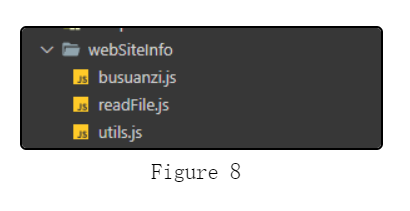
站点信息代码
这一步的文件目录不能随便移动,因为该目录是 Vuepress 规定的。
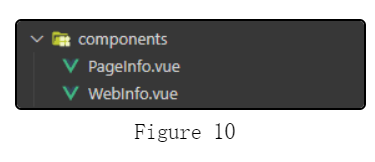
首先进入 docs/.vuepress 目录,创建 components 文件夹
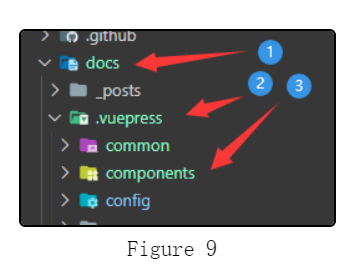
创建一个 vue 文件:WebInfo.vue,这就是首页的站点信息模块。
并添加如下内容:
  1<template>
  2  <!-- Young Kbt -->
  3  <div class="web-info card-box">
  4    <div class="webinfo-title">
  5      <i
  6        class="iconfont icon-award"
  7        style="font-size: 0.875rem; font-weight: 900; width: 1.25em"
  8      ></i>
  9      <span>站点信息</span>
 10    </div>
 11    <div class="webinfo-item">
 12      <div class="webinfo-item-title">文章数目:</div>
 13      <div class="webinfo-content">{{ mdFileCount }} 篇</div>
 14    </div>
 15
 16    <div class="webinfo-item">
 17      <div class="webinfo-item-title">已运行时间:</div>
 18      <div class="webinfo-content">
 19        {{ createToNowDay != 0 ? createToNowDay + " 天" : "不到一天" }}
 20      </div>
 21    </div>
 22
 23    <div class="webinfo-item">
 24      <div class="webinfo-item-title">本站总字数:</div>
 25      <div class="webinfo-content">{{ totalWords }} 字</div>
 26    </div>
 27
 28    <div class="webinfo-item">
 29      <div class="webinfo-item-title">最后活动时间:</div>
 30      <div class="webinfo-content">
 31        {{ lastActiveDate == "刚刚" ? "刚刚" : lastActiveDate + "前" }}
 32      </div>
 33    </div>
 34
 35    <div v-if="indexView" class="webinfo-item">
 36      <div class="webinfo-item-title">本站被访问了:</div>
 37      <div class="webinfo-content">
 38        <span id="busuanzi_value_site_pv" class="web-site-pv"
 39          ><i title="正在获取..." class="loading iconfont icon-loading"></i>
 40        </span>
 41        次
 42      </div>
 43    </div>
 44
 45    <div v-if="indexView" class="webinfo-item">
 46      <div class="webinfo-item-title">您的访问排名:</div>
 47      <div class="webinfo-content busuanzi">
 48        <span id="busuanzi_value_site_uv" class="web-site-uv"
 49          ><i title="正在获取..." class="loading iconfont icon-loading"></i>
 50        </span>
 51        名
 52      </div>
 53    </div>
 54  </div>
 55</template>
 56
 57<script>
 58import { dayDiff, timeDiff, lastUpdatePosts } from "../webSiteInfo/utils";
 59import fetch from "../webSiteInfo/busuanzi"; // 统计量
 60export default {
 61  data() {
 62    return {
 63      // Young Kbt
 64      mdFileCount: 0, // markdown 文档总数
 65      createToNowDay: 0, // 博客创建时间距今多少天
 66      lastActiveDate: "", // 最后活动时间
 67      totalWords: 0, // 本站总字数
 68      indexView: true, // 开启访问量和排名统计
 69    };
 70  },
 71  computed: {
 72    $lastUpdatePosts() {
 73      return lastUpdatePosts(this.$filterPosts);
 74    },
 75  },
 76  mounted() {
 77    // Young Kbt
 78    if (Object.keys(this.$themeConfig.blogInfo).length > 0) {
 79      const {
 80        blogCreate,
 81        mdFileCountType,
 82        totalWords,
 83        moutedEvent,
 84        eachFileWords,
 85        indexIteration,
 86        indexView,
 87      } = this.$themeConfig.blogInfo;
 88      this.createToNowDay = dayDiff(blogCreate);
 89      if (mdFileCountType != "archives") {
 90        this.mdFileCount = mdFileCountType.length;
 91      } else {
 92        this.mdFileCount = this.$filterPosts.length;
 93      }
 94      if (totalWords == "archives" && eachFileWords) {
 95        let archivesWords = 0;
 96        eachFileWords.forEach((itemFile) => {
 97          if (itemFile.wordsCount < 1000) {
 98            archivesWords += itemFile.wordsCount;
 99          } else {
100            let wordsCount = itemFile.wordsCount.slice(
101              0,
102              itemFile.wordsCount.length - 1
103            );
104            archivesWords += wordsCount * 1000;
105          }
106        });
107        this.totalWords = Math.round(archivesWords / 100) / 10 + "k";
108      } else if (totalWords == "archives") {
109        this.totalWords = 0;
110        console.log(
111          "如果 totalWords = 'archives',必须传入 eachFileWords,显然您并没有传入!"
112        );
113      } else {
114        this.totalWords = totalWords;
115      }
116      // 最后一次活动时间
117      this.lastActiveDate = timeDiff(this.$lastUpdatePosts[0].lastUpdated);
118      this.mountedWebInfo(moutedEvent);
119      // 获取访问量和排名
120      this.indexView = indexView == undefined ? true : indexView;
121      if (this.indexView) {
122        this.getIndexViewCouter(indexIteration);
123      }
124    }
125  },
126  methods: {
127    /**
128     * 挂载站点信息模块
129     */
130    mountedWebInfo(moutedEvent = ".tags-wrapper") {
131      let interval = setInterval(() => {
132        const tagsWrapper = document.querySelector(moutedEvent);
133        const webInfo = document.querySelector(".web-info");
134        if (tagsWrapper && webInfo) {
135          if (!this.isSiblilngNode(tagsWrapper, webInfo)) {
136            tagsWrapper.parentNode.insertBefore(
137              webInfo,
138              tagsWrapper.nextSibling
139            );
140            clearInterval(interval);
141          }
142        }
143      }, 200);
144    },
145    /**
146     * 挂载在兄弟元素后面,说明当前组件是 siblingNode 变量
147     */
148    isSiblilngNode(element, siblingNode) {
149      if (element.siblingNode == siblingNode) {
150        return true;
151      } else {
152        return false;
153      }
154    },
155    /**
156     * 首页的统计量
157     */
158    getIndexViewCouter(iterationTime = 3000) {
159      fetch();
160      var i = 0;
161      var defaultCouter = "9999";
162      // 如果只需要第一次获取数据(可能获取失败),可注释掉 setTimeout 内容,此内容是第一次获取失败后,重新获取访问量
163      // 可能会导致访问量再次 + 1 原因:取决于 setTimeout 的时间(需求调节),setTimeout 太快导致第一个获取的数据没返回,就第二次获取,导致结果返回 + 2 的数据
164      setTimeout(() => {
165        let indexUv = document.querySelector(".web-site-pv");
166        let indexPv = document.querySelector(".web-site-uv");
167        if (
168          indexPv &&
169          indexUv &&
170          indexPv.innerText == "" &&
171          indexUv.innerText == ""
172        ) {
173          let interval = setInterval(() => {
174            // 再次判断原因:防止进入 setInterval 的瞬间,访问量获取成功
175            if (
176              indexPv &&
177              indexUv &&
178              indexPv.innerText == "" &&
179              indexUv.innerText == ""
180            ) {
181              i += iterationTime;
182              if (i > iterationTime * 5) {
183                indexPv.innerText = defaultCouter;
184                indexUv.innerText = defaultCouter;
185                clearInterval(interval); // 5 次后无法获取,则取消获取
186              }
187              if (indexPv.innerText == "" && indexUv.innerText == "") {
188                // 手动获取访问量
189                fetch();
190              } else {
191                clearInterval(interval);
192              }
193            } else {
194              clearInterval(interval);
195            }
196          }, iterationTime);
197          // 绑定 beforeDestroy 生命钩子,清除定时器
198          this.$once("hook:beforeDestroy", () => {
199            clearInterval(interval);
200            interval = null;
201          });
202        }
203      }, iterationTime);
204    },
205    beforeMount() {
206      let webInfo = document.querySelector(".web-info");
207      webInfo && webInfo.parentNode.removeChild(webInfo);
208    },
209  },
210};
211</script>
212
213<style scoped>
214.web-info {
215  font-size: 0.875rem;
216  padding: 0.95rem;
217}
218.webinfo-title {
219  text-align: center;
220  color: #888;
221  font-weight: bold;
222  padding: 0 0 10px 0;
223}
224.webinfo-item {
225  padding: 8px 0 0;
226  margin: 0;
227}
228.webinfo-item-title {
229  display: inline-block;
230}
231.webinfo-content {
232  display: inline-block;
233  float: right;
234}
235@keyframes turn {
236  0% {
237    transform: rotate(0deg);
238  }
239  100% {
240    transform: rotate(360deg);
241  }
242}
243.loading {
244  display: inline-block;
245  animation: turn 1s linear infinite;
246  -webkit-animation: turn 1s linear infinite;
247}
248</style>
继续创建一个 vue 文件:PageInfo.vue,这就是文章页的信息模块:文章浏览量、字数代码、预阅读时间。
  1<template></template>
  2
  3<script>
  4import fetch from "../webSiteInfo/busuanzi";
  5export default {
  6  mounted() {
  7    // 首页不初始页面信息
  8    if (this.$route.path != "/") {
  9      this.initPageInfo();
 10    }
 11  },
 12  watch: {
 13    $route(to, from) {
 14      // 如果页面是非首页,# 号也会触发路由变化,这里要排除掉
 15      if (
 16        to.path !== "/" &&
 17        to.path !== from.path &&
 18        this.$themeConfig.blogInfo
 19      ) {
 20        this.initPageInfo();
 21      }
 22    },
 23  },
 24  methods: {
 25    /**
 26     * 初始化页面信息
 27     */
 28    initPageInfo() {
 29      if (this.$frontmatter.article == undefined || this.$frontmatter.article) {
 30        // 排除掉 article 为 false 的文章
 31        const { eachFileWords, pageView, pageIteration, readingTime } =
 32          this.$themeConfig.blogInfo;
 33        // 下面两个 if 可以调换位置,从而让文章的浏览量和字数交换位置
 34        if (eachFileWords) {
 35          try {
 36            eachFileWords.forEach((itemFile) => {
 37              if (itemFile.permalink == this.$frontmatter.permalink) {
 38                // this.addPageWordsCount 和 if 可以调换位置,从而让文章的字数和预阅读时间交换位置
 39                this.addPageWordsCount(itemFile.wordsCount);
 40                if (readingTime || readingTime == undefined) {
 41                  this.addReadTimeCount(itemFile.readingTime);
 42                }
 43                throw new Error();
 44              }
 45            });
 46          } catch (error) {}
 47        }
 48        if (pageView || pageView == undefined) {
 49          this.addPageView();
 50          this.getPageViewCouter(pageIteration);
 51        }
 52        return;
 53      }
 54    },
 55    /**
 56     * 文章页的访问量
 57     */
 58    getPageViewCouter(iterationTime = 3000) {
 59      fetch();
 60      let i = 0;
 61      var defaultCouter = "9999";
 62      // 如果只需要第一次获取数据(可能获取失败),可注释掉 setTimeout 内容,此内容是第一次获取失败后,重新获取访问量
 63      // 可能会导致访问量再次 + 1 原因:取决于 setTimeout 的时间(需求调节),setTimeout 太快导致第一个获取的数据没返回,就第二次获取,导致结果返回 + 2 的数据
 64      setTimeout(() => {
 65        let pageView = document.querySelector(".view-data");
 66        if (pageView && pageView.innerText == "") {
 67          let interval = setInterval(() => {
 68            // 再次判断原因:防止进入 setInterval 的瞬间,访问量获取成功
 69            if (pageView && pageView.innerText == "") {
 70              i += iterationTime;
 71              if (i > iterationTime * 5) {
 72                pageView.innerText = defaultCouter;
 73                clearInterval(interval); // 5 次后无法获取,则取消获取
 74              }
 75              if (pageView.innerText == "") {
 76                // 手动获取访问量
 77                fetch();
 78              } else {
 79                clearInterval(interval);
 80              }
 81            } else {
 82              clearInterval(interval);
 83            }
 84          }, iterationTime);
 85          // 绑定 beforeDestroy 生命钩子,清除定时器
 86          this.$once("hook:beforeDestroy", () => {
 87            clearInterval(interval);
 88            interval = null;
 89          });
 90        }
 91      }, iterationTime);
 92    },
 93    /**
 94     * 添加浏览量元素
 95     */
 96    addPageView() {
 97      let pageView = document.querySelector(".page-view");
 98      if (pageView) {
 99        pageView.innerHTML =
100          '<a style="color: #888; margin-left: 3px" href="javascript:;" id="busuanzi_value_page_pv" class="view-data"><i title="正在获取..." class="loading iconfont icon-loading"></i></a>';
101      } else {
102        // 创建访问量的元素
103        let template = document.createElement("div");
104        template.title = "浏览量";
105        template.className = "page-view iconfont icon-view";
106        template.style.float = "left";
107        template.style.marginLeft = "20px";
108        template.style.fontSize = "0.8rem";
109        template.innerHTML =
110          '<a style="color: #888; margin-left: 3px" href="javascript:;" id="busuanzi_value_page_pv" class="view-data"><i title="正在获取..." class="loading iconfont icon-loading"></i></a>';
111        // 添加 loading 效果
112        let style = document.createElement("style");
113        style.innerHTML = `@keyframes turn {
114        0% {
115          transform: rotate(0deg);
116        }
117        100% {
118          transform: rotate(360deg);
119        }
120      }
121      .loading {
122        display: inline-block;
123        animation: turn 1s linear infinite;
124        -webkit-animation: turn 1s linear infinite;
125      }`;
126        document.head.appendChild(style);
127        this.mountedView(template);
128      }
129    },
130    /**
131     * 添加当前文章页的字数元素
132     */
133    addPageWordsCount(wordsCount = 0) {
134      let words = document.querySelector(".book-words");
135      if (words) {
136        words.innerHTML = `<a href="javascript:;" style="margin-left: 3px; color: #888">${wordsCount}</a>`;
137      } else {
138        let template = document.createElement("div");
139        template.title = "文章字数";
140        template.className = "book-words iconfont icon-book";
141        template.style.float = "left";
142        template.style.marginLeft = "20px";
143        template.style.fontSize = "0.8rem";
144
145        template.innerHTML = `<a href="javascript:;" style="margin-left: 3px; color: #888">${wordsCount}</a>`;
146        this.mountedView(template);
147      }
148    },
149    /**
150     * 添加预计的阅读时间
151     */
152    addReadTimeCount(readTimeCount = 0) {
153      let reading = document.querySelector(".reading-time");
154      if (reading) {
155        reading.innerHTML = `<a href="javascript:;" style="margin-left: 3px; color: #888">${readTimeCount}</a>`;
156      } else {
157        let template = document.createElement("div");
158        template.title = "预阅读时长";
159        template.className = "reading-time iconfont icon-shijian";
160        template.style.float = "left";
161        template.style.marginLeft = "20px";
162        template.style.fontSize = "0.8rem";
163        template.innerHTML = `<a href="javascript:;" style="margin-left: 3px; color: #888">${readTimeCount}</a>`;
164        this.mountedView(template);
165      }
166    },
167    /**
168     * 挂载目标到页面上
169     */
170    mountedView(
171      template,
172      mountedIntervalTime = 100,
173      moutedParentEvent = ".articleInfo-wrap > .articleInfo > .info"
174    ) {
175      let i = 0;
176      let parentElement = document.querySelector(moutedParentEvent);
177      if (parentElement) {
178        if (!this.isMountedView(template, parentElement)) {
179          parentElement.appendChild(template);
180        }
181      } else {
182        let interval = setInterval(() => {
183          parentElement = document.querySelector(moutedParentEvent);
184          if (parentElement) {
185            if (!this.isMountedView(template, parentElement)) {
186              parentElement.appendChild(template);
187              clearInterval(interval);
188            }
189          } else if (i > 1 * 10) {
190            // 10 秒后清除
191            clearInterval(interval);
192          }
193        }, mountedIntervalTime);
194        // 绑定 beforeDestroy 生命钩子,清除定时器
195        this.$once("hook:beforeDestroy", () => {
196          clearInterval(interval);
197          interval = null;
198        });
199      }
200    },
201    /**
202     * 如果元素存在,则删除
203     */
204    removeElement(selector) {
205      var element = document.querySelector(selector);
206      element && element.parentNode.removeChild(element);
207    },
208    /**
209     * 目标是否已经挂载在页面上
210     */
211    isMountedView(element, parentElement) {
212      if (element.parentNode == parentElement) {
213        return true;
214      } else {
215        return false;
216      }
217    },
218  },
219  // 防止重写编译时,导致页面信息重复出现问题
220  beforeMount() {
221    clearInterval(this.interval);
222    this.removeElement(".page-view");
223    this.removeElement(".book-words");
224    this.removeElement(".reading-time");
225  },
226};
227</script>
228
229<style></style>
最终效果如图:
创建好了两个 vue 组件,我们需要使用它们。
使用
WebInfo.vue组件
打开 docs/index.md
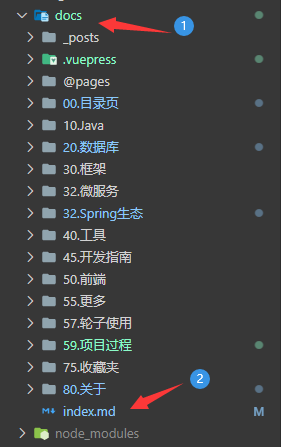
移到最下方,添加如下内容:
1<ClientOnly>
2  <WebInfo/>
3</ClientOnly>
使用
PageInfo.vue组件
在 docs/.vuepress/config.js(新版是 config.ts)的 plugins 中添加配置。
js
1module.exports = {
2    plugins: [
3        {
4            name: 'custom-plugins',
5            globalUIComponents: ["PageInfo"] // 2.x 版本 globalUIComponents 改名为 clientAppRootComponentFiles
6        }
7    ]
8}
ts (本次使用这个)
1import { UserPlugins } from 'vuepress/config'
2plugins: <UserPlugins>[
3    [
4    	{
5        	name: 'custom-plugins',
6        	globalUIComponents: ["PageInfo"] // 2.x 版本 globalUIComponents 改名为 clientAppRootComponentFiles
7    	}
8    ]
9]
站点信息配置
上面都按照步骤写好代码、使用组件了,那么就可以走最后一步配置我们的站点信息。
进入到 docs/.vuepress/config.js(新版为 config.ts)文件。
引入之前写好的工具代码文件:(路径要准确,这里仅仅是模板)
js
1const { readFileList, readTotalFileWords, readEachFileWords } = require('./webSiteInfo/readFile');
ts (本次)
1import { readFileList, readTotalFileWords, readEachFileWords } from './webSiteInfo/readFile';
如图(演示 JS 代码块):

在 themeConfig 中添加如下内容:
 1// 站点配置(首页 & 文章页)
 2blogInfo: {
 3  blogCreate: '2021-10-19', // 博客创建时间
 4  indexView: true,  // 开启首页的访问量和排名统计,默认 true(开启)
 5  pageView: true,  // 开启文章页的浏览量统计,默认 true(开启)
 6  readingTime: true,  // 开启文章页的预计阅读时间,条件:开启 eachFileWords,默认 true(开启)。可在 eachFileWords 的 readEachFileWords 的第二个和第三个参数自定义,默认 1 分钟 300 中文、160 英文
 7  eachFileWords: readEachFileWords([''], 300, 160),  // 开启每个文章页的字数。readEachFileWords(['xx']) 关闭 xx 目录(可多个,可不传参数)下的文章页字数和阅读时长,后面两个参数分别是 1 分钟里能阅读的中文字数和英文字数。无默认值。readEachFileWords() 方法默认排除了 article 为 false 的文章
 8  mdFileCountType: 'archives',  // 开启文档数。1. archives 获取归档的文档数(默认)。2. 数组 readFileList(['xx']) 排除 xx 目录(可多个,可不传参数),获取其他目录的文档数。提示:readFileList() 获取 docs 下所有的 md 文档(除了 `.vuepress` 和 `@pages` 目录下的文档)
 9  totalWords: 'archives',  // 开启本站文档总字数。1. archives 获取归档的文档数(使用 archives 条件:传入 eachFileWords,否则报错)。2. readTotalFileWords(['xx']) 排除 xx 目录(可多个,可不传参数),获取其他目录的文章字数。无默认值
10  moutedEvent: '.tags-wrapper',   // 首页的站点模块挂载在某个元素后面(支持多种选择器),指的是挂载在哪个兄弟元素的后面,默认是热门标签 '.tags-wrapper' 下面,提示:'.categories-wrapper' 会挂载在文章分类下面。'.blogger-wrapper' 会挂载在博客头像模块下面
11  // 下面两个选项:第一次获取访问量失败后的迭代时间
12  indexIteration: 2500,   // 如果首页获取访问量失败,则每隔多少时间后获取一次访问量,直到获取成功或获取 10 次后。默认 3 秒。注意:设置时间太低,可能导致访问量 + 2、+ 3 ......
13  pageIteration: 2500,    // 如果文章页获取访问量失败,则每隔多少时间后获取一次访问量,直到获取成功或获取 10 次后。默认 3 秒。注意:设置时间太低,可能导致访问量 + 2、+ 3 ......
14  // 说明:成功获取一次访问量,访问量 + 1,所以第一次获取失败后,设置的每个隔段重新获取时间,将会影响访问量的次数。如 100 可能每次获取访问量 + 3
15},
如图(图片内容不一定是最新,最新的是代码块内容):
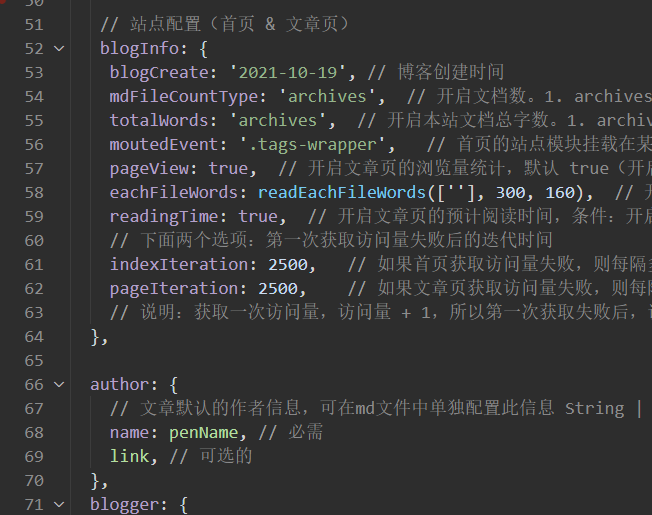
属性配置的具体介绍请看 属性配置。
本地主题
如果已经看完了在线主题的内容,其实本内容的大小不变,只是位置变换、一些代码重组。
配置了在线主题,就不需要配置本地主题,反之亦然。
工具类
在 vdoing/util 目录下创建 webSiteInfo.js,添加如下内容:
  1// 日期格式化(只获取年月日)
  2export function dateFormat(date) {
  3  if (!(date instanceof Date)) {
  4    date = new Date(date);
  5  }
  6  return `${date.getUTCFullYear()}-${zero(date.getUTCMonth() + 1)}-${zero(date.getUTCDate())}`;
  7}
  8
  9// 小于10补0
 10export function zero(d) {
 11  return d.toString().padStart(2, '0');
 12}
 13
 14/**
 15 * 计算最后活动时间
 16 */
 17export function lastUpdatePosts(posts) {
 18  posts.sort((prev, next) => {
 19    return compareDate(prev, next);
 20  });
 21  return posts;
 22}
 23
 24// 获取时间的时间戳
 25export function getTimeNum(post) {
 26  let dateStr = post.lastUpdated || post.frontmatter.date;
 27  let date = new Date(dateStr);
 28  if (date == "Invalid Date" && dateStr) { // 修复new Date()在Safari下出现Invalid Date的问题
 29    date = new Date(dateStr.replace(/-/g, '/'));
 30  }
 31  return date.getTime();
 32}
 33
 34// 比对时间
 35export function compareDate(a, b) {
 36  return getTimeNum(b) - getTimeNum(a);
 37}
 38
 39/**
 40 * 获取两个日期相差多少天
 41 */
 42export function dayDiff(startDate, endDate) {
 43  if (!endDate) {
 44    endDate = startDate;
 45    startDate = new Date();
 46  }
 47  startDate = dateFormat(startDate);
 48  endDate = dateFormat(endDate);
 49  let day = parseInt(Math.abs(new Date(startDate) - new Date(endDate)) / (1000 * 60 * 60 * 24));
 50  return day;
 51}
 52
 53/**
 54 * 计算相差多少年/月/日/时/分/秒
 55 */
 56export function timeDiff(startDate, endDate) {
 57  if (!endDate) {
 58    endDate = startDate;
 59    startDate = new Date();
 60  }
 61  if (!(startDate instanceof Date)) {
 62    startDate = new Date(startDate);
 63  }
 64  if (!(endDate instanceof Date)) {
 65    endDate = new Date(endDate);
 66  }
 67  // 计算时间戳的差
 68  const diffValue = parseInt((Math.abs(endDate - startDate) / 1000));
 69  if (diffValue == 0) {
 70    return '刚刚';
 71  } else if (diffValue < 60) {
 72    return diffValue + ' 秒';
 73  } else if (parseInt(diffValue / 60) < 60) {
 74    return parseInt(diffValue / 60) + ' 分';
 75  } else if (parseInt(diffValue / (60 * 60)) < 24) {
 76    return parseInt(diffValue / (60 * 60)) + ' 时';
 77  } else if (parseInt(diffValue / (60 * 60 * 24)) < getDays(startDate.getMonth, startDate.getFullYear)) {
 78    return parseInt(diffValue / (60 * 60 * 24)) + ' 天';
 79  } else if (parseInt(diffValue / (60 * 60 * 24 * getDays(startDate.getMonth, startDate.getFullYear))) < 12) {
 80    return parseInt(diffValue / (60 * 60 * 24 * getDays(startDate.getMonth, startDate.getFullYear))) + ' 月';
 81  } else {
 82    return parseInt(diffValue / (60 * 60 * 24 * getDays(startDate.getMonth, startDate.getFullYear) * 12)) + ' 年';
 83  }
 84}
 85
 86/**
 87 * 判断当前月的天数(28、29、30、31)
 88 */
 89export function getDays(mouth, year) {
 90  let days = 30;
 91  if (mouth === 2) {
 92    days = year % 4 === 0 ? 29 : 28;
 93  } else if (mouth === 1 || mouth === 3 || mouth === 5 || mouth === 7 || mouth === 8 || mouth === 10 || mouth === 12) {
 94    // 月份为:1,3,5,7,8,10,12 时,为大月.则天数为 31;
 95    days = 31;
 96  }
 97  return days;
 98}
 99
100/**
101 * 已运行时间低于一天显示时分秒
102 * 目前该函数没有使用,低于一天直接显示不到一天
103 */
104export function getTime(startDate, endDate) {
105  if (day < 0) {
106    let hour = parseInt(Math.abs(new Date(startDate) - new Date(endDate)) / (1000 * 60 * 60));
107    if (hour > 0) {
108      let minute = parseInt(Math.abs(new Date(startDate) - new Date(endDate) - hour * 60 * 60 * 1000) / (1000 * 60));
109      if (minute > 0) {
110        let second = parseInt(Math.abs(new Date(startDate) - new Date(endDate) - hour * 60 * 60 * 1000 - minute * 60 * 1000) / (1000));
111        if (second != 0) {
112          return hour + ' 小时 ' + minute + ' 分钟 ' + second + ' 秒';
113        } else {
114          return hour + ' 小时 ' + minute + ' 分钟 ';
115        }
116      } else {
117        return hour + ' 小时 ';
118      }
119    } else {
120      let minute = parseInt(Math.abs(new Date(startDate) - new Date(endDate) - hour * 60 * 60 * 1000) / (1000 * 60));
121      if (minute > 0) {
122        let second = parseInt(Math.abs(new Date(startDate) - new Date(endDate) - hour * 60 * 60 * 1000 - minute * 60 * 1000) / (1000));
123        if (second != 0) {
124          return + minute + ' 分钟 ' + second + ' 秒';
125        } else {
126          return minute + ' 分钟 ';
127        }
128      } else {
129        return parseInt(Math.abs(new Date(startDate) - new Date(endDate) - hour * 60 * 60 * 1000 - minute * 60 * 1000) / (1000)) + ' 秒 ';
130      }
131    }
132  }
133}
134
135var bszCaller, bszTag, scriptTag, ready;
136
137var t,
138  e,
139  n,
140  a = !1,
141  c = [];
142
143// 修复Node同构代码的问题
144if (typeof document !== "undefined") {
145  (ready = function (t) {
146    return (
147      a ||
148      "interactive" === document.readyState ||
149      "complete" === document.readyState
150        ? t.call(document)
151        : c.push(function () {
152            return t.call(this);
153          }),
154      this
155    );
156  }),
157    (e = function () {
158      for (var t = 0, e = c.length; t < e; t++) c[t].apply(document);
159      c = [];
160    }),
161    (n = function () {
162      a ||
163        ((a = !0),
164        e.call(window),
165        document.removeEventListener
166          ? document.removeEventListener("DOMContentLoaded", n, !1)
167          : document.attachEvent &&
168            (document.detachEvent("onreadystatechange", n),
169            window == window.top && (clearInterval(t), (t = null))));
170    }),
171    document.addEventListener
172      ? document.addEventListener("DOMContentLoaded", n, !1)
173      : document.attachEvent &&
174        (document.attachEvent("onreadystatechange", function () {
175          /loaded|complete/.test(document.readyState) && n();
176        }),
177        window == window.top &&
178          (t = setInterval(function () {
179            try {
180              a || document.documentElement.doScroll("left");
181            } catch (t) {
182              return;
183            }
184            n();
185          }, 5)));
186}
187
188bszCaller = {
189  fetch: function (t, e) {
190    var n = "BusuanziCallback_" + Math.floor(1099511627776 * Math.random());
191    t = t.replace("=BusuanziCallback", "=" + n);
192    (scriptTag = document.createElement("SCRIPT")),
193      (scriptTag.type = "text/javascript"),
194      (scriptTag.defer = !0),
195      (scriptTag.src = t),
196      document.getElementsByTagName("HEAD")[0].appendChild(scriptTag);
197    window[n] = this.evalCall(e);
198  },
199  evalCall: function (e) {
200    return function (t) {
201      ready(function () {
202        try {
203          e(t),
204            scriptTag &&
205              scriptTag.parentElement &&
206              scriptTag.parentElement.removeChild &&
207              scriptTag.parentElement.removeChild(scriptTag);
208        } catch (t) {
209          console.log(t), bszTag.hides();
210        }
211      });
212    };
213  },
214};
215
216export function fetch() {
217  bszTag && bszTag.hides();
218  bszCaller.fetch("//busuanzi.ibruce.info/busuanzi?jsonpCallback=BusuanziCallback", function (t) {
219    bszTag.texts(t), bszTag.shows();
220  })
221};
222
223bszTag = {
224  bszs: ["site_pv", "page_pv", "site_uv"],
225  texts: function (n) {
226    this.bszs.map(function (t) {
227      var e = document.getElementById("busuanzi_value_" + t);
228      e && (e.innerHTML = n[t]);
229    });
230  },
231  hides: function () {
232    this.bszs.map(function (t) {
233      var e = document.getElementById("busuanzi_container_" + t);
234      e && (e.style.display = "none");
235    });
236  },
237  shows: function () {
238    this.bszs.map(function (t) {
239      var e = document.getElementById("busuanzi_container_" + t);
240      e && (e.style.display = "inline");
241    });
242  },
243};
Vue组件创建
需要两个 Vue 组件,分别是首页的站点信息模块和文章页信息模块。
在 vdoing/components 目录下创建 WebInfo.vue 文件,添加如下内容:
  1<template>
  2  <!-- Young Kbt -->
  3  <div class="web-info card-box">
  4    <div class="webinfo-title">
  5      <i
  6        class="iconfont icon-award"
  7        style="font-size: 0.875rem; font-weight: 900; width: 1.25em"
  8      ></i>
  9      <span>站点信息</span>
 10    </div>
 11    <div class="webinfo-item">
 12      <div class="webinfo-item-title">文章数目:</div>
 13      <div class="webinfo-content">{{ mdFileCount }} 篇</div>
 14    </div>
 15
 16    <div class="webinfo-item">
 17      <div class="webinfo-item-title">已运行时间:</div>
 18      <div class="webinfo-content">
 19        {{ createToNowDay != 0 ? createToNowDay + " 天" : "不到一天" }}
 20      </div>
 21    </div>
 22
 23    <div class="webinfo-item">
 24      <div class="webinfo-item-title">本站总字数:</div>
 25      <div class="webinfo-content">{{ totalWords }} 字</div>
 26    </div>
 27
 28    <div class="webinfo-item">
 29      <div class="webinfo-item-title">最后活动时间:</div>
 30      <div class="webinfo-content">
 31        {{ lastActiveDate == "刚刚" ? "刚刚" : lastActiveDate + "前" }}
 32      </div>
 33    </div>
 34
 35    <div v-if="indexView" class="webinfo-item">
 36      <div class="webinfo-item-title">本站被访问了:</div>
 37      <div class="webinfo-content">
 38        <span id="busuanzi_value_site_pv" class="web-site-pv"
 39          ><i title="正在获取..." class="loading iconfont icon-loading"></i>
 40        </span>
 41        次
 42      </div>
 43    </div>
 44
 45    <div v-if="indexView" class="webinfo-item">
 46      <div class="webinfo-item-title">您的访问排名:</div>
 47      <div class="webinfo-content busuanzi">
 48        <span id="busuanzi_value_site_uv" class="web-site-uv"
 49          ><i title="正在获取..." class="loading iconfont icon-loading"></i>
 50        </span>
 51        名
 52      </div>
 53    </div>
 54  </div>
 55</template>
 56
 57<script>
 58import { dayDiff, timeDiff, lastUpdatePosts, fetch } from "../util/webSiteInfo";
 59export default {
 60  data() {
 61    return {
 62      // Young Kbt
 63      mdFileCount: 0, // markdown 文档总数
 64      createToNowDay: 0, // 博客创建时间距今多少天
 65      lastActiveDate: "", // 最后活动时间
 66      totalWords: 0, // 本站总字数
 67      indexView: true, // 开启访问量和排名统计
 68    };
 69  },
 70  computed: {
 71    $lastUpdatePosts() {
 72      return lastUpdatePosts(this.$filterPosts);
 73    },
 74  },
 75  mounted() {
 76    // Young Kbt
 77    if (Object.keys(this.$themeConfig.blogInfo).length > 0) {
 78      const {
 79        blogCreate,
 80        mdFileCountType,
 81        totalWords,
 82        moutedEvent,
 83        eachFileWords,
 84        indexIteration,
 85        indexView,
 86      } = this.$themeConfig.blogInfo;
 87      this.createToNowDay = dayDiff(blogCreate);
 88      if (mdFileCountType != "archives") {
 89        this.mdFileCount = mdFileCountType.length;
 90      } else {
 91        this.mdFileCount = this.$filterPosts.length;
 92      }
 93      if (totalWords == "archives" && eachFileWords) {
 94        let archivesWords = 0;
 95        eachFileWords.forEach((itemFile) => {
 96          if (itemFile.wordsCount < 1000) {
 97            archivesWords += itemFile.wordsCount;
 98          } else {
 99            let wordsCount = itemFile.wordsCount.slice(
100              0,
101              itemFile.wordsCount.length - 1
102            );
103            archivesWords += wordsCount * 1000;
104          }
105        });
106        this.totalWords = Math.round(archivesWords / 100) / 10 + "k";
107      } else if (totalWords == "archives") {
108        this.totalWords = 0;
109        console.log(
110          "如果 totalWords = 'archives',必须传入 eachFileWords,显然您并没有传入!"
111        );
112      } else {
113        this.totalWords = totalWords;
114      }
115      // 最后一次活动时间
116      this.lastActiveDate = timeDiff(this.$lastUpdatePosts[0].lastUpdated);
117      this.mountedWebInfo(moutedEvent);
118      // 获取访问量和排名
119      this.indexView = indexView == undefined ? true : indexView;
120      if (this.indexView) {
121        this.getIndexViewCouter(indexIteration);
122      }
123    }
124  },
125  methods: {
126    /**
127     * 挂载站点信息模块
128     */
129    mountedWebInfo(moutedEvent = ".tags-wrapper") {
130      let interval = setInterval(() => {
131        const tagsWrapper = document.querySelector(moutedEvent);
132        const webInfo = document.querySelector(".web-info");
133        if (tagsWrapper && webInfo) {
134          if (!this.isSiblilngNode(tagsWrapper, webInfo)) {
135            tagsWrapper.parentNode.insertBefore(
136              webInfo,
137              tagsWrapper.nextSibling
138            );
139            clearInterval(interval);
140          }
141        }
142      }, 200);
143    },
144    /**
145     * 挂载在兄弟元素后面,说明当前组件是 siblingNode 变量
146     */
147    isSiblilngNode(element, siblingNode) {
148      if (element.siblingNode == siblingNode) {
149        return true;
150      } else {
151        return false;
152      }
153    },
154    /**
155     * 首页的统计量
156     */
157    getIndexViewCouter(iterationTime = 3000) {
158      fetch();
159      var i = 0;
160      var defaultCouter = "9999";
161      // 如果只需要第一次获取数据(可能获取失败),可注释掉 setTimeout 内容,此内容是第一次获取失败后,重新获取访问量
162      // 可能会导致访问量再次 + 1 原因:取决于 setTimeout 的时间(需求调节),setTimeout 太快导致第一个获取的数据没返回,就第二次获取,导致结果返回 + 2 的数据
163      setTimeout(() => {
164        let indexUv = document.querySelector(".web-site-pv");
165        let indexPv = document.querySelector(".web-site-uv");
166        if (
167          indexPv &&
168          indexUv &&
169          indexPv.innerText == "" &&
170          indexUv.innerText == ""
171        ) {
172          let interval = setInterval(() => {
173            // 再次判断原因:防止进入 setInterval 的瞬间,访问量获取成功
174            if (
175              indexPv &&
176              indexUv &&
177              indexPv.innerText == "" &&
178              indexUv.innerText == ""
179            ) {
180              i += iterationTime;
181              if (i > iterationTime * 5) {
182                indexPv.innerText = defaultCouter;
183                indexUv.innerText = defaultCouter;
184                clearInterval(interval); // 5 次后无法获取,则取消获取
185              }
186              if (indexPv.innerText == "" && indexUv.innerText == "") {
187                // 手动获取访问量
188                fetch();
189              } else {
190                clearInterval(interval);
191              }
192            } else {
193              clearInterval(interval);
194            }
195          }, iterationTime);
196          // 绑定 beforeDestroy 生命钩子,清除定时器
197          this.$once("hook:beforeDestroy", () => {
198            clearInterval(interval);
199            interval = null;
200          });
201        }
202      }, iterationTime);
203    },
204
205  },
206};
207</script>
208
209<style scoped>
210.web-info {
211  font-size: 0.875rem;
212  padding: 0.95rem;
213}
214.webinfo-title {
215  text-align: center;
216  color: #888;
217  font-weight: bold;
218  padding: 0 0 10px 0;
219}
220.webinfo-item {
221  padding: 8px 0 0;
222  margin: 0;
223}
224.webinfo-item-title {
225  display: inline-block;
226}
227.webinfo-content {
228  display: inline-block;
229  float: right;
230}
231@keyframes turn {
232  0% {
233    transform: rotate(0deg);
234  }
235  100% {
236    transform: rotate(360deg);
237  }
238}
239.loading {
240  display: inline-block;
241  animation: turn 1s linear infinite;
242  -webkit-animation: turn 1s linear infinite;
243}
244</style>
继续在 vdoing/components 目录下创建 PageInfo.vue 文件,添加如下内容:
  1<template>
  2  <div class="page-view">
  3    <!-- 文章字数 -->
  4    <div title="文章字数" class="book-words iconfont icon-book">
  5      <a href="javascript:;" style="margin-left: 3px; color: #888">{{
  6        wordsCount
  7      }}</a>
  8    </div>
  9
 10    <!-- 预阅读时长 -->
 11    <div
 12      v-if="readingTime"
 13      title="预阅读时长"
 14      class="reading-time iconfont icon-shijian"
 15    >
 16      <a href="javascript:;" style="margin-left: 3px; color: #888">{{
 17        readingTime
 18      }}</a>
 19    </div>
 20    <!-- 浏览量 -->
 21    <div v-if="pageView" title="浏览量" class="page-view iconfont icon-view">
 22      <a
 23        style="color: #888; margin-left: 3px"
 24        href="javascript:;"
 25        id="busuanzi_value_page_pv"
 26        class="view-data"
 27        ><i title="正在获取..." class="loading iconfont icon-loading"></i
 28      ></a>
 29    </div>
 30  </div>
 31</template>
 32
 33<script>
 34import { fetch } from "../util/webSiteInfo";
 35export default {
 36  data() {
 37    return {
 38      // Young Kbt
 39      wordsCount: 0,
 40      readingTime: 0,
 41      pageView: true,
 42      pageIteration: 3000,
 43    };
 44  },
 45  mounted() {
 46    this.initPageInfo();
 47  },
 48  watch: {
 49    $route(to, from) {
 50      if (
 51        to.path !== "/" &&
 52        to.path != from.path &&
 53        this.$themeConfig.blogInfo
 54      ) {
 55        this.initPageInfo();
 56      }
 57    },
 58  },
 59  methods: {
 60    /**
 61     * 初始化页面信息
 62     */
 63    initPageInfo() {
 64      this.$filterPosts.forEach((itemPage) => {
 65        if (itemPage.path == this.$route.path) {
 66          const { eachFileWords, pageView, pageIteration, readingTime } =
 67            this.$themeConfig.blogInfo;
 68          this.pageIteration = pageIteration;
 69          if (eachFileWords) {
 70            eachFileWords.forEach((itemFile) => {
 71              if (itemFile.permalink == itemPage.frontmatter.permalink) {
 72                this.wordsCount = itemFile.wordsCount;
 73                if (readingTime || readingTime == undefined) {
 74                  this.readingTime = itemFile.readingTime;
 75                } else {
 76                  this.readingTime = false;
 77                }
 78              }
 79            });
 80          }
 81          this.pageView = pageView == undefined ? true : pageView;
 82          if (this.pageView) {
 83            this.getPageViewCouter(this.pageIteration);
 84          }
 85          return;
 86        }
 87      });
 88    },
 89    /**
 90     * 文章页的访问量
 91     */
 92    getPageViewCouter(iterationTime = 3000) {
 93      fetch();
 94      let i = 0;
 95      var defaultCouter = "9999";
 96      // 如果只需要第一次获取数据(可能获取失败),可注释掉 setTimeout 内容,此内容是第一次获取失败后,重新获取访问量
 97      // 可能会导致访问量再次 + 1 原因:取决于 setTimeout 的时间(需求调节),setTimeout 太快导致第一个获取的数据没返回,就第二次获取,导致结果返回 + 2 的数据
 98      setTimeout(() => {
 99        let pageView = document.querySelector(".view-data");
100        if (pageView && pageView.innerText == "") {
101          let interval = setInterval(() => {
102            // 再次判断原因:防止进入 setInterval 的瞬间,访问量获取成功
103            if (pageView && pageView.innerText == "") {
104              i += iterationTime;
105              if (i > iterationTime * 5) {
106                pageView.innerText = defaultCouter;
107                clearInterval(interval); // 5 次后无法获取,则取消获取
108              }
109              if (pageView.innerText == "") {
110                // 手动获取访问量
111                fetch();
112              } else {
113                clearInterval(interval);
114              }
115            } else {
116              clearInterval(interval);
117            }
118          }, iterationTime);
119          // 绑定 beforeDestroy 生命钩子,清除定时器
120          this.$once("hook:beforeDestroy", () => {
121            clearInterval(interval);
122            interval = null;
123          });
124        }
125      }, iterationTime);
126    },
127  },
128};
129</script>
130
131<style scoped>
132.page-view > div {
133  float: left;
134  margin-left: 20px;
135  font-size: 0.8rem;
136}
137
138@keyframes turn {
139  0% {
140    transform: rotate(0deg);
141  }
142
143  100% {
144    transform: rotate(360deg);
145  }
146}
147
148.loading {
149  display: inline-block;
150  animation: turn 1s linear infinite;
151  -webkit-animation: turn 1s linear infinite;
152}
153</style>
Vue组件引用
写好两个组件,那么我们需要使用它们。
引入
WebInfo.vue组件
打开 vdoing/components/Home.vue 文件。
大概在 174 行处引入 WebInfo.vue 组件:
1import WebInfo from './WebInfo.vue';
1
大概在 242 行处找到 components 注册该组件:
1components: { ......, WebInfo },
1
大概在 153 行处(div 的 class 为 custom-html-box 的上方),添加如下内容:
1<webInfo />
1
三个效果图:
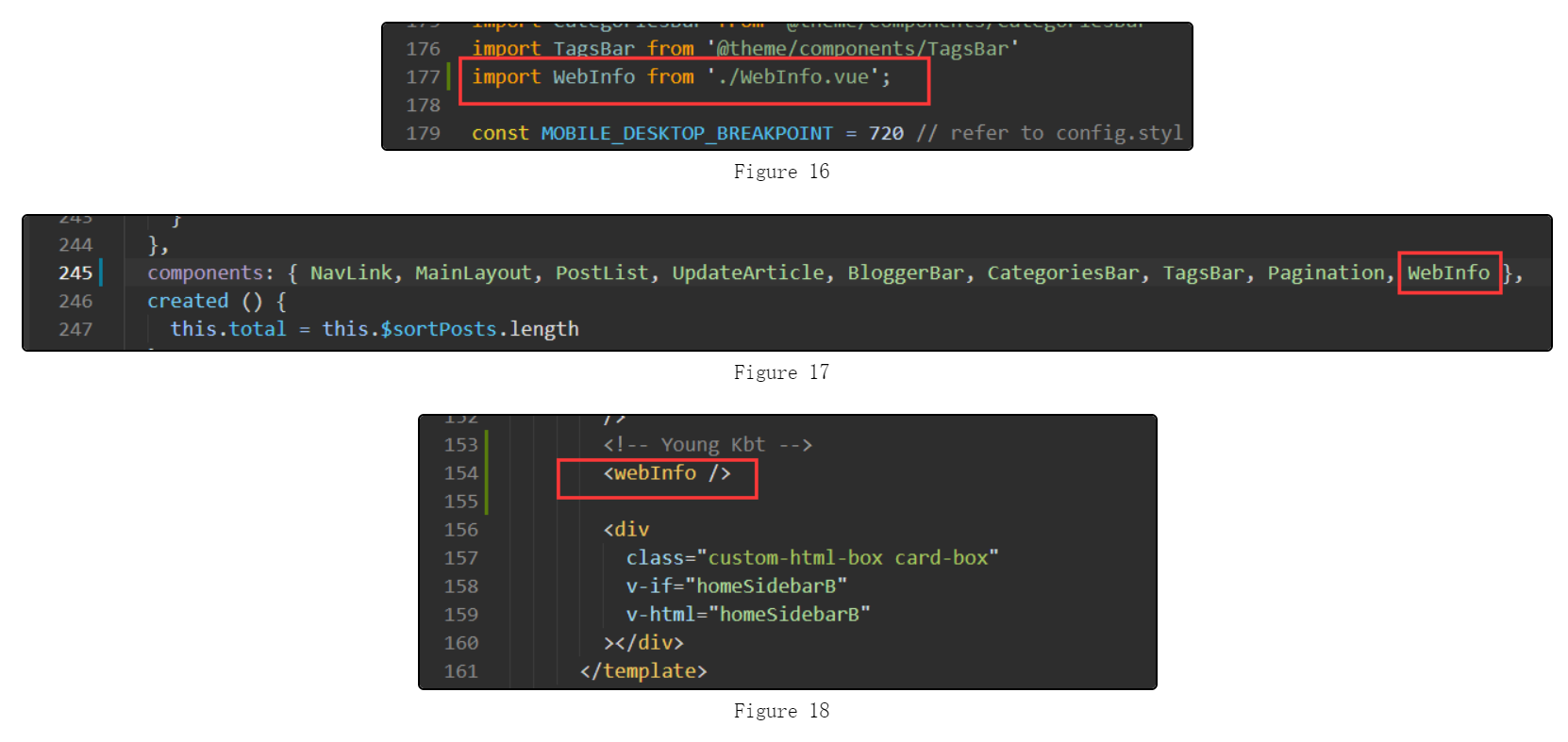
引入
PageInfo.vue组件
打开 vdoing/components/ArticleInfo.vue 文件。
大概在 67 行处引入 PagesView.vue 组件:
1import PageInfo from './PageInfo.vue';
1
大概在 69 行处添加 components 注册该组件(data() 上方):
1components: { PageInfo },
1
大概在 61 行处,添加如下内容:
1<PageInfo style="margin-left: 0" />
1
效果图:
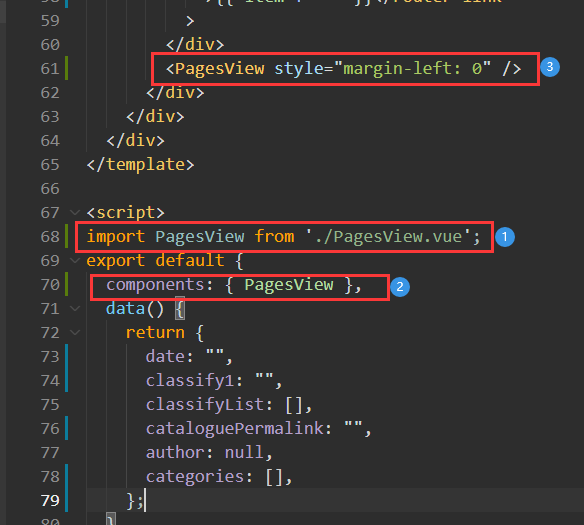
核心配置文件
在 docs/.vuepress 目录下创建 webSiteInfo 文件夹,并在文件夹里创建 readFile.js 文件。
添加如下内容:
js
  1const fs = require('fs'); // 文件模块
  2const path = require('path'); // 路径模块
  3const matter = require('gray-matter'); // FrontMatter解析器 https://github.com/jonschlinkert/gray-matter
  4const chalk = require('chalk') // 命令行打印美化
  5const log = console.log
  6const docsRoot = path.join(__dirname, '..', '..', '..', 'docs'); // docs文件路径
  7
  8/**
  9 * 获取本站的文章数据
 10 * 获取所有的 md 文档,可以排除指定目录下的文档
 11 */
 12function readFileList(excludeFiles = [''], dir = docsRoot, filesList = []) {
 13  const files = fs.readdirSync(dir);
 14  files.forEach((item, index) => {
 15    let filePath = path.join(dir, item);
 16    const stat = fs.statSync(filePath);
 17    if (!(excludeFiles instanceof Array)) {
 18      log(chalk.yellow(`error: 传入的参数不是一个数组。`))
 19    }
 20    excludeFiles.forEach((excludeFile) => {
 21      if (stat.isDirectory() && item !== '.vuepress' && item !== '@pages' && item !== excludeFile) {
 22        readFileList(excludeFiles, path.join(dir, item), filesList);  //递归读取文件
 23      } else {
 24        if (path.basename(dir) !== 'docs') { // 过滤 docs目录级下的文件
 25
 26          const fileNameArr = path.basename(filePath).split('.')
 27          let name = null, type = null;
 28          if (fileNameArr.length === 2) { // 没有序号的文件
 29            name = fileNameArr[0]
 30            type = fileNameArr[1]
 31          } else if (fileNameArr.length === 3) { // 有序号的文件
 32            name = fileNameArr[1]
 33            type = fileNameArr[2]
 34          } else { // 超过两个‘.’的
 35            log(chalk.yellow(`warning: 该文件 "${filePath}" 没有按照约定命名,将忽略生成相应数据。`))
 36            return
 37          }
 38          if (type === 'md') { // 过滤非 md 文件
 39            filesList.push({
 40              name,
 41              filePath
 42            });
 43          }
 44        }
 45      }
 46    });
 47  });
 48  return filesList;
 49}
 50/**
 51 * 获取本站的文章总字数
 52 * 可以排除某个目录下的 md 文档字数
 53 */
 54function readTotalFileWords(excludeFiles = ['']) {
 55  const filesList = readFileList(excludeFiles);
 56  var wordCount = 0;
 57  filesList.forEach((item) => {
 58    const content = getContent(item.filePath);
 59    var len = counter(content);
 60    wordCount += len[0] + len[1];
 61  });
 62  if (wordCount < 1000) {
 63    return wordCount;
 64  }
 65  return Math.round(wordCount / 100) / 10 + 'k';
 66}
 67/**
 68 * 获取每一个文章的字数
 69 * 可以排除某个目录下的 md 文档字数
 70 */
 71function readEachFileWords(excludeFiles = [''], cn, en) {
 72  const filesListWords = [];
 73  const filesList = readFileList(excludeFiles);
 74  filesList.forEach((item) => {
 75    const content = getContent(item.filePath);
 76    var len = counter(content);
 77    // 计算预计的阅读时间
 78    var readingTime = readTime(len, cn, en);
 79    var wordsCount = 0;
 80    wordsCount = len[0] + len[1];
 81    if (wordsCount >= 1000) {
 82      wordsCount = Math.round(wordsCount / 100) / 10 + 'k';
 83    }
 84    // fileMatterObj => {content:'剔除frontmatter后的文件内容字符串', data:{<frontmatter对象>}, ...}
 85    const fileMatterObj = matter(content, {});
 86    const matterData = fileMatterObj.data;
 87    filesListWords.push({ ...item, wordsCount, readingTime, ...matterData });
 88  });
 89  return filesListWords;
 90}
 91
 92/**
 93 * 计算预计的阅读时间
 94 */
 95function readTime(len, cn = 300, en = 160) {
 96  var readingTime = len[0] / cn + len[1] / en;
 97  if (readingTime > 60 && readingTime < 60 * 24) {   // 大于一个小时,小于一天
 98    let hour = parseInt(readingTime / 60);
 99    let minute = parseInt((readingTime - hour * 60));
100    if (minute === 0) {
101      return hour + 'h';
102    }
103    return hour + 'h' + minute + 'm';
104  } else if (readingTime > 60 * 24) {      // 大于一天
105    let day = parseInt(readingTime / (60 * 24));
106    let hour = parseInt((readingTime - day * 24 * 60) / 60);
107    if (hour === 0) {
108      return day + 'd';
109    }
110    return day + 'd' + hour + 'h';
111  }
112  return readingTime < 1 ? '1' : parseInt((readingTime * 10)) / 10 + 'm';   // 取一位小数
113}
114
115/**
116 * 读取文件内容
117 */
118function getContent(filePath) {
119  return fs.readFileSync(filePath, 'utf8');
120}
121/**
122 * 获取文件内容的字数
123 * cn:中文
124 * en:一整句英文(没有空格隔开的英文为 1 个)
125 */
126function counter(content) {
127  const cn = (content.match(/[\u4E00-\u9FA5]/g) || []).length;
128  const en = (content.replace(/[\u4E00-\u9FA5]/g, '').match(/[a-zA-Z0-9_\u0392-\u03c9\u0400-\u04FF]+|[\u4E00-\u9FFF\u3400-\u4dbf\uf900-\ufaff\u3040-\u309f\uac00-\ud7af\u0400-\u04FF]+|[\u00E4\u00C4\u00E5\u00C5\u00F6\u00D6]+|\w+/g) || []).length;
129  return [cn, en];
130}
131
132module.exports = {
133  readFileList,
134  readTotalFileWords,
135  readEachFileWords,
136}
配置站点信息
最后一步,在 docs/.vuepress/config.js(新版为 config.ts)文件,引入写好的 readFile.js 文件(路径要准确,这里仅仅是模板)
1const { readFileList, readTotalFileWords, readEachFileWords } = require('./webSiteInfo/readFile');
1
如图(演示 JS 代码块):

在 themeConfig 中添加如下内容:
 1// 站点配置(首页 & 文章页)
 2blogInfo: {
 3  blogCreate: '2021-10-19', // 博客创建时间
 4  indexView: true,  // 开启首页的访问量和排名统计,默认 true(开启)
 5  pageView: true,  // 开启文章页的浏览量统计,默认 true(开启)
 6  readingTime: true,  // 开启文章页的预计阅读时间,条件:开启 eachFileWords,默认 true(开启)。可在 eachFileWords 的 readEachFileWords 的第二个和第三个参数自定义,默认 1 分钟 300 中文、160 英文
 7  eachFileWords: readEachFileWords([''], 300, 160),  // 开启每个文章页的字数。readEachFileWords(['xx']) 关闭 xx 目录(可多个,可不传参数)下的文章页字数和阅读时长,后面两个参数分别是 1 分钟里能阅读的中文字数和英文字数。无默认值。readEachFileWords() 方法默认排除了 article 为 false 的文章
 8  mdFileCountType: 'archives',  // 开启文档数。1. archives 获取归档的文档数(默认)。2. 数组 readFileList(['xx']) 排除 xx 目录(可多个,可不传参数),获取其他目录的文档数。提示:readFileList() 获取 docs 下所有的 md 文档(除了 `.vuepress` 和 `@pages` 目录下的文档)
 9  totalWords: 'archives',  // 开启本站文档总字数。1. archives 获取归档的文档数(使用 archives 条件:传入 eachFileWords,否则报错)。2. readTotalFileWords(['xx']) 排除 xx 目录(可多个,可不传参数),获取其他目录的文章字数。无默认值
10  moutedEvent: '.tags-wrapper',   // 首页的站点模块挂载在某个元素后面(支持多种选择器),指的是挂载在哪个兄弟元素的后面,默认是热门标签 '.tags-wrapper' 下面,提示:'.categories-wrapper' 会挂载在文章分类下面。'.blogger-wrapper' 会挂载在博客头像模块下面
11  // 下面两个选项:第一次获取访问量失败后的迭代时间
12  indexIteration: 2500,   // 如果首页获取访问量失败,则每隔多少时间后获取一次访问量,直到获取成功或获取 10 次后。默认 3 秒。注意:设置时间太低,可能导致访问量 + 2、+ 3 ......
13  pageIteration: 2500,    // 如果文章页获取访问量失败,则每隔多少时间后获取一次访问量,直到获取成功或获取 10 次后。默认 3 秒。注意:设置时间太低,可能导致访问量 + 2、+ 3 ......
14  // 说明:成功获取一次访问量,访问量 + 1,所以第一次获取失败后,设置的每个隔段重新获取时间,将会影响访问量的次数。如 100 可能每次获取访问量 + 3
15},
如图(图片内容不一定是最新):
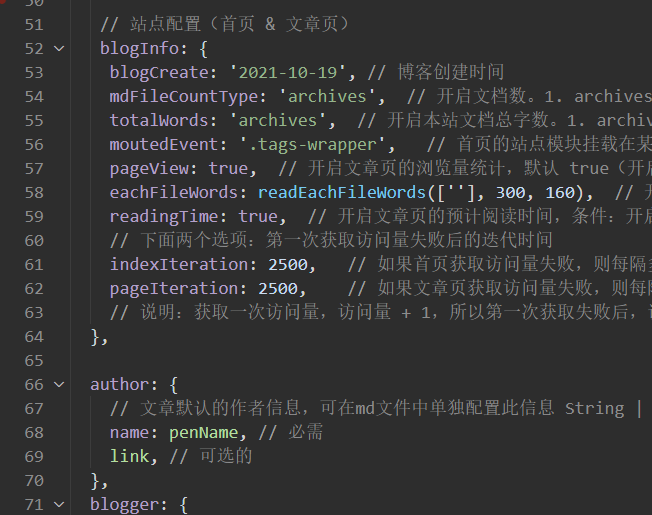
属性配置的具体介绍请看 属性配置。
属性配置
blogCreate
- 类型:
string - 默认值:当前时间(
new Date()) - 格式:yyyy-mm-dd
博客创建时间。如果不添加时间,页面上显示 0 天。
mdFileCountType
- 类型:
string|readFileList() - 参数:数组
- 默认值:archives
文章数目。如果不添加内容,页面上显示归档的文章数目。
readFileList 是一个 js 文件,需要引入,参数是 目录的全名,最终效果会 排除该目录里的文章数,可多选,逗号隔开。也可不传参数。
温馨提示:readFileList() 不传参数会获取 docs 下所有的 md 文档(除了 .vuepress 和 @pages 目录下的文档)。
totalWords
- 类型:
string|readFileWords() - 参数:数组
- 默认值:null
本站文档总字数。如果不添加内容,页面上显示 0 字。
string 仅支持 archives,并且使用该类型有条件:必须使用 eachFileWords,否则报错。
readFileWords 是一个 js 文件,需要引入,参数是目录的全名,最终效果会 排除该目录里的文章字数,可多选,逗号隔开。也可不传参数。
moutedEvent
- 类型:
string - 默认值:.tags-wrapper
选择挂载的元素属性,支持多种选择器(id、class ……),该模块会挂载到该元素后面,形成兄弟元素。(仅支持首页的元素)。
温馨提示:.categories-wrapper 会挂载在文章分类下面;.blogger-wrapper 会挂载在头像模块下面;.icons 会挂载在头像下方、图标上方。
默认是热门标签 .tags-wrapper 下面。
indexView
- 类型:
boolean - 默认值:true
开启首页的访问量和排名统计,默认 true(开启)。
pageView
- 类型
boolean - 默认值:true
开启文章页的浏览量统计,默认 true(开启)。
eachFileWords
- 类型:
readEachFileWords() - 参数:数组
- 默认值:null
开启每个文章页的字数。如果不添加内容,则不开启。
readEachFileWords(['xx']) 关闭 xx 目录(可多个,可不传参数)下的文章页字数和阅读时长。
readEachFileWords() 第一个参数是数组,后面两个参数分别是 1 分钟里能阅读的中文字数和英文字数,配合 readingTime 使用。
readEachFileWords() 方法默认排除了 article 为 false 的文章。
readingTime
- 类型:
boolean - 默认值:true
- 条件:使用
eachFileWords
开启文章页的预计阅读时间。默认阅读中文 1 分钟 300 个字,英文 1 分钟 160 个字。如果想自定义阅读文字时长,请在 eachFileWords 的 readEachFileWords() 传入后面两个参数。分别为 1 分钟阅读的中文和英文个数。
indexIteration
- 类型:
number - 默认值:3000
如果首页获取访问量失败,则每隔多少时间后获取一次访问量,直到获取成功或获取 10 次后。默认 3 秒。
注意:设置时间太低,可能导致访问量 + 2、+ 3 ……
pageIteration
- 类型:
number - 默认值:3000
如果文章页获取访问量失败,则每隔多少时间后获取一次访问量,直到获取成功或获取 10 次后。默认 3 秒。
注意:设置时间太低,可能导致访问量 + 2、+ 3 ……
说明:成功获取一次访问量,访问量 + 1,所以第一次获取失败后,设置的每个隔段重新获取时间,将会影响访问量的次数。如 100 可能每次获取访问量 + 3。
结束语
如果你还有疑惑,可以去我的 GitHub 仓库或者 Gitee 仓库查看源码。
如果你有更好的方式,评论区留言告诉我,或者加入 Vdoing 主题的 QQ 群:694387113。谢谢!
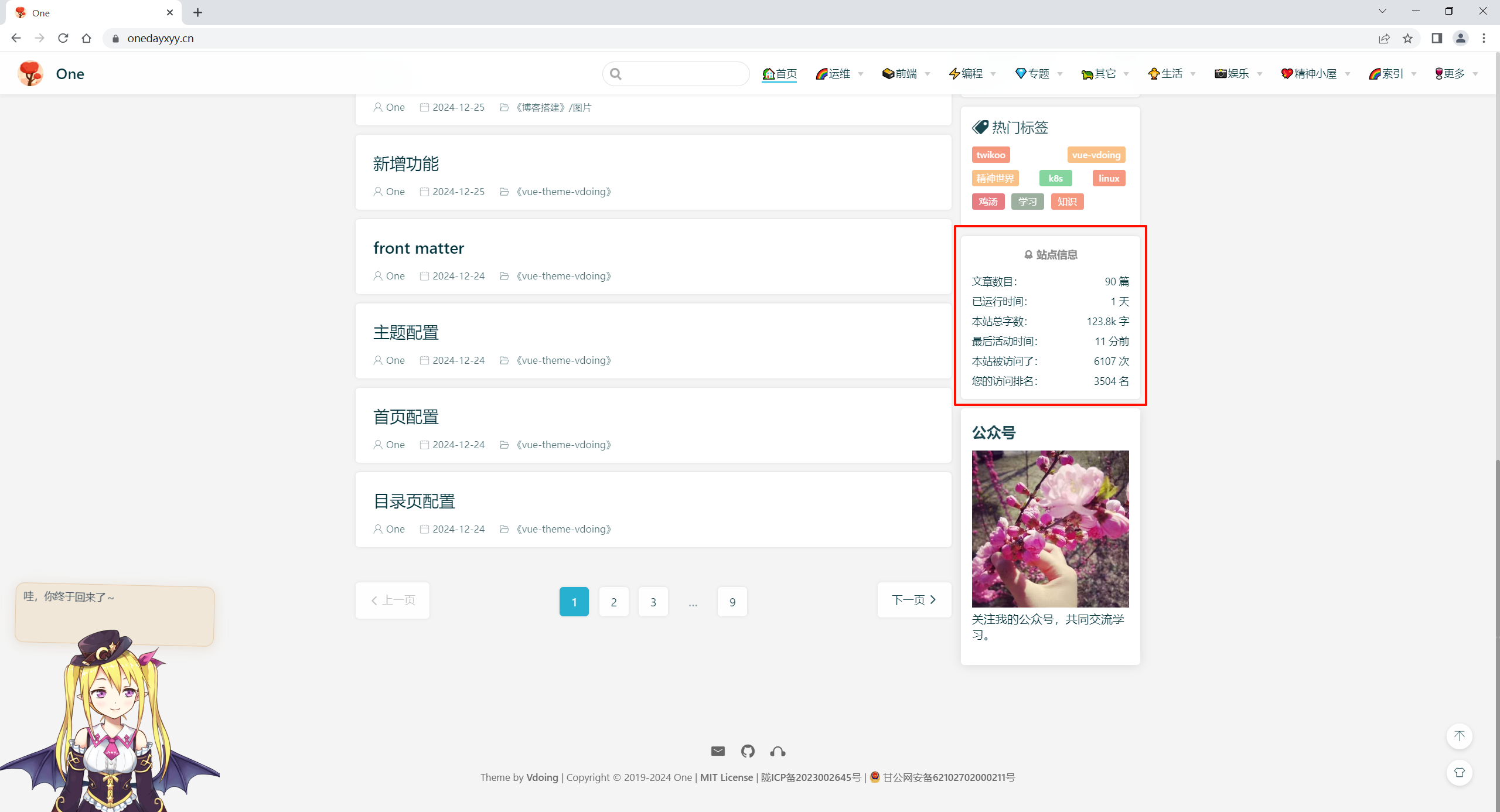
自己配置完的效果
其它方案-自建busuanzi
2024年12月26日记录


📡
推荐使用微信支付

推荐使用支付宝