--
:
--
:
--
实战-yaml方式安装ingress-nginx(测试成功)(DaemonSet方式)v3-20230311
最后更新于:
v3-2023.3.11-实战-yaml方式安装ingress-nginx(测试成功)(DaemonSet方式)
目录
[toc]
实验环境
1实验环境:
21、win10,vmwrokstation虚机;
32、k8s集群:3台centos7.6 1810虚机,1个master节点,2个node节点
4   k8s version:v1.22.2
5   containerd: v1.5.5
6
7 #同样在k8s version: v1.25.4,containerd: v1.6.10下也可以使用次方法;
实验软件
2023.3.11-实战:yaml方式安装ingress-nginx-2023.3.11(测试成功)
链接:https://pan.baidu.com/s/1EsyXFCL-_p4eDh0ciIfz2Q?pwd=dlxc
提取码:dlxc

1、安装过程
- 安装 ingress-nginx 有多种方式,我们这里直接使用下面的命令进行一键安装:
 1(1)下载部署文件
 2wget https://raw.githubusercontent.com/kubernetes/ingress-nginx/controller-v1.5.1/deploy/static/provider/cloud/deploy.yaml
 3#我软件包里以提供,是已经修改好了的;
 4
 5(2)替换镜像 #如果使用我提供的yaml文件,这里的配置就不要做了;!!!
 6# 可以替换对应的两个镜像
 7# cnych/ingress-nginx:v1.5.1
 8# cnych/ingress-nginx-kube-webhook-certgen:v20220916-gd32f8c343
 9
10将
11image: registry.k8s.io/ingress-nginx/controller:v1.5.1@sha256:4ba73c697770664c1e00e9f968de14e08f606ff961c76e5d7033a4a9c593c629
12替换为:
13image: cnych/ingress-nginx:v1.5.1
14
15将 #这个需要替换2处
16image: registry.k8s.io/ingress-nginx/kube-webhook-certgen:v20220916-gd32f8c343@sha256:39c5b2e3310dc4264d638ad28d9d1d96c4cbb2b2dcfb52368fe4e3c63f61e10f
17替换为:
18image: cnych/ingress-nginx-kube-webhook-certgen:v20220916-gd32f8c343
19
20(3)部署
21[root@master1 ~]#kubectl apply -f deploy.yaml
22namespace/ingress-nginx created
23serviceaccount/ingress-nginx created
24serviceaccount/ingress-nginx-admission created
25role.rbac.authorization.k8s.io/ingress-nginx created
26role.rbac.authorization.k8s.io/ingress-nginx-admission created
27clusterrole.rbac.authorization.k8s.io/ingress-nginx created
28clusterrole.rbac.authorization.k8s.io/ingress-nginx-admission created
29rolebinding.rbac.authorization.k8s.io/ingress-nginx created
30rolebinding.rbac.authorization.k8s.io/ingress-nginx-admission created
31clusterrolebinding.rbac.authorization.k8s.io/ingress-nginx created
32clusterrolebinding.rbac.authorization.k8s.io/ingress-nginx-admission created
33configmap/ingress-nginx-controller created
34service/ingress-nginx-controller created
35service/ingress-nginx-controller-admission created
36daemonset.apps/ingress-nginx-controller created
37job.batch/ingress-nginx-admission-create created
38job.batch/ingress-nginx-admission-patch created
39ingressclass.networking.k8s.io/nginx created
40validatingwebhookconfiguration.admissionregistration.k8s.io/ingress-nginx-admission created
41[root@master1 ~]#
这里注意下:
和默认使用Deployment方式部署,DaemonSet部署时需要更改如下2点:(自己附件deploy.yaml里已经都更改好了的)
01.更改部署方式为DaemonSet

1406 apiVersion: apps/v1
2407 kind: DaemonSet
02.添加容忍
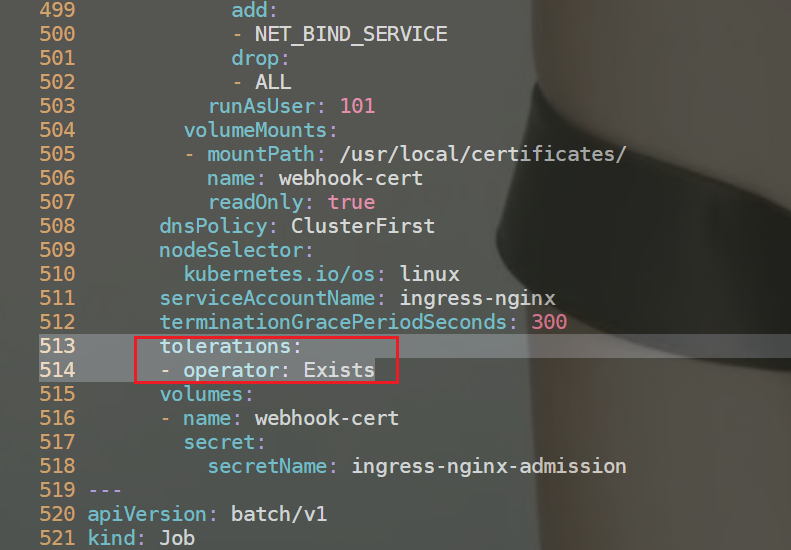
1513       tolerations:
2514       - operator: Exists
- 上面的命令执行后会自动创建一个名为 ingress-nginx 的命名空间,会生成如下几个 Pod:
1[root@master1 ingress-nginx]#kubectl get pods -n ingress-nginx -owide
2NAME                                      READY   STATUS      RESTARTS   AGE     IP            NODE      NOMINATED NODE   READINESS GATES
3ingress-nginx-admission-create--1-5h6rr   0/1     Completed   0          20m     10.244.1.25   node1     <none>           <none>
4ingress-nginx-admission-patch--1-jdn2k    0/1     Completed   0          20m     10.244.2.18   node2     <none>           <none>
5ingress-nginx-controller-46kbb            1/1     Running     0          7m58s   10.244.2.20   node2     <none>           <none>
6ingress-nginx-controller-xtbn4            1/1     Running     0          10m     10.244.0.2    master1   <none>           <none>
7ingress-nginx-controller-zxffk            1/1     Running     0          8m20s   10.244.1.27   node1     <none>           <none>
- 此外还会创建如下两个 Service 对象:
1[root@master1 ingress-nginx]#kubectl get svc -n ingress-nginx
2NAME                                 TYPE           CLUSTER-IP      EXTERNAL-IP   PORT(S)                      AGE
3ingress-nginx-controller             LoadBalancer   10.108.58.246   			  80:32439/TCP,443:31347/TCP   20m
4ingress-nginx-controller-admission   ClusterIP      10.101.184.28   <none>        443/TCP                      20m
其中 ingress-nginx-controller-admission 是为准入控制器提供服务的,我们也是强烈推荐开启该准入控制器,这样当我们创建不合要求的 Ingress 对象后就会直接被拒绝了。另外一个 ingress-nginx-controller 就是ingress 控制器对外暴露的服务,我们可以看到默认是一个 LoadBalancer 类型的 Service,我们知道该类型是用于云服务商的,我们这里在本地环境,暂时不能使用,但是可以通过他的 NodePort 来对外暴露,后面我们会提供在本地测试环境提供 LoadBalancer 的方式。
- 到这里 ingress-nginx 就部署成功了,安装完成后还会创建一个名为 nginx 的 IngressClass 对象:
 1[root@master1 ~]# kubectl get ingressclass
 2NAME    CONTROLLER             PARAMETERS   AGE
 3nginx   k8s.io/ingress-nginx   <none>       3m43s
 4
 5[root@master1 ~]#kubectl get ingressclass nginx -o yaml
 6apiVersion: networking.k8s.io/v1
 7kind: IngressClass
 8metadata:
 9  annotations:
10    kubectl.kubernetes.io/last-applied-configuration: |
11      {"apiVersion":"networking.k8s.io/v1","kind":"IngressClass","metadata":{"annotations":{},"labels":{"app.kubernetes.io/component":"controller","app.kubernetes.io/instance":"ingress-nginx","app.kubernetes.io/name":"ingress-nginx","app.kubernetes.io/part-of":"ingress-nginx","app.kubernetes.io/version":"1.5.1"},"name":"nginx"},"spec":{"controller":"k8s.io/ingress-nginx"}}
12  creationTimestamp: "2023-03-01T14:49:35Z"
13  generation: 1
14  labels:
15    app.kubernetes.io/component: controller
16    app.kubernetes.io/instance: ingress-nginx
17    app.kubernetes.io/name: ingress-nginx
18    app.kubernetes.io/part-of: ingress-nginx
19    app.kubernetes.io/version: 1.5.1
20  name: nginx
21  resourceVersion: "20342"
22  uid: 7b4ad44f-1eff-405b-9da4-821808529177
23spec:
24  controller: k8s.io/ingress-nginx
25[root@master1 ~]#
这里我们只提供了一个 controller 属性,对应的值和 ingress-nginx 的启动参数中的 controller-class 一致的。
 1[root@master1 ~]#cat deploy.yaml
 2431     spec:
 3432       containers:
 4433       - args:
 5434         - /nginx-ingress-controller
 6435         - --publish-service=$(POD_NAMESPACE)/ingress-nginx-controller
 7436         - --election-id=ingress-nginx-leader
 8437         - --controller-class=k8s.io/ingress-nginx
 9438         - --ingress-class=nginx
10439         - --configmap=$(POD_NAMESPACE)/ingress-nginx-controller
11440         - --validating-webhook=:8443
12441         - --validating-webhook-certificate=/usr/local/certificates/cert
13442         - --validating-webhook-key=/usr/local/certificates/key
2、第一个示例
- 我们先看下
ingress-controllerpod所在的节点
 1[root@master1 ~]#vim deploy.yaml
 2406 apiVersion: apps/v1
 3407 kind: Daemonset
 4……
 5509       nodeSelector:
 6510         kubernetes.io/os: linux
 7
 8[root@master1 ingress-nginx]#kubectl get pods -n ingress-nginx -owide
 9NAME                                      READY   STATUS      RESTARTS   AGE     IP            NODE      NOMINATED NODE   READINESS GATES
10ingress-nginx-admission-create--1-5h6rr   0/1     Completed   0          20m     10.244.1.25   node1     <none>           <none>
11ingress-nginx-admission-patch--1-jdn2k    0/1     Completed   0          20m     10.244.2.18   node2     <none>           <none>
12ingress-nginx-controller-46kbb            1/1     Running     0          7m58s   10.244.2.20   node2     <none>           <none>
13ingress-nginx-controller-xtbn4            1/1     Running     0          10m     10.244.0.2    master1   <none>           <none>
14ingress-nginx-controller-zxffk            1/1     Running     0          8m20s   10.244.1.27   node1     <none>           <none>
- 安装成功后,现在我们来为一个 nginx 应用创建一个 Ingress 资源,如下所示:
 1# my-nginx.yaml
 2apiVersion: apps/v1
 3kind: Deployment
 4metadata:
 5  name: my-nginx
 6spec:
 7  selector:
 8    matchLabels:
 9      app: my-nginx
10  template:
11    metadata:
12      labels:
13        app: my-nginx
14    spec:
15      containers:
16      - name: my-nginx
17        image: nginx
18        ports:
19        - containerPort: 80
20---
21apiVersion: v1
22kind: Service
23metadata:
24  name: my-nginx
25  labels:
26    app: my-nginx
27spec:
28  ports:
29  - port: 80
30    protocol: TCP
31    name: http
32  selector:
33    app: my-nginx
34---
35apiVersion: networking.k8s.io/v1
36kind: Ingress
37metadata:
38  name: my-nginx
39  namespace: default
40spec:
41  ingressClassName: nginx  # 使用 nginx 的 IngressClass(关联的 ingress-nginx 控制器)
42  rules:
43  - host: first-ingress.172.29.9.52.nip.io  # 将域名映射到 my-nginx 服务
44    http:
45      paths:
46      - path: /
47        pathType: Prefix
48        backend:
49          service:  # 将所有请求发送到 my-nginx 服务的 80 端口
50            name: my-nginx
51            port:
52              number: 80
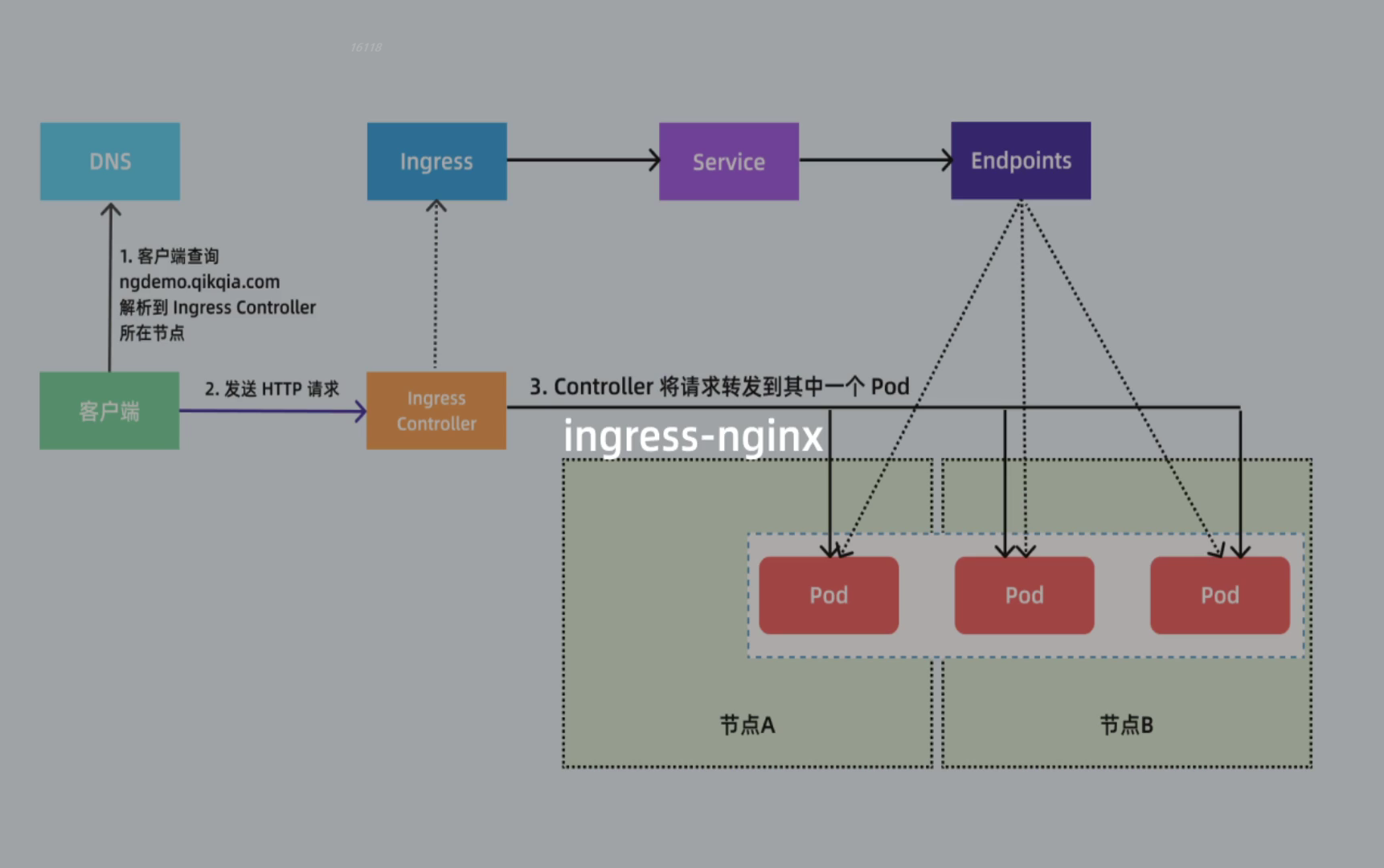
不过需要注意大部分Ingress控制器都不是直接转发到Service,而是只是通过Service来获取后端的Endpoints列表(因此这里的svc只起到了一个服务发现的作用),直接转发到Pod,这样可以减少网络跳转,提高性能!!!
⚠️ 注意:
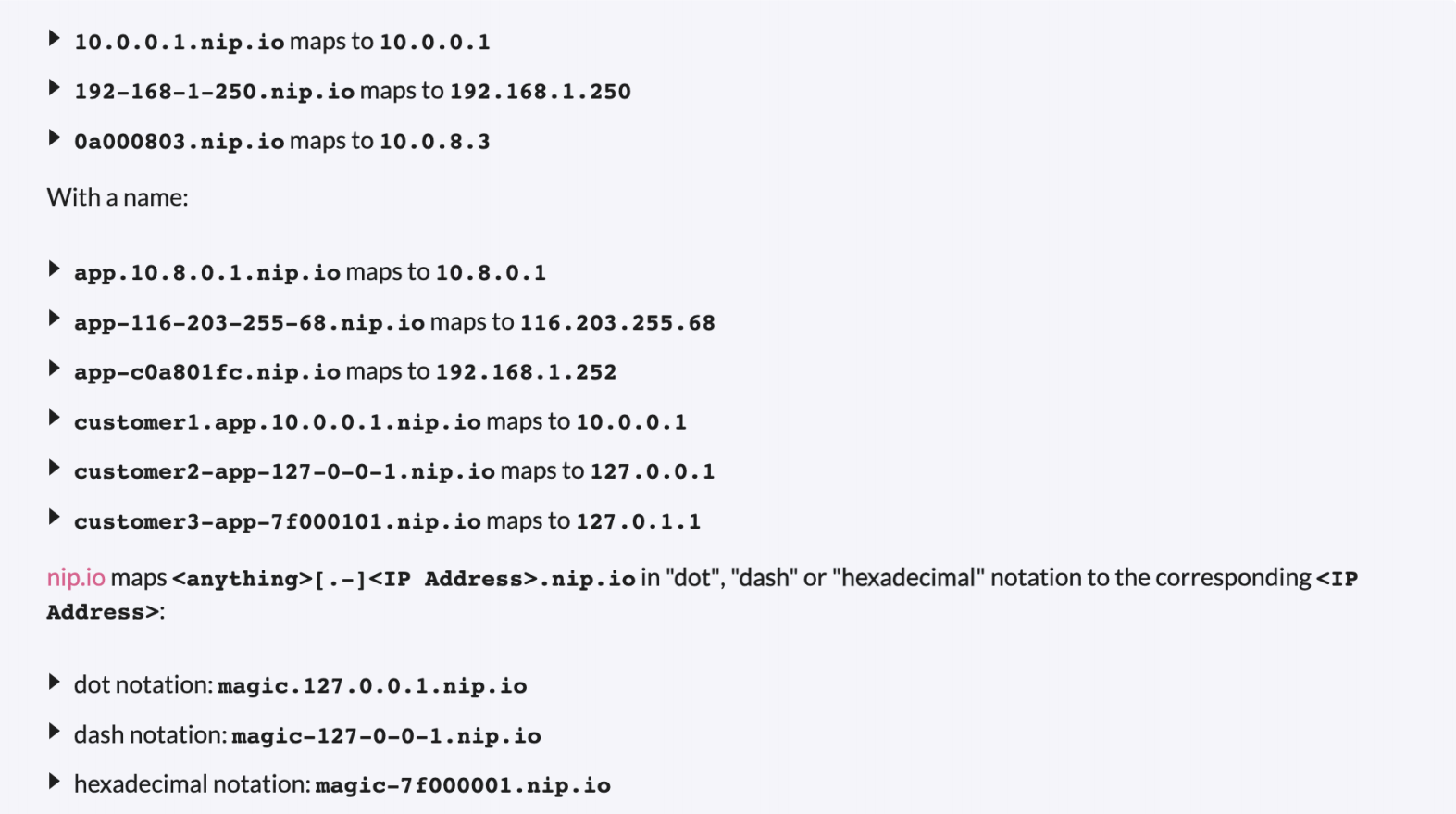
注意我们这里配置的域名是 first-ingress.172.18.0.2.nip.io,该地址其实会直接映射到 172.18.0.2 上面,该 IP 地址就是我的 Node 节点地址,因为我们这里 ingress 控制器是通过 NodePort 对外进行暴露的,所以可以通过 域名:nodePort 来访问服务。nip.io 是由 PowerDNS 提供支持的开源服务,允许我们可以直接通过使用以下格式将任何 IP 地址映射到主机名,这样我们就不需要在 etc/hosts 文件中配置映射了,对于 Ingress 测试非常方便。
注意:
nip.io不需要另外安装服务,我们只要安装如下命令配置就好。
- 这里直接创建上面的资源对象即可:
 1[root@master1 ~]#kubectl apply -f my-nginx.yaml
 2deployment.apps/my-nginx created
 3service/my-nginx created
 4ingress.networking.k8s.io/my-nginx created
 5[root@master1 ~]#kubectl get ingress
 6NAME       CLASS   HOSTS                              ADDRESS   PORTS   AGE
 7my-nginx   nginx   first-ingress.172.29.9.52.nip.io             80      27m
 8
 9root@master1 ~]#kubectl get svc -ningress-nginx
10NAME                                 TYPE           CLUSTER-IP      EXTERNAL-IP   PORT(S)                      AGE
11ingress-nginx-controller             LoadBalancer   10.96.228.157   <pending>     80:30933/TCP,443:31697/TCP   7h51m
12ingress-nginx-controller-admission   ClusterIP      10.105.93.22    <none>        443/TCP                      7h51m
在上面的 Ingress 资源对象中我们使用配置 ingressClassName: nginx 指定让我们安装的 ingress-nginx 这个控制器来处理我们的 Ingress 资源,配置的匹配路径类型为前缀的方式去匹配 / ,将来自域名 firstingress.172.29.9.52.nip.io 的所有请求转发到 my-nginx 服务的后端 Endpoints 中去,注意访问的时候需要带上 ingress-nginx svc的NodePort 端口。
- 测试
 1[root@master1 ~]#curl first-ingress.172.29.9.52.nip.io
 2curl: (7) Failed connect to first-ingress.172.29.9.52.nip.io:80; Connection refused
 3
 4[root@master1 ~]#curl first-ingress.172.29.9.52.nip.io:30933 #注意:这里的ingrexx-nginx默认是一个 LoadBalancer 类型的 Service,我们知道该类型是用于云服务商的,我们这里在本地环境,暂时不能使用,但是可以通过他的 NodePort 来对外暴露。
 5<!DOCTYPE html>
 6<html>
 7<head>
 8<title>Welcome to nginx!</title>
 9<style>
10html { color-scheme: light dark; }
11body { width: 35em; margin: 0 auto;
12font-family: Tahoma, Verdana, Arial, sans-serif; }
13</style>
14</head>
15<body>
16<h1>Welcome to nginx!</h1>
17<p>If you see this page, the nginx web server is successfully installed and
18working. Further configuration is required.</p>
19
20<p>For online documentation and support please refer to
21<a href="http://nginx.org/">nginx.org</a>.<br/>
22Commercial support is available at
23<a href="http://nginx.com/">nginx.com</a>.</p>
24
25<p><em>Thank you for using nginx.</em></p>
26</body>
27</html>
28[root@master1 ~]#
- 前面我们也提到了 ingress-nginx 控制器的核心原理就是将我们的 Ingress 这些资源对象映射翻译成 Nginx 配置文件 nginx.conf ,我们可以通过查看控制器中的配置文件来验证这点:
  1[root@master1 ~]#kubectl exec -it ingress-nginx-controller-c66bc7c5c-pj2h8 -n ingress-nginx -- cat /etc/nginx/nginx.conf
  2……
  3
  4        upstream upstream_balancer {
  5                ### Attention!!!
  6                #
  7                # We no longer create "upstream" section for every backend.
  8                # Backends are handled dynamically using Lua. If you would like to debug
  9                # and see what backends ingress-nginx has in its memory you can
 10                # install our kubectl plugin https://kubernetes.github.io/ingress-nginx/kubectl-plugin.
 11                # Once you have the plugin you can use "kubectl ingress-nginx backends" command to
 12                # inspect current backends.
 13                #
 14                ###
 15
 16                server 0.0.0.1; # placeholder
 17
 18                balancer_by_lua_block {
 19                        balancer.balance()
 20                }
 21
 22                keepalive 320;
 23                keepalive_time 1h;
 24                keepalive_timeout  60s;
 25                keepalive_requests 10000;
 26
 27        }
 28……
 29        ## start server first-ingress.172.29.9.52.nip.io
 30        server {
 31                server_name first-ingress.172.29.9.52.nip.io ;
 32
 33                listen 80  ;
 34                listen [::]:80  ;
 35                listen 443  ssl http2 ;
 36                listen [::]:443  ssl http2 ;
 37
 38                set $proxy_upstream_name "-";
 39
 40                ssl_certificate_by_lua_block {
 41                        certificate.call()
 42                }
 43
 44                location / {
 45
 46                        set $namespace      "default";
 47                        set $ingress_name   "my-nginx";
 48                        set $service_name   "my-nginx";
 49                        set $service_port   "80";
 50                        set $location_path  "/";
 51                        set $global_rate_limit_exceeding n;
 52
 53                        rewrite_by_lua_block {
 54                                lua_ingress.rewrite({
 55                                        force_ssl_redirect = false,
 56                                        ssl_redirect = true,
 57                                        force_no_ssl_redirect = false,
 58                                        preserve_trailing_slash = false,
 59                                        use_port_in_redirects = false,
 60                                        global_throttle = { namespace = "", limit = 0, window_size = 0, key = { }, ignored_cidrs = { } },
 61                                })
 62                                balancer.rewrite()
 63                                plugins.run()
 64                        }
 65
 66                        # be careful with `access_by_lua_block` and `satisfy any` directives as satisfy any
 67                        # will always succeed when there's `access_by_lua_block` that does not have any lua code doing `ngx.exit(ngx.DECLINED)`
 68                        # other authentication method such as basic auth or external auth useless - all requests will be allowed.
 69                        #access_by_lua_block {
 70                        #}
 71
 72                        header_filter_by_lua_block {
 73                                lua_ingress.header()
 74                                plugins.run()
 75                        }
 76
 77                        body_filter_by_lua_block {
 78                                plugins.run()
 79                        }
 80
 81                        log_by_lua_block {
 82                                balancer.log()
 83
 84                                monitor.call()
 85
 86                                plugins.run()
 87                        }
 88
 89                        port_in_redirect off;
 90
 91                        set $balancer_ewma_score -1;
 92                        set $proxy_upstream_name "default-my-nginx-80";
 93                        set $proxy_host          $proxy_upstream_name;
 94                        set $pass_access_scheme  $scheme;
 95
 96                        set $pass_server_port    $server_port;
 97
 98                        set $best_http_host      $http_host;
 99                        set $pass_port           $pass_server_port;
100
101                        set $proxy_alternative_upstream_name "";
102
103                        client_max_body_size                    1m;
104
105                        proxy_set_header Host                   $best_http_host;
106
107                        # Pass the extracted client certificate to the backend
108
109                        # Allow websocket connections
110                        proxy_set_header                        Upgrade           $http_upgrade;
111
112                        proxy_set_header                        Connection        $connection_upgrade;
113
114                        proxy_set_header X-Request-ID           $req_id;
115                        proxy_set_header X-Real-IP              $remote_addr;
116
117                        proxy_set_header X-Forwarded-For        $remote_addr;
118
119                        proxy_set_header X-Forwarded-Host       $best_http_host;
120                        proxy_set_header X-Forwarded-Port       $pass_port;
121                        proxy_set_header X-Forwarded-Proto      $pass_access_scheme;
122                        proxy_set_header X-Forwarded-Scheme     $pass_access_scheme;
123
124                        proxy_set_header X-Scheme               $pass_access_scheme;
125
126                        # Pass the original X-Forwarded-For
127                        proxy_set_header X-Original-Forwarded-For $http_x_forwarded_for;
128
129                        # mitigate HTTPoxy Vulnerability
130                        # https://www.nginx.com/blog/mitigating-the-httpoxy-vulnerability-with-nginx/
131                        proxy_set_header Proxy                  "";
132
133                        # Custom headers to proxied server
134
135                        proxy_connect_timeout                   5s;
136                        proxy_send_timeout                      60s;
137                        proxy_read_timeout                      60s;
138
139                        proxy_buffering                         off;
140                        proxy_buffer_size                       4k;
141                        proxy_buffers                           4 4k;
142
143                        proxy_max_temp_file_size                1024m;
144
145                        proxy_request_buffering                 on;
146                        proxy_http_version                      1.1;
147
148                        proxy_cookie_domain                     off;
149                        proxy_cookie_path                       off;
150
151                        # In case of errors try the next upstream server before returning an error
152                        proxy_next_upstream                     error timeout;
153                        proxy_next_upstream_timeout             0;
154                        proxy_next_upstream_tries               3;
155
156                        proxy_pass http://upstream_balancer;
157
158                        proxy_redirect                          off;
159
160                }
161
162        }
163        ## end server first-ingress.172.29.9.52.nip.io
164……
我们可以在 nginx.conf 配置文件中看到上面我们新增的 Ingress 资源对象的相关配置信息,不过需要注意的是现在并不会为每个 backend 后端都创建一个 upstream 配置块,现在是使用 Lua 程序进行动态处理的,所以我们没有直接看到后端的 Endpoints 相关配置数据。
关于我
我的博客主旨:
- 排版美观,语言精炼;
- 文档即手册,步骤明细,拒绝埋坑,提供源码;
- 本人实战文档都是亲测成功的,各位小伙伴在实际操作过程中如有什么疑问,可随时联系本人帮您解决问题,让我们一起进步!
🍀 微信二维码 x2675263825 (舍得), qq:2675263825。

🍀 微信公众号 《云原生架构师实战》

🍀 语雀
https://www.yuque.com/xyy-onlyone
🍀 csdn https://blog.csdn.net/weixin_39246554?spm=1010.2135.3001.5421

🍀 知乎 https://www.zhihu.com/people/foryouone

最后
好了,关于本次就到这里了,感谢大家阅读,最后祝大家生活快乐,每天都过的有意义哦,我们下期见!

1
📡
推荐使用微信支付

推荐使用支付宝