--
:
--
:
--
4、Ingress 入口流量
最后更新于:
Ingress 入口流量
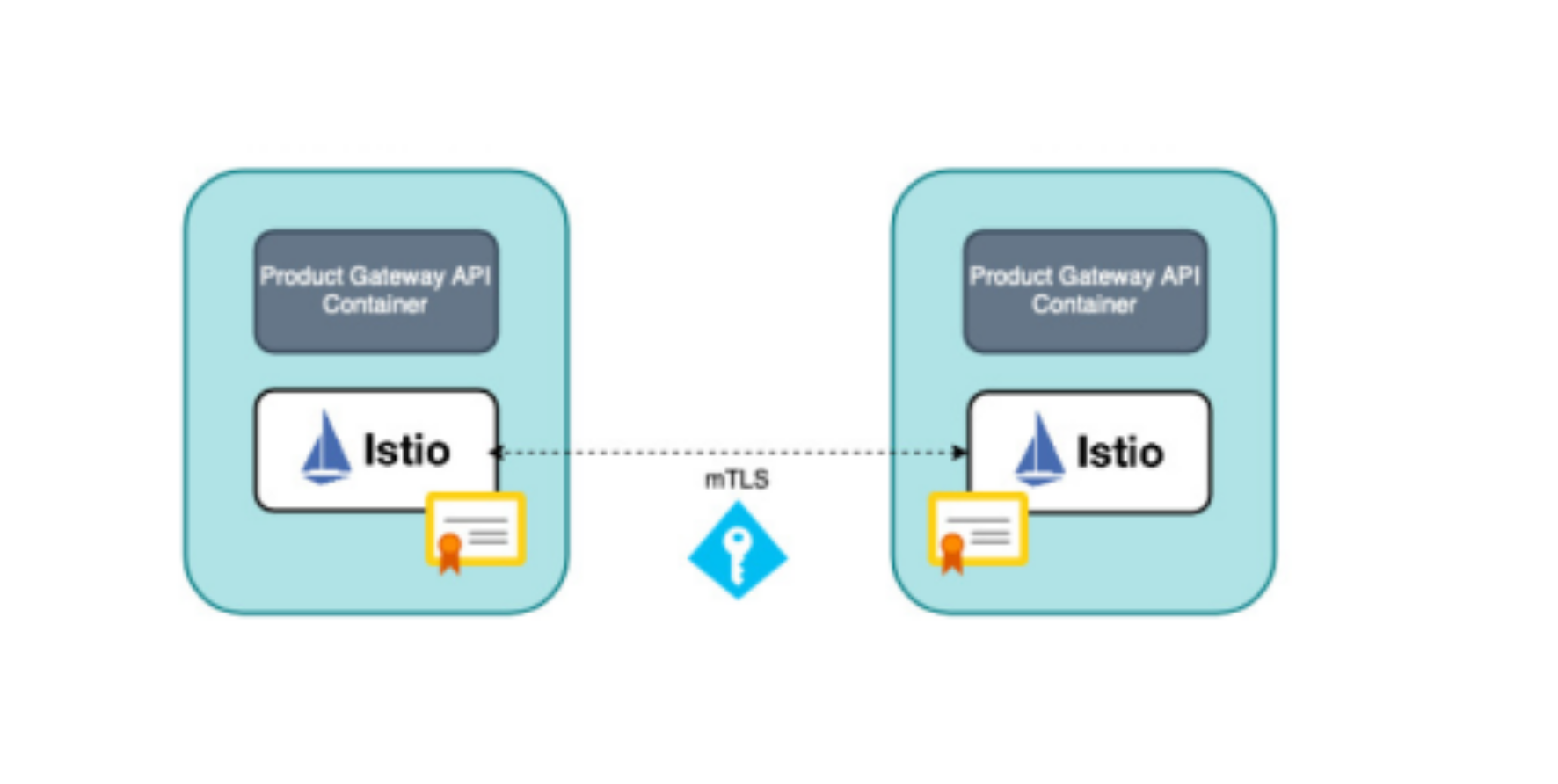
我们知道在 Kubernetes 中我们会使用 Ingress 来暴露 HTTP 流量的入口,在 Istio 中我们是通过 Gateway 来暴露流量入口的,那么我们是否可以使用 Ingress 对象来支持 Istio 的流量入口呢?答案是肯定的,但是我们还是建议使用 Gateway 而不是 Ingress 来使用 Istio 提供的完整功能集,例如丰富的流量管理和安全功能。
k8s gateway api。
目录
[toc]
本节实战
| 实战名称 |
|---|
| 🚩 实战:Kubernetes Ingress-2023.11.15(测试成功) |
| 🚩 实战:Ingress Gateway-2023.11.15(测试成功) |
| 🚩 实战:istio安全网关-2023.11.16(测试成功) |
| 🚩 实战:TLS 透传-2023.11.16(测试成功) |
Kubernetes Ingress
==🚩 实战:Kubernetes Ingress-2023.11.15(测试成功)==
实验环境:
1k8s v1.27.6(containerd://1.6.20)(cni:flannel:v0.22.2)
2
3[root@master1 ~]#istioctl version
4client version: 1.19.3
5control plane version: 1.19.3
6data plane version: 1.19.3 (8 proxies)
实验软件:
链接:https://pan.baidu.com/s/1VEYZ8jPDGsHXvnxwkKHzZA?pwd=062k
提取码:062k
2023.11.15-实战:Kubernetes Ingress-2023.11.15(测试成功)

应用程序在以下链接里:
链接:https://pan.baidu.com/s/1pMnJxgL63oTlGFlhrfnXsA?pwd=7yqb
提取码:7yqb
2023.11.5-实战:BookInfo 示例应用-2023.11.5(测试成功)

实验步骤:
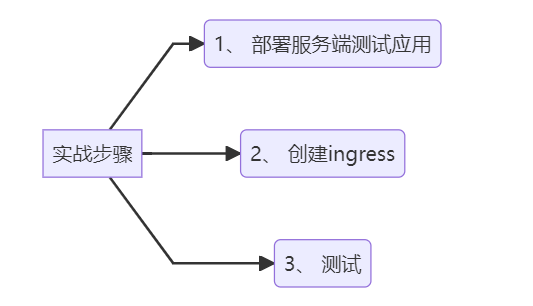
1graph LR
2	A[实战步骤] -->B(1、 部署服务端测试应用)
3	A[实战步骤] -->C(2、 创建ingress)
4	A[实战步骤] -->D(3、 测试)
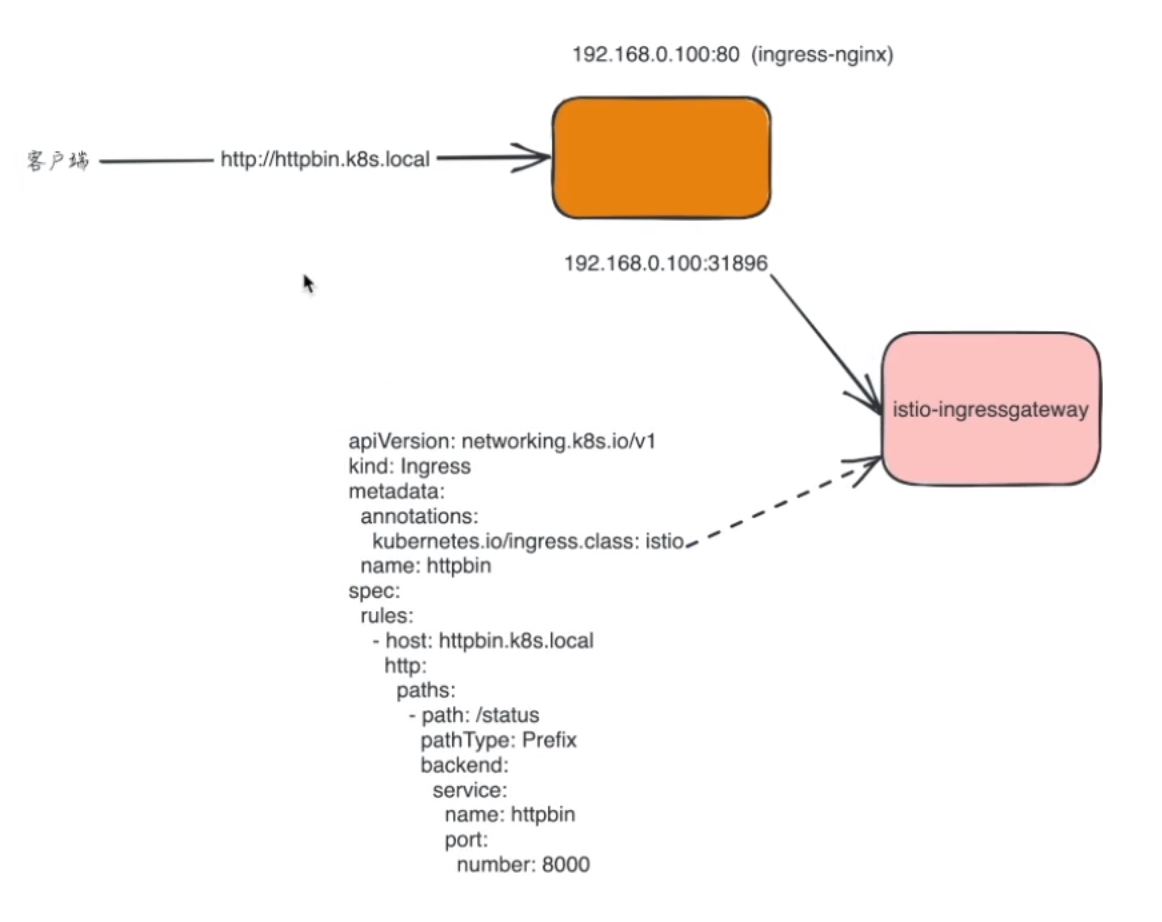
下面我们来使用 Ingress 资源配置 Istio 的入口网关,使用 Kubernetes Ingress 可以暴露从集群外到集群内服务的 HTTP 和 HTTPS 路由。
- 这里我们部署一个
httpbin应用,用来测试:
1kubectl apply -f samples/httpbin/httpbin.yaml
查看:
1[root@master1 istio-1.19.3]#kubectl get po -l app=httpbin
2NAME                       READY   STATUS    RESTARTS   AGE
3httpbin-86869bccff-7lpjx   2/2     Running   0          2d14h
4[root@master1 istio-1.19.3]#kubectl get svc
5NAME          TYPE        CLUSTER-IP       EXTERNAL-IP   PORT(S)             AGE
6httpbin       ClusterIP   10.111.57.195    <none>        8000/TCP            2d14h
7……
- 创建后我们就可以创建一个
Ingress对象来暴露httpbin服务了:
⚠️ ==特别注意:==
 1#httpbin-ingress.yaml
 2apiVersion: networking.k8s.io/v1
 3kind: Ingress
 4metadata:
 5  annotations:
 6    kubernetes.io/ingress.class: istio
 7  name: httpbin
 8spec:
 9  rules:
10    - host: httpbin.k8s.local
11      http:
12        paths:
13          - path: /status
14            pathType: Prefix
15            backend:
16              service:
17                name: httpbin
18                port:
19                  number: 8000
可以看到这个 Ingress 对象和我们在 Kubernetes 中的使用方法没有什么区别,唯一不同的是我们这里使用了一个 kubernetes.io/ingress.class 注解来告知 Istio Ingress Gateway 它应该处理该 Ingress,否则它将被忽略。
我们应用上面的资源清单:
1[root@master1 istio-1.19.3]#kubectl apply -f httpbin-ingress.yaml
2ingress.networking.k8s.io/httpbin created
3Warning: annotation "kubernetes.io/ingress.class" is deprecated, please use 'spec.ingressClassName' instead
- 我们可以通过
kubectl get ingress命令来查看下 Ingress 对象的状态:
1$ kubectl get ingress
2NAME      CLASS    HOSTS              ADDRESS   PORTS   AGE
3httpbin   <none>   httpbin.k8s.local            80      6s
- 然后我们可以使用
curl来访问httpbin服务:
 1# 获取 Ingress Gateway 的地址和端口
 2export INGRESS_PORT=$(kubectl -n istio-system get service istio-ingressgateway -o jsonpath='{.spec.ports[?(@.name=="http2")].nodePort}')
 3export INGRESS_HOST=$(kubectl get pod -l istio=ingressgateway -n istio-system -o jsonpath='{.items[0].status.hostIP}')
 4
 5echo $INGRESS_PORT
 6echo $INGRESS_HOST
 7
 8# 访问 httpbin 服务
 9$ curl -s -I -HHost:httpbin.k8s.local "http://$INGRESS_HOST:$INGRESS_PORT/status/200"
10HTTP/1.1 200 OK
11server: istio-envoy
12date: Mon, 13 Nov 2023 06:10:13 GMT
13content-type: text/html; charset=utf-8
14# .......
注意使用 -H 标志将 Host 的 HTTP 头设置为 httpbin.k8s.local, 因为 Ingress 中已经配置为处理访问该域名的请求,但是在测试环境中,该域名并没有相应的 DNS 绑定,当然我们也可以直接在 /etc/hosts 中添加一个映射(当然是istio-ingressgateway-9c8b9b586-vj44lpod所在node节点了)。

- 访问未指定的其他 URL 时,将返回 HTTP 404 错误:
1$ curl -s -I -HHost:httpbin.k8s.local "http://$INGRESS_HOST:$INGRESS_PORT/headers"
2HTTP/1.1 404 Not Found
3#......

- 注意下:自己当前istio环境
 1[root@master1 istio-1.19.3]#export INGRESS_PORT=$(kubectl -n istio-system get service istio-ingressgateway -o jsonpath='{.spec.ports[?(@.name=="http2")].nodePort}')
 2[root@master1 istio-1.19.3]#export INGRESS_HOST=$(kubectl get pod -l istio=ingressgateway -n istio-system -o jsonpath='{.items[0].status.hostIP}')
 3[root@master1 istio-1.19.3]#echo $INGRESS_PORT
 431666
 5[root@master1 istio-1.19.3]#echo $INGRESS_HOST
 6172.29.9.63
 7
 8[root@master1 istio-1.19.3]#kubectl get po -owide -l istio=ingressgateway -nistio-system
 9NAME                                   READY   STATUS    RESTARTS   AGE    IP            NODE    NOMINATED NODE   READINESS GATES
10istio-ingressgateway-9c8b9b586-vj44l   1/1     Running   0          3d6h   10.244.2.15   node2   <none>           <none>
11[root@master1 istio-1.19.3]#kubectl get svc -nistio-system
12NAME                   TYPE           CLUSTER-IP       EXTERNAL-IP   PORT(S)                                                                      AGE
13istio-egressgateway    ClusterIP      10.109.85.119    <none>        80/TCP,443/TCP                                                               8d
14istio-ingressgateway   LoadBalancer   10.105.233.167   <pending>     15021:31410/TCP,80:31666/TCP,443:32213/TCP,31400:30291/TCP,15443:31787/TCP   8d
15istiod                 ClusterIP      10.109.185.251   <none>        15010/TCP,15012/TCP,443/TCP,15014/TCP                                        8d
- 在 Kubernetes 1.18 中,添加了新资源
IngressClass,以替换 Ingress 资源上的kubernetes.io/ingress.class注解,我们也可以使用该资源来替换注解的方式,需要将controller字段设置为istio.io/ingress-controller,如下所示:
 1#httpbin-ingress2.yaml
 2apiVersion: networking.k8s.io/v1
 3kind: IngressClass
 4metadata:
 5  name: istio
 6spec:
 7  controller: istio.io/ingress-controller # 指定 Ingress Controller 为 istio
 8---
 9apiVersion: networking.k8s.io/v1
10kind: Ingress
11metadata:
12  name: httpbin
13spec:
14  ingressClassName: istio # 指定 IngressClass 为 istio
15  rules:
16    - host: httpbin.k8s.local
17      http:
18        paths:
19          - path: /
20            pathType: Prefix
21            backend:
22              service:
23                name: httpbin
24                port:
25                  number: 8000
上面这种方式更加简洁,而且可以避免使用注解的方式,但是需要注意的是,该资源对象只能在 Kubernetes 1.18 及以上版本中使用。
- 应用上面ingress对象
 1#先删除旧的ingress对象
 2[root@master1 istio-1.19.3]#kubectl delete -f httpbin-ingress.yaml
 3ingress.networking.k8s.io "httpbin" deleted
 4
 5[root@master1 istio-1.19.3]#kubectl apply -f httpbin-ingress2.yaml
 6ingressclass.networking.k8s.io/istio created
 7ingress.networking.k8s.io/ingress created
 8
 9#查看
10[root@master1 istio-1.19.3]#kubectl get ingressclass
11NAME    CONTROLLER                    PARAMETERS   AGE
12istio   istio.io/ingress-controller   <none>       27s
13[root@master1 istio-1.19.3]#kubectl get ingress
14NAME      CLASS   HOSTS               ADDRESS   PORTS   AGE
15ingress   istio   httpbin.k8s.local             80      35s
- 再次测试
 1[root@master1 istio-1.19.3]#curl -s -I -HHost:httpbin.k8s.local "http://$INGRESS_HOST:$INGRESS_PORT/status/200"
 2HTTP/1.1 200 OK
 3server: istio-envoy
 4date: Wed, 15 Nov 2023 12:51:24 GMT
 5content-type: text/html; charset=utf-8
 6access-control-allow-origin: *
 7access-control-allow-credentials: true
 8content-length: 0
 9x-envoy-upstream-service-time: 6
10
11[root@master1 istio-1.19.3]#curl -s -I -HHost:httpbin.k8s.local "http://$INGRESS_HOST:$INGRESS_PORT/headers"
12HTTP/1.1 200 OK
13server: istio-envoy
14date: Wed, 15 Nov 2023 12:51:29 GMT
15content-type: application/json
16content-length: 597
17access-control-allow-origin: *
18access-control-allow-credentials: true
19x-envoy-upstream-service-time: 12
符合预期,测试结束。😘
- 记得回收掉刚才创建的资源
1[root@master1 istio-1.19.3]#kubectl delete -f httpbin-ingress2.yaml
2ingressclass.networking.k8s.io "istio" deleted
3ingress.networking.k8s.io "ingress" deleted
此外 Ingress 还可以进行 TLS 设置,Istio 支持此功能,但是引用的 Secret 必须存在于 istio-ingressgateway 部署的命名空间(通常是 istio-system)中。
通过 Kubernetes Ingress 我们可以将流量导入到 Istio 中,但是对于一些高级的流量管理功能,比如路由、熔断、限流等就很难实现了,所以我们还是建议使用 Istio 的 Gateway 资源来暴露流量入口。
Ingress Gateway
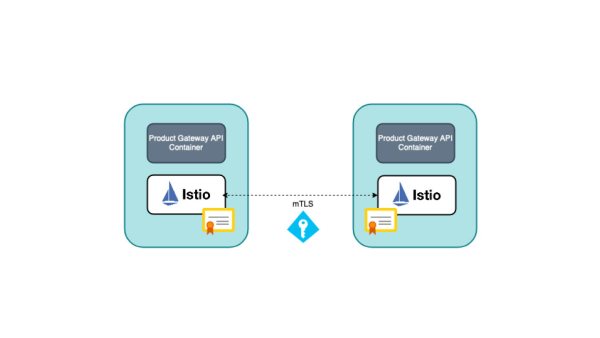
前面我们都是通过 Istio 提供的 Gateway 资源来暴露流量入口,与 Ingress 相比,Gateway 提供了更广泛的自定义和灵活性,并允许将 Istio 功能(例如监控和路由规则)应用于进入集群的流量。
Ingress Gateway
==🚩 实战:Ingress Gateway-2023.11.15(测试成功)==
实验环境:
1k8s v1.27.6(containerd://1.6.20)(cni:flannel:v0.22.2)
2
3[root@master1 ~]#istioctl version
4client version: 1.19.3
5control plane version: 1.19.3
6data plane version: 1.19.3 (8 proxies)
实验软件:
链接:https://pan.baidu.com/s/1C-ZlPHuXzzXGPAlNEYdySA?pwd=lpyx
提取码:lpyx
2023.11.15-实战:Ingress Gateway-2023.11.15(测试成功)

应用程序在以下链接里:
链接:https://pan.baidu.com/s/1pMnJxgL63oTlGFlhrfnXsA?pwd=7yqb
提取码:7yqb
2023.11.5-实战:BookInfo 示例应用-2023.11.5(测试成功)
实验步骤:
1graph LR
2	A[实战步骤] -->B(1、 部署服务端测试应用)
3	A[实战步骤] -->C(2、 创建ingress)
4	A[实战步骤] -->D(3、 测试)
Ingress Gateway 描述在网格边界运作的负载均衡器,用于接收传入的 HTTP/TCP 连接。它会配置暴露的端口、协议等,但与 Kubernetes Ingress 资源不同,Gateway 对象不会包括任何流量路由配置,和路由规则相关的配置需要使用 VirtualService 和 DestinationRule 资源来实现。
- 比如上面的
httpbin应用,如果通过Gateway对象来暴露流量入口,那么我们需要创建一个Gateway对象,然后再创建一个VirtualService对象来配置流量路由,内容如下所示:
 1#ingress-gateway.yaml
 2apiVersion: networking.istio.io/v1alpha3
 3kind: Gateway
 4metadata:
 5  name: httpbin-gateway
 6spec:
 7  selector:
 8    istio: ingressgateway
 9  servers:
10    - port:
11        number: 80
12        name: http
13        protocol: HTTP
14      hosts:
15        - "httpbin.k8s.local"
16---
17apiVersion: networking.istio.io/v1alpha3
18kind: VirtualService
19metadata:
20  name: httpbin
21spec:
22  hosts:
23    - "httpbin.k8s.local"
24  gateways:
25    - httpbin-gateway
26  http:
27    - match:
28        - uri:
29            prefix: /status
30        - uri:
31            prefix: /delay
32      route:
33        - destination:
34            port:
35              number: 8000
36            host: httpbin
上面的资源清单我们就通过 Gateway 对象暴露了 HTTP 流量的入口,然后通过 VirtualService 对象来配置流量路由,一共配置了两个路由规则,允许流量流向路径 /status 和 /delay。gateways 列表指定了哪些请求允许通 httpbin-gateway 网关,所有其他外部请求均被拒绝并返回 404 响应。
- 直接应用上面的资源清单
1kubectl apply -f ingress-gateway.yaml
- 然后我们可以通过
curl来访问httpbin服务:
 1# 获取 Ingress Gateway 的地址和端口
 2export INGRESS_PORT=$(kubectl -n istio-system get service istio-ingressgateway -o jsonpath='{.spec.ports[?(@.name=="http2")].nodePort}')
 3export INGRESS_HOST=$(kubectl get pod -l istio=ingressgateway -n istio-system -o jsonpath='{.items[0].status.hostIP}')
 4
 5# 访问 httpbin 服务
 6$ curl -s -I -HHost:httpbin.k8s.local "http://$INGRESS_HOST:$INGRESS_PORT/status/200"
 7HTTP/1.1 200 OK
 8server: istio-envoy
 9date: Mon, 13 Nov 2023 06:32:58 GMT
10content-type: text/html; charset=utf-8
11# .......
12
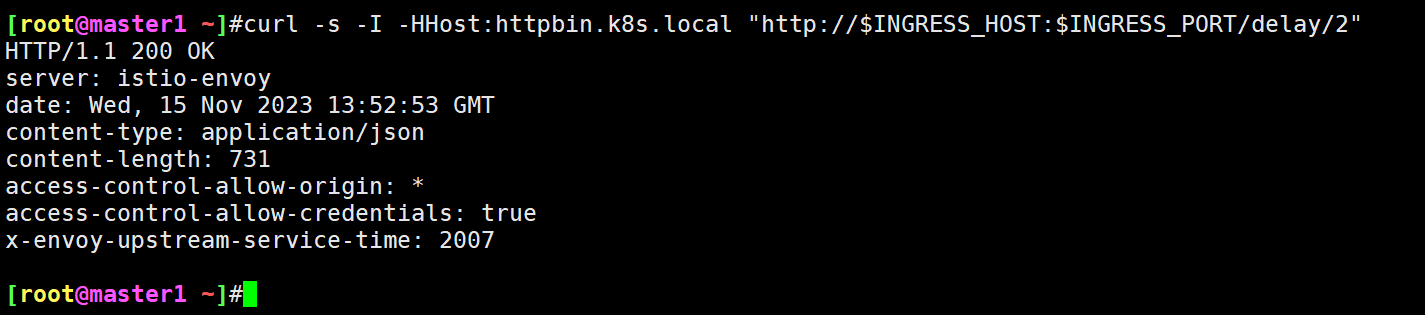
13$ curl -s -I -HHost:httpbin.k8s.local "http://$INGRESS_HOST:$INGRESS_PORT/delay/2" #延迟2s
- 如果请求
/status、/delay以外的路径,将会返回 404 错误:
1$ curl -s -I -HHost:httpbin.k8s.local "http://$INGRESS_HOST:$INGRESS_PORT/headers"
2HTTP/1.1 404 Not Found
3...
测试结束。😘
- 回收刚才创建的资源
1kubectl delete -f ingress-gateway.yaml
当然除了这最基本的功能之外,Gateway 还支持很多其他高级功能,比如 TLS、SNI 等。
安全网关
我们已经了解了如何使用 Gateway 对象来对外暴露 HTTP 服务,那么我们如何使用 TLS 或 mTLS 来暴露安全的 HTTPS 服务呢?
==🚩 实战:istio安全网关-2023.11.16(测试成功)==
实验环境:
1k8s v1.27.6(containerd://1.6.20)(cni:flannel:v0.22.2)
2
3[root@master1 ~]#istioctl version
4client version: 1.19.3
5control plane version: 1.19.3
6data plane version: 1.19.3 (8 proxies)
实验软件:
链接:https://pan.baidu.com/s/1jw67Xvj-2ZYl3uuq59kO1g?pwd=p2mr
提取码:p2mr
–来自百度网盘超级会员V8的分享
2023.11.16-实战:istio安全网关-2023.11.16(测试成功)

应用程序在以下链接里:
链接:https://pan.baidu.com/s/1pMnJxgL63oTlGFlhrfnXsA?pwd=7yqb
提取码:7yqb
2023.11.5-实战:BookInfo 示例应用-2023.11.5(测试成功)
前期准备:
- 这里我们还是使用
httpbin应用来演示:
1kubectl apply -f samples/httpbin/httpbin.yaml
接下来我们需要使用 openssl 命令==来生成客户端和服务器证书和密钥。==
⚠️ 注意:
以下证书、私钥创建的有点多哦,注意下。
(0)
- ==首先创建用于服务签名的根证书和私钥:==
1mkdir example_certs1
2openssl req -x509 -sha256 -nodes -days 365 -newkey rsa:2048 -subj '/O=example Inc./CN=example.com' -keyout example_certs1/example.com.key -out example_certs1/example.com.crt

1[root@master1 ~]#ll example_certs1/
2total 8
3-rw-r--r-- 1 root root 1164 Nov 16 05:59 example.com.crt
4-rw-r--r-- 1 root root 1708 Nov 16 05:59 example.com.key
(1)
- 接着为
httpbin.example.com创建证书和私钥:
1openssl req -out example_certs1/httpbin.example.com.csr -newkey rsa:2048 -nodes -keyout example_certs1/httpbin.example.com.key -subj "/CN=httpbin.example.com/O=httpbin organization"
2
3openssl x509 -req -sha256 -days 365 -CA example_certs1/example.com.crt -CAkey example_certs1/example.com.key -set_serial 0 -in example_certs1/httpbin.example.com.csr -out example_certs1/httpbin.example.com.crt


- 创建第二组相同类型的证书和密钥:(用同一组根证书为一个域名签发了2套证书,用于后期测试)
1mkdir example_certs2
2openssl req -x509 -sha256 -nodes -days 365 -newkey rsa:2048 -subj '/O=example Inc./CN=example.com' -keyout example_certs2/example.com.key -out example_certs2/example.com.crt
3
4openssl req -out example_certs2/httpbin.example.com.csr -newkey rsa:2048 -nodes -keyout example_certs2/httpbin.example.com.key -subj "/CN=httpbin.example.com/O=httpbin organization"
5openssl x509 -req -sha256 -days 365 -CA example_certs2/example.com.crt -CAkey example_certs2/example.com.key -set_serial 0 -in example_certs2/httpbin.example.com.csr -out example_certs2/httpbin.example.com.crt
查看:
1[root@master1 ~]#ll example_certs2/
2total 20
3-rw-r--r-- 1 root root 1164 Nov 16 06:08 example.com.crt
4-rw-r--r-- 1 root root 1704 Nov 16 06:08 example.com.key
5-rw-r--r-- 1 root root 1054 Nov 16 06:08 httpbin.example.com.crt
6-rw-r--r-- 1 root root  948 Nov 16 06:08 httpbin.example.com.csr
7-rw-r--r-- 1 root root 1704 Nov 16 06:08 httpbin.example.com.key
(2)
- 为
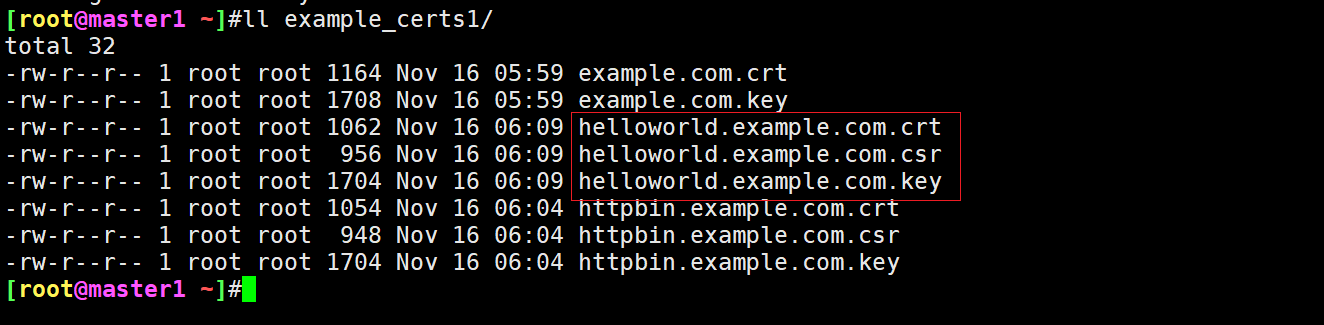
helloworld.example.com生成证书和私钥:
1openssl req -out example_certs1/helloworld.example.com.csr -newkey rsa:2048 -nodes -keyout example_certs1/helloworld.example.com.key -subj "/CN=helloworld.example.com/O=helloworld organization"
2
3openssl x509 -req -sha256 -days 365 -CA example_certs1/example.com.crt -CAkey example_certs1/example.com.key -set_serial 1 -in example_certs1/helloworld.example.com.csr -out example_certs1/helloworld.example.com.crt
(3)
- ==生成客户端证书和私钥==:
1openssl req -out example_certs1/client.example.com.csr -newkey rsa:2048 -nodes -keyout example_certs1/client.example.com.key -subj "/CN=client.example.com/O=client organization"
2
3openssl x509 -req -sha256 -days 365 -CA example_certs1/example.com.crt -CAkey example_certs1/example.com.key -set_serial 1 -in example_certs1/client.example.com.csr -out example_certs1/client.example.com.crt
- 您可以通过运行以下命令确认您拥有所有需要的文件:
 1$ ls example_cert*
 2example_certs1:
 3client.example.com.crt          example.com.key                 httpbin.example.com.crt
 4client.example.com.csr          helloworld.example.com.crt      httpbin.example.com.csr
 5client.example.com.key          helloworld.example.com.csr      httpbin.example.com.key
 6example.com.crt                 helloworld.example.com.key
 7
 8example_certs2:
 9example.com.crt         httpbin.example.com.crt httpbin.example.com.key
10example.com.key         httpbin.example.com.csr
1.单主机配置 TLS Ingress Gateway
接下来我们就可以在 Gateway 对象中配置 TLS 了。
- 首先我们需要创建一个
Secret对象,用来存储证书和密钥:
1$ kubectl create -n istio-system secret tls httpbin-credential \
2  --key=example_certs1/httpbin.example.com.key \
3  --cert=example_certs1/httpbin.example.com.crt
查看:
1[root@master1 ~]#kubectl get secret -nistio-system
2NAME                 TYPE                DATA   AGE
3httpbin-credential   kubernetes.io/tls   2      11s
4……
- 然后在
Gateway对象中需要定义一个443端口的网关,并将credentialName的值设置为httpbin-credential,该值与Secret的名称相同,TLS 模式的值应为SIMPLE,内容如下所示:
 1#tls-gateway.yaml
 2apiVersion: networking.istio.io/v1alpha3
 3kind: Gateway
 4metadata:
 5  name: mygateway
 6spec:
 7  selector:
 8    istio: ingressgateway # use istio default ingress gateway
 9  servers:
10    - port:
11        number: 443
12        name: https
13        protocol: HTTPS
14      tls:
15        mode: SIMPLE
16        credentialName: httpbin-credential # 必须和 secret 对象名称一致
17      hosts:
18        - httpbin.example.com
- 接下来,通过定义相应的
VirtualService对象来配置网关的入口流量路由:
 1#tls-gateway.yaml
 2apiVersion: networking.istio.io/v1alpha3
 3kind: VirtualService
 4metadata:
 5  name: httpbin
 6spec:
 7  hosts:
 8    - "httpbin.example.com"
 9  gateways:
10    - mygateway
11  http:
12    - match:
13        - uri:
14            prefix: /status
15        - uri:
16            prefix: /delay
17      route:
18        - destination:
19            port:
20              number: 8000
21            host: httpbin
- 部署上面2个对象
完整清单:
 1#tls-gateway.yaml
 2apiVersion: networking.istio.io/v1alpha3
 3kind: Gateway
 4metadata:
 5  name: mygateway
 6spec:
 7  selector:
 8    istio: ingressgateway # use istio default ingress gateway
 9  servers:
10    - port:
11        number: 443
12        name: https
13        protocol: HTTPS
14      tls:
15        mode: SIMPLE
16        credentialName: httpbin-credential # 必须和 secret 对象名称一致
17      hosts:
18        - httpbin.example.com
19
20---
21apiVersion: networking.istio.io/v1alpha3
22kind: VirtualService
23metadata:
24  name: httpbin
25spec:
26  hosts:
27    - "httpbin.example.com"
28  gateways:
29    - mygateway
30  http:
31    - match:
32        - uri:
33            prefix: /status
34        - uri:
35            prefix: /delay
36      route:
37        - destination:
38            port:
39              number: 8000
40            host: httpbin
部署:
1[root@master1 istio-1.19.3]#kubectl apply -f tls-gateway.yaml
2gateway.networking.istio.io/mygateway created
3virtualservice.networking.istio.io/httpbin created
查看:
1[root@master1 istio-1.19.3]#kubectl get gateway
2NAME               AGE
3……
4mygateway          26s
5[root@master1 istio-1.19.3]#kubectl get vs
6NAME          GATEWAYS               HOSTS                     AGE
7……
8httpbin       ["mygateway"]          ["httpbin.example.com"]   26s
9……
- 应用上面的资源对象后,我们就可以向
httpbin服务发送 HTTPS 请求了:
这里要用到的是istio-ingressgateway的443端口:
1[root@master1 istio-1.19.3]#kubectl get svc -nistio-system
2NAME                   TYPE           CLUSTER-IP       EXTERNAL-IP   PORT(S)                                                                      AGE
3istio-egressgateway    ClusterIP      10.109.85.119    <none>        80/TCP,443/TCP                                                               8d
4istio-ingressgateway   LoadBalancer   10.105.233.167   <pending>     15021:31410/TCP,80:31666/TCP,443:32213/TCP,31400:30291/TCP,15443:31787/TCP   8d
5istiod                 ClusterIP      10.109.185.251   <none>        15010/TCP,15012/TCP,443/TCP,15014/TCP                                        8d
 1# 获取 Ingress Gateway 的地址和 HTTPS 端口
 2export INGRESS_HOST=$(kubectl get pod -l istio=ingressgateway -n istio-system -o jsonpath='{.items[0].status.hostIP}')
 3export SECURE_INGRESS_PORT=$(kubectl -n istio-system get service istio-ingressgateway -o jsonpath='{.spec.ports[?(@.name=="https")].nodePort}')
 4echo $INGRESS_HOST
 5echo $SECURE_INGRESS_PORT
 6#[root@master1 istio-1.19.3]#echo $INGRESS_HOST
 7#172.29.9.63
 8#[root@master1 istio-1.19.3]#echo $SECURE_INGRESS_PORT
 9#32213
10
11# 访问 httpbin 服务
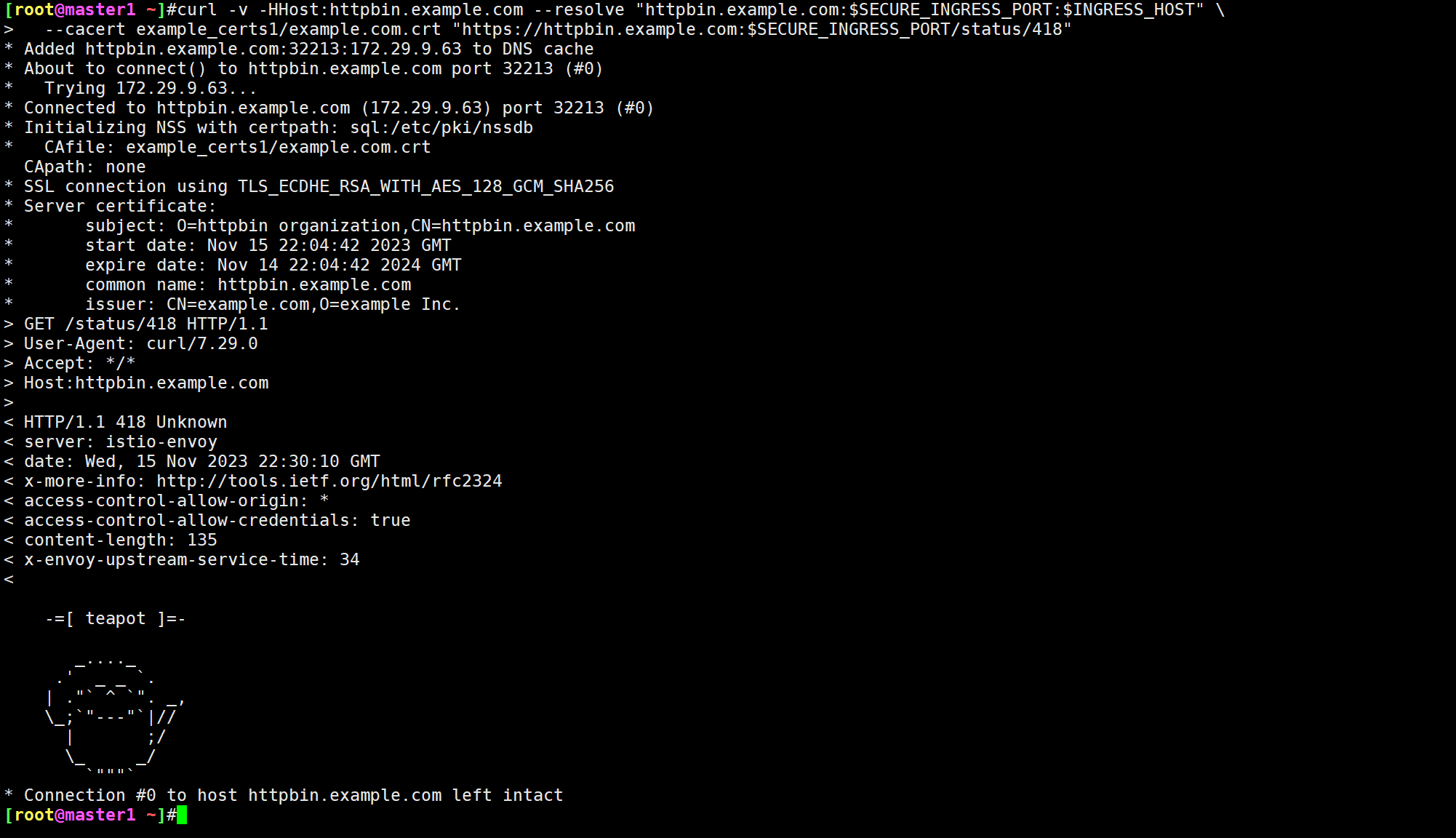
12$ curl -v -HHost:httpbin.example.com --resolve "httpbin.example.com:$SECURE_INGRESS_PORT:$INGRESS_HOST" \
13  --cacert example_certs1/example.com.crt "https://httpbin.example.com:$SECURE_INGRESS_PORT/status/418"
14# ......
15* Initializing NSS with certpath: sql:/etc/pki/nssdb
16*   CAfile: example_certs1/example.com.crt
17  CApath: none
18* SSL connection using TLS_ECDHE_RSA_WITH_AES_128_GCM_SHA256
19* Server certificate:
20*       subject: O=httpbin organization,CN=httpbin.example.com
21*       start date: Nov 13 06:58:40 2023 GMT
22*       expire date: Nov 12 06:58:40 2024 GMT
23*       common name: httpbin.example.com
24*       issuer: CN=example.com,O=example Inc.
25> GET /status/418 HTTP/1.1
26> User-Agent: curl/7.29.0
27> Accept: */*
28> Host:httpbin.example.com
29>
30< HTTP/1.1 418 Unknown
31< server: istio-envoy
32# ......
33
34    -=[ teapot ]=-
35
36       _...._
37     .'  _ _ `.
38    | ."` ^ `". _,
39    \_;`"---"`|//
40      |       ;/
41      \_     _/
42        `"""`
- 接着我们可以删除网关的 Secret 然后使用不同的证书和密钥重新创建它来更改网关的凭据:
1kubectl -n istio-system delete secret httpbin-credential
2
3# 创建新的证书和密钥
4kubectl create -n istio-system secret tls httpbin-credential \
5  --key=example_certs2/httpbin.example.com.key \
6  --cert=example_certs2/httpbin.example.com.crt
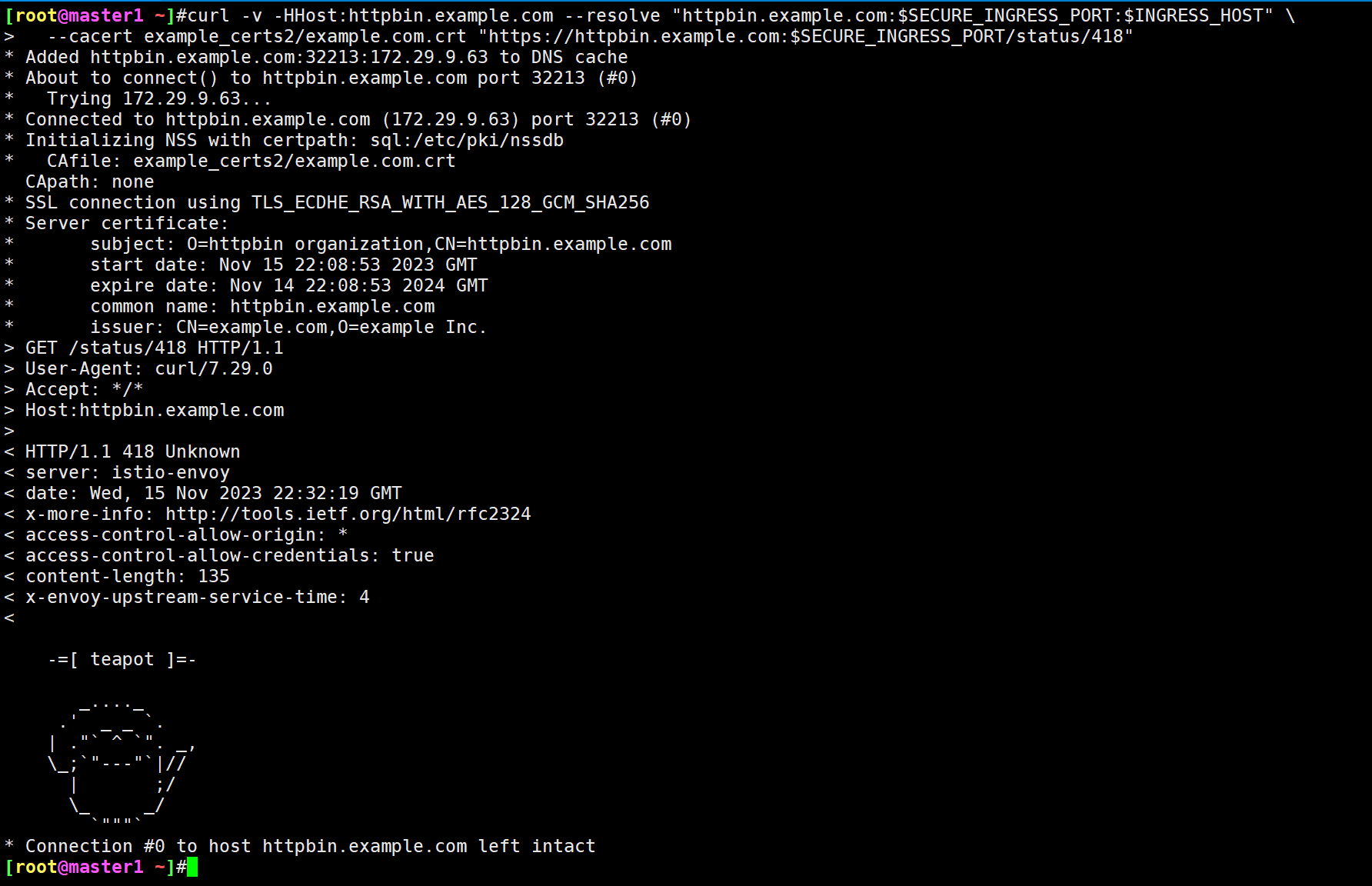
- 使用新的证书链和
curl来访问httpbin服务:
 1$ curl -v -HHost:httpbin.example.com --resolve "httpbin.example.com:$SECURE_INGRESS_PORT:$INGRESS_HOST" \
 2  --cacert example_certs2/example.com.crt "https://httpbin.example.com:$SECURE_INGRESS_PORT/status/418"
 3...
 4HTTP/1.1 418 Unknown
 5...
 6
 7    -=[ teapot ]=-
 8
 9       _...._
10     .'  _ _ `.
11    | ."` ^ `". _,
12    \_;`"---"`|//
13      |       ;/
14      \_     _/
15        `"""`
- 如果使用之前的证书链来访问 httpbin,则会失败:
 1$ curl -v -HHost:httpbin.example.com --resolve "httpbin.example.com:$SECURE_INGRESS_PORT:$INGRESS_HOST" \
 2 --cacert example_certs1/example.com.crt "https://httpbin.example.com:$SECURE_INGRESS_PORT/status/418"
 3# ......
 4* Initializing NSS with certpath: sql:/etc/pki/nssdb
 5*   CAfile: example_certs1/example.com.crt
 6  CApath: none
 7* Server certificate:
 8*       subject: O=httpbin organization,CN=httpbin.example.com
 9*       start date: Nov 13 06:59:17 2023 GMT
10*       expire date: Nov 12 06:59:17 2024 GMT
11*       common name: httpbin.example.com
12*       issuer: CN=example.com,O=example Inc.
13* NSS error -8182 (SEC_ERROR_BAD_SIGNATURE)
14* Peer's certificate has an invalid signature.
15* Closing connection 0
16curl: (60) Peer's certificate has an invalid signature.
17# ......
测试结束。😘
2.多个主机配置 TLS Ingress Gateway
上面是为单个主机配置 TLS 入口网关的方法。
此外我们还可以为多个主机(例如 httpbin.example.com 和 helloworld-v1.example.com)配置入口网关,入口网关配置有与每个主机相对应的唯一凭据。
- 首先删除并使用原始证书和密钥重新创建 Secret 来恢复上一个示例中的
httpbin凭据:
1kubectl -n istio-system delete secret httpbin-credential
2
3kubectl create -n istio-system secret tls httpbin-credential \
4  --key=example_certs1/httpbin.example.com.key \
5  --cert=example_certs1/httpbin.example.com.crt
- 然后我们启动
helloworld-v1示例:
还可以这样搞哦:
1# 创建 service=helloworld 的服务
2$ kubectl apply -f samples/helloworld/helloworld.yaml -l service=helloworld
3
4# 创建 version=v1 的应用
5$ kubectl apply -f samples/helloworld/helloworld.yaml -l version=v1
- 然后创建
helloworld-credentialSecret:
1$ kubectl create -n istio-system secret tls helloworld-credential --key=example_certs1/helloworld.example.com.key --cert=example_certs1/helloworld.example.com.crt
- 然后使用
httpbin.example.com和helloworld.example.com主机配置入口网关,创建如下所示的Gateway对象:
 1#tls2-gateway.yaml
 2apiVersion: networking.istio.io/v1alpha3
 3kind: Gateway
 4metadata:
 5  name: mygateway
 6spec:
 7  selector:
 8    istio: ingressgateway # use istio default ingress gateway
 9  servers:
10    - port:
11        number: 443
12        name: https-httpbin
13        protocol: HTTPS
14      tls:
15        mode: SIMPLE
16        credentialName: httpbin-credential
17      hosts:
18        - httpbin.example.com
19    - port:
20        number: 443
21        name: https-helloworld
22        protocol: HTTPS
23      tls:
24        mode: SIMPLE
25        credentialName: helloworld-credential
26      hosts:
27        - helloworld.example.com
这里我们为 443 端口定义一个具有两个 server 配置的网关,将每个端口上的 credentialName 值分别设置为 httpbin-credential 和 helloworld-credential,将 TLS 模式设置为 SIMPLE。
- 然后定义相应的
VirtualService来配置网关的流量路由。
 1#tls2-gateway.yaml
 2apiVersion: networking.istio.io/v1alpha3
 3kind: VirtualService
 4metadata:
 5  name: helloworld
 6spec:
 7  hosts:
 8    - helloworld.example.com
 9  gateways:
10    - mygateway
11  http:
12    - match:
13        - uri:
14            exact: /hello
15      route:
16        - destination:
17            host: helloworld
18            port:
19              number: 5000
- 直接应用上面的资源对象即可
完整清单如下:
 1#tls2-gateway.yaml
 2apiVersion: networking.istio.io/v1alpha3
 3kind: Gateway
 4metadata:
 5  name: mygateway
 6spec:
 7  selector:
 8    istio: ingressgateway # use istio default ingress gateway
 9  servers:
10    - port:
11        number: 443
12        name: https-httpbin
13        protocol: HTTPS
14      tls:
15        mode: SIMPLE
16        credentialName: httpbin-credential
17      hosts:
18        - httpbin.example.com
19    - port:
20        number: 443
21        name: https-helloworld
22        protocol: HTTPS
23      tls:
24        mode: SIMPLE
25        credentialName: helloworld-credential
26      hosts:
27        - helloworld.example.com
28
29---
30apiVersion: networking.istio.io/v1alpha3
31kind: VirtualService
32metadata:
33  name: helloworld
34spec:
35  hosts:
36    - helloworld.example.com
37  gateways:
38    - mygateway
39  http:
40    - match:
41        - uri:
42            exact: /hello
43      route:
44        - destination:
45            host: helloworld
46            port:
47              number: 5000
部署:
1kubectl apply -f tls2-gateway.yaml
查看:
1[root@master1 ~]#kubectl get gateway
2NAME               AGE
3mygateway          20m
4[root@master1 ~]#kubectl get vs
5NAME          GATEWAYS               HOSTS                        AGE
6helloworld    ["mygateway"]          ["helloworld.example.com"]   19s
7httpbin       ["mygateway"]          ["httpbin.example.com"]      20m
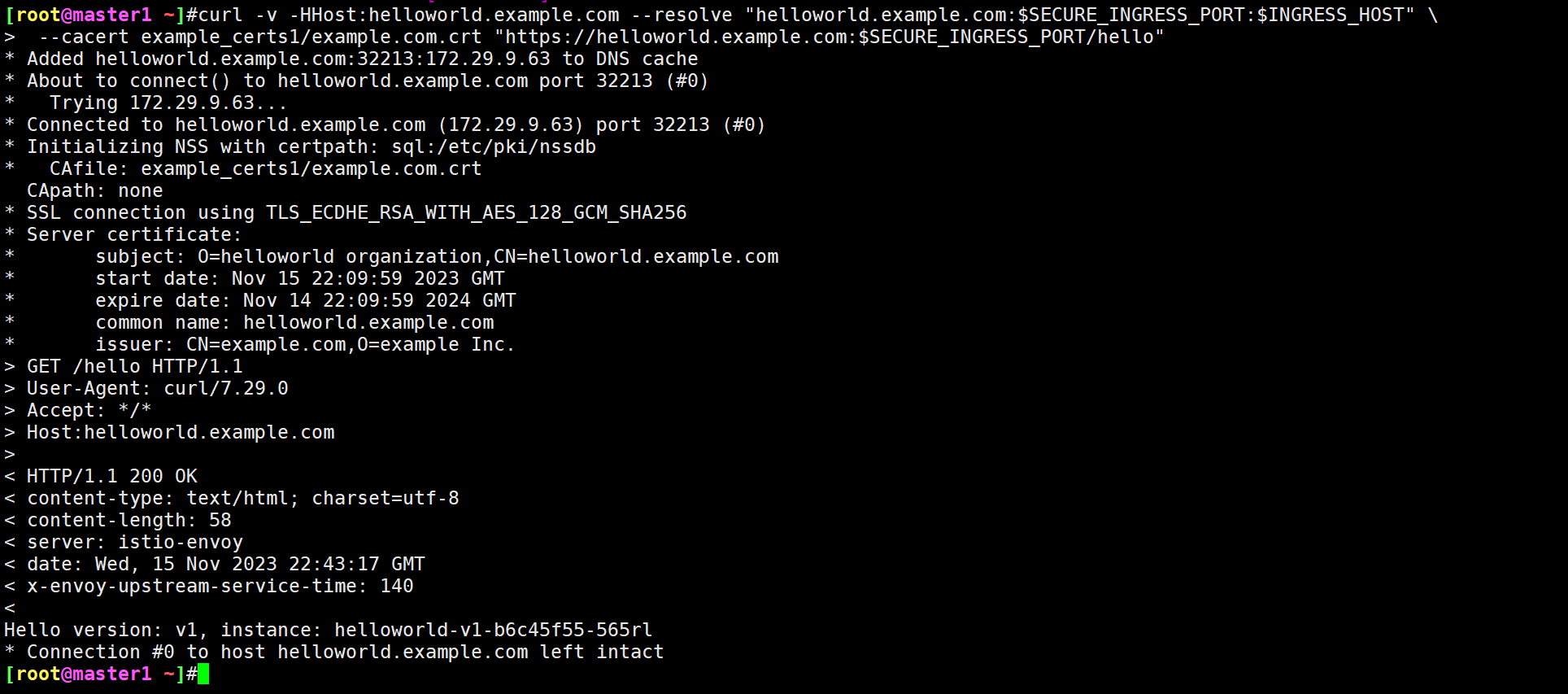
- 然后向
helloworld.example.com发送 HTTPS 请求:
 1$ curl -v -HHost:helloworld.example.com --resolve "helloworld.example.com:$SECURE_INGRESS_PORT:$INGRESS_HOST" \
 2 --cacert example_certs1/example.com.crt "https://helloworld.example.com:$SECURE_INGRESS_PORT/hello"
 3# ......
 4* Initializing NSS with certpath: sql:/etc/pki/nssdb
 5*   CAfile: example_certs1/example.com.crt
 6  CApath: none
 7* SSL connection using TLS_ECDHE_RSA_WITH_AES_128_GCM_SHA256
 8* Server certificate:
 9*       subject: O=helloworld organization,CN=helloworld.example.com
10*       start date: Nov 13 07:01:57 2023 GMT
11*       expire date: Nov 12 07:01:57 2024 GMT
12*       common name: helloworld.example.com
13*       issuer: CN=example.com,O=example Inc.
14# ......
15< HTTP/1.1 200 OK
16# ......
17Hello version: v1, instance: helloworld-v1-b6c45f55-85l49
- 同样向
httpbin.example.com发送一个 HTTPS 请求,仍然返回一个茶壶:
 1$ curl -v -HHost:httpbin.example.com --resolve "httpbin.example.com:$SECURE_INGRESS_PORT:$INGRESS_HOST" \
 2 --cacert example_certs1/example.com.crt "https://httpbin.example.com:$SECURE_INGRESS_PORT/status/418"
 3# ......
 4
 5    -=[ teapot ]=-
 6
 7       _...._
 8     .'  _ _ `.
 9    | ."` ^ `". _,
10    \_;`"---"`|//
11      |       ;/
12      \_     _/
13        `"""`
测试结束。😘
3.双向 TLS Ingress Gateway
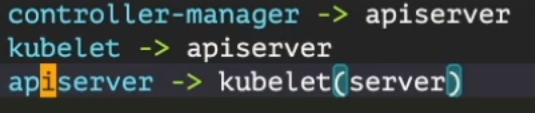
同样我们还可以扩展网关的定义以支持==双向 TLS==。双向 TLS 简称 mTLS,是一种相互身份验证的方法。mTLS 通过验证他们都拥有正确的私人密钥来确保网络连接两端的各方都是他们声称的身份。他们各自的 TLS 证书中的信息提供了额外的验证。
k8s里很多地方都是一个双向认证。
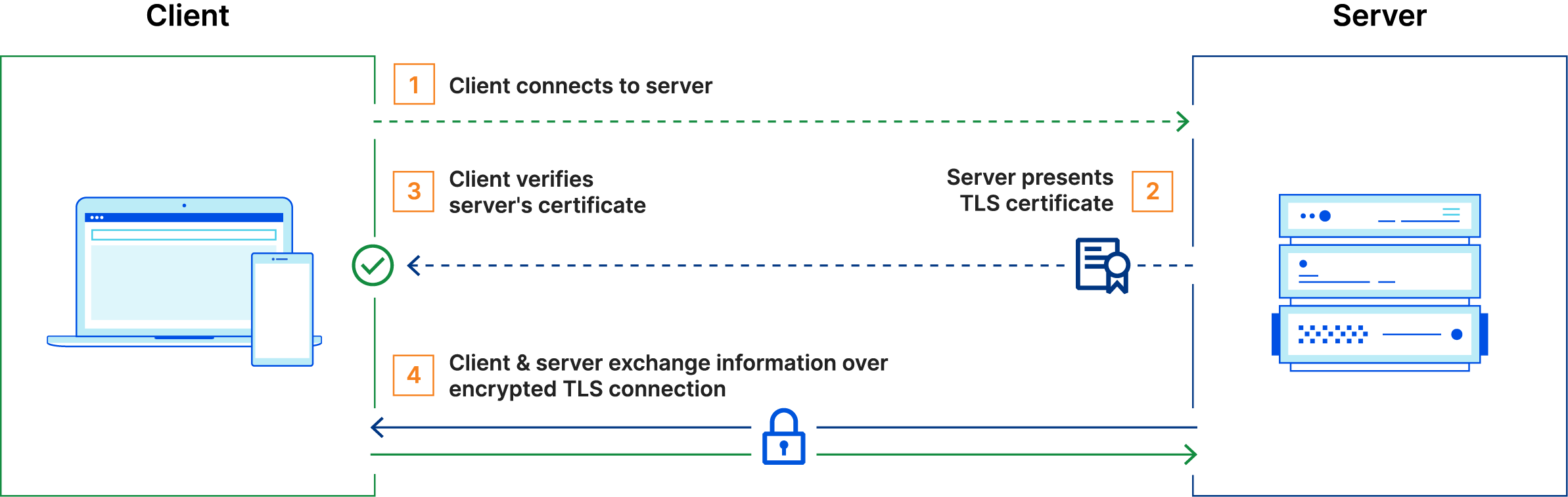
通常在 TLS 中,服务器有一个 TLS 证书和一个公钥/私钥对,而客户端没有,典型的 TLS 流程是这样运作的:
- 客户端连接到服务器
- 服务器出示其 TLS 证书
- 客户端验证服务器的证书
- 客户端和服务器通过加密的 TLS 连接交换信息
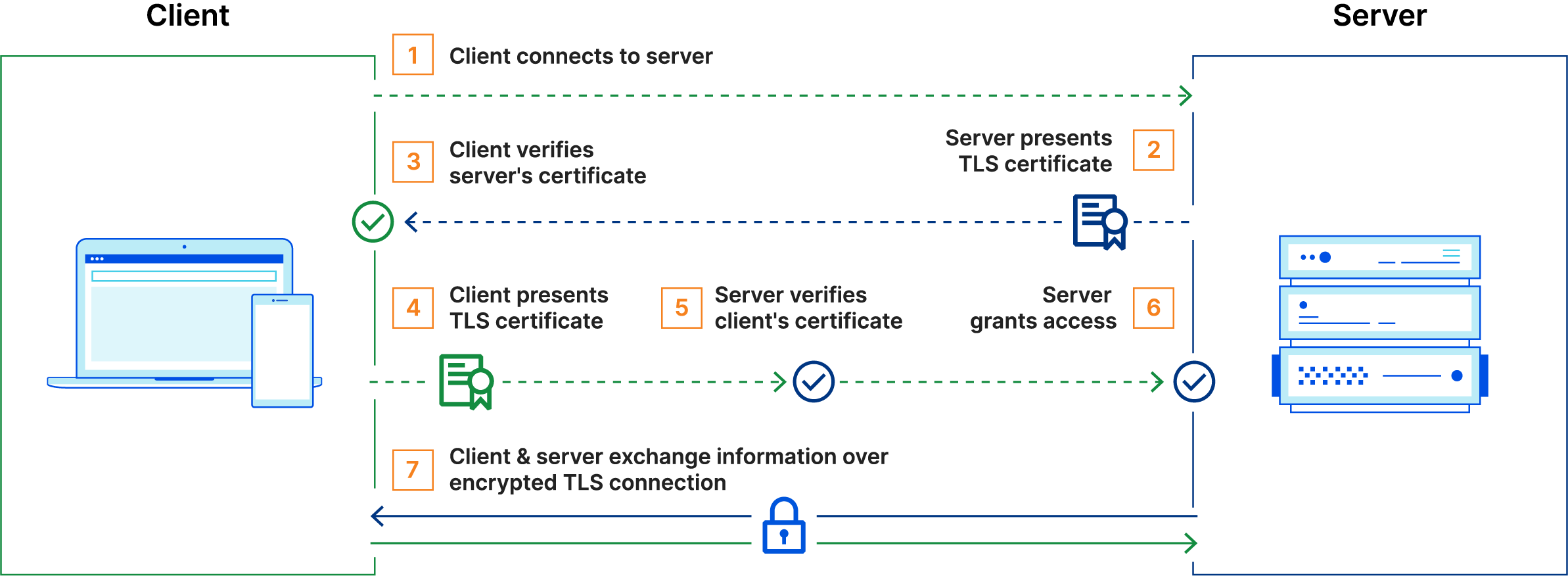
然而,在 mTLS 中,客户端和服务器都有一个证书,并且双方都使用它们的公钥/私钥对进行身份验证。与常规 TLS 相比,mTLS 中有一些额外步骤来验证双方。
- 客户端连接到服务器
- 服务器出示其 TLS 证书
- 客户端验证服务器的证书
- 客户端出示其 TLS 证书
- 服务器验证客户端的证书
- 服务器授予访问权限
- 客户端和服务器通过加密的 TLS 连接交换信息
接下来我们就来使用 mTLS 来配置 Ingress Gateway。
- 首先还是删除其 Secret 并创建一个新的来更改入口网关的凭据,==需要注意的是服务器使用 CA 证书来验证其客户端,我们必须使用名称
cacert来持有 CA 证书。==
1$ kubectl -n istio-system delete secret httpbin-credential
2
3$ kubectl create -n istio-system secret generic httpbin-credential \
4  --from-file=tls.key=example_certs1/httpbin.example.com.key \
5  --from-file=tls.crt=example_certs1/httpbin.example.com.crt \
6  --from-file=ca.crt=example_certs1/example.com.crt
- 接下来更改
Gateway的定义将 TLS 模式设置为MUTUAL。
 1#tls3-gateway.yaml
 2apiVersion: networking.istio.io/v1alpha3
 3kind: Gateway
 4metadata:
 5  name: mygateway
 6spec:
 7  selector:
 8    istio: ingressgateway # use istio default ingress gateway
 9  servers:
10    - port:
11        number: 443
12        name: https
13        protocol: HTTPS
14      tls:
15        mode: MUTUAL # 设置为 MUTUAL,双向 TLS
16        credentialName: httpbin-credential
17      hosts:
18        - httpbin.example.com
部署:
1kubectl apply -f tls3-gateway.yaml
- 应用后我们来尝试使用之前的方法发送 HTTPS 请求:
 1$ curl -v -HHost:httpbin.example.com --resolve "httpbin.example.com:$SECURE_INGRESS_PORT:$INGRESS_HOST" \
 2--cacert example_certs1/example.com.crt "https://httpbin.example.com:$SECURE_INGRESS_PORT/status/418"
 3# ......
 4*   CAfile: example_certs1/example.com.crt
 5  CApath: none
 6* NSS: client certificate not found (nickname not specified)
 7* NSS error -12227 (SSL_ERROR_HANDSHAKE_FAILURE_ALERT)
 8* SSL peer was unable to negotiate an acceptable set of security parameters.
 9* Closing connection 0
10curl: (35) NSS: client certificate not found (nickname not specified)
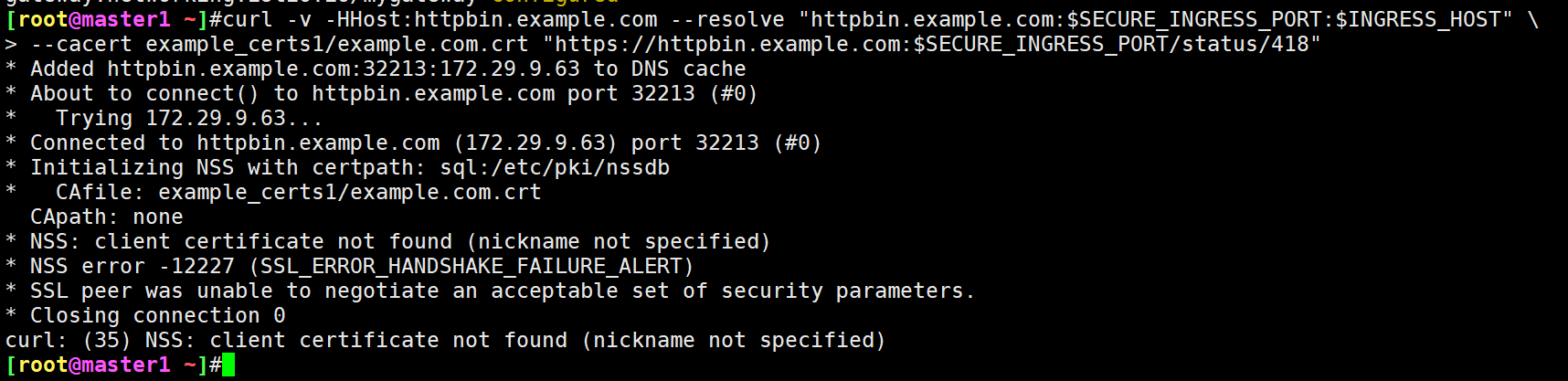
- 从提示可以看出,客户端证书没有找到,由于我们这里配置的是双向 TLS 的方式,我们没有将客户端证书传递给 curl,我们可以通过
--cert和--key标志来进行传递:
 1$ curl -v -HHost:httpbin.example.com --resolve "httpbin.example.com:$SECURE_INGRESS_PORT:$INGRESS_HOST" \
 2 --cacert example_certs1/example.com.crt --cert example_certs1/client.example.com.crt --key example_certs1/client.example.com.key \
 3 "https://httpbin.example.com:$SECURE_INGRESS_PORT/status/418"
 4# ......
 5* Initializing NSS with certpath: sql:/etc/pki/nssdb
 6*   CAfile: example_certs1/example.com.crt
 7  CApath: none
 8* NSS: client certificate from file
 9*       subject: O=client organization,CN=client.example.com
10*       start date: Nov 13 07:02:22 2023 GMT
11*       expire date: Nov 12 07:02:22 2024 GMT
12*       common name: client.example.com
13*       issuer: CN=example.com,O=example Inc.
14* SSL connection using TLS_ECDHE_RSA_WITH_AES_128_GCM_SHA256
15* Server certificate:
16*       subject: O=httpbin organization,CN=httpbin.example.com
17*       start date: Nov 13 06:58:40 2023 GMT
18*       expire date: Nov 12 06:58:40 2024 GMT
19*       common name: httpbin.example.com
20*       issuer: CN=example.com,O=example Inc.
21< HTTP/1.1 418 Unknown
22# ......
23<
24
25    -=[ teapot ]=-
26
27       _...._
28     .'  _ _ `.
29    | ."` ^ `". _,
30    \_;`"---"`|//
31      |       ;/
32      \_     _/
33        `"""`
到这里我们就验证了通过 TLS 或 mTLS 将服务暴露到服务网格外。
- 测试完成后记得清理下资源:(6)
 1# 删除网关配置和路由:
 2kubectl delete gateway mygateway
 3kubectl delete virtualservice httpbin helloworld
 4
 5# 删除 Secret、证书和密钥:
 6kubectl delete -n istio-system secret httpbin-credential helloworld-credential
 7rm -rf ./example_certs1 ./example_certs2
 8
 9# 关闭 httpbin 和 helloworld 服务:
10kubectl delete -f samples/httpbin/httpbin.yaml
11kubectl delete deployment helloworld-v1
12kubectl delete service helloworld
Ingress Gateway TLS 透传
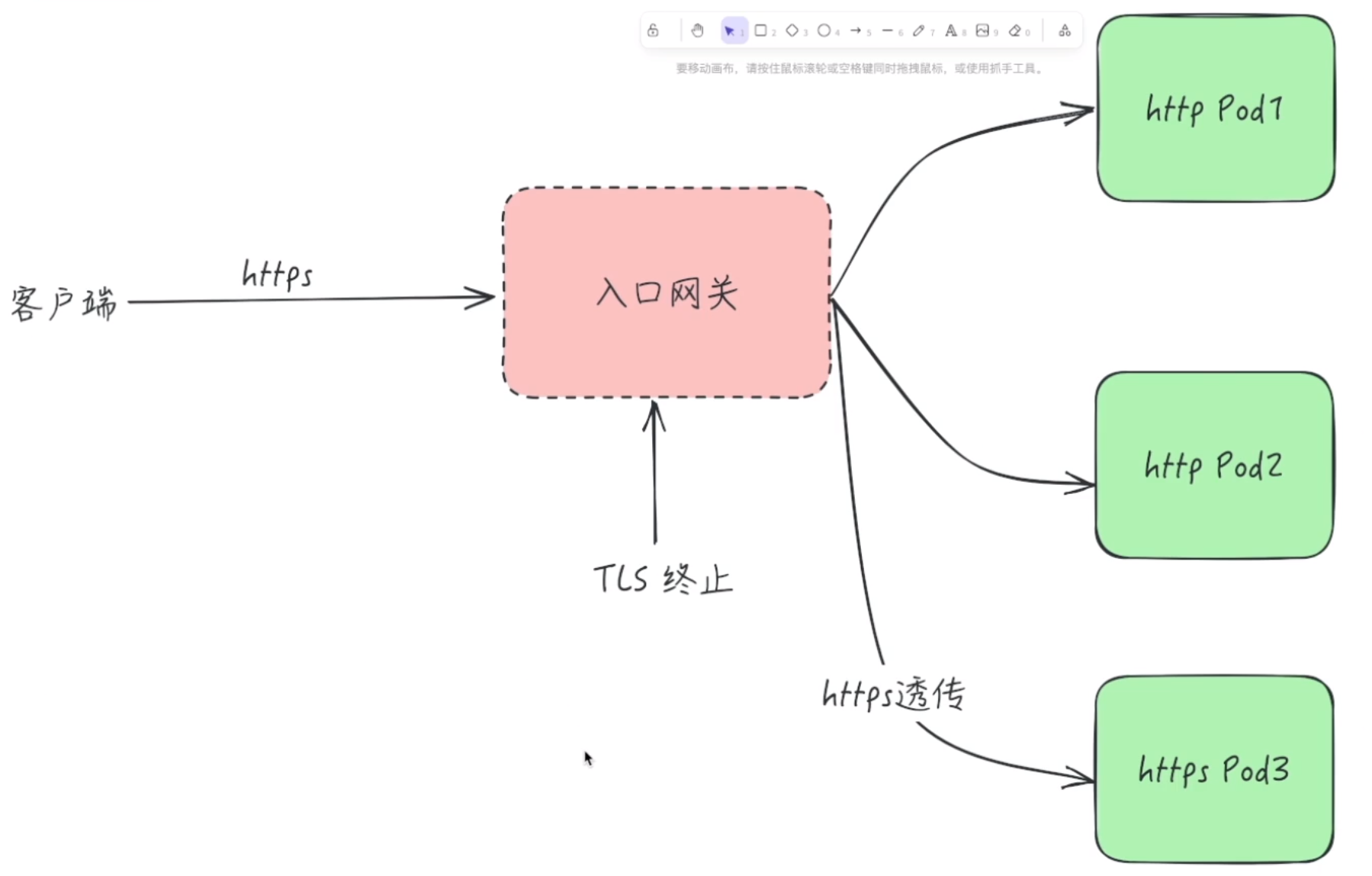
前面我们了解了如何为 HTTP 服务配置 HTTPS 访问入口,那如果我们的后台服务本身就是 HTTPS 的,那么如何为 HTTPS 服务配置 HTTPS 访问入口,即配置 Ingress Gateway 执行 SNI 透传,而不是对传入请求进行 TLS 终止。
既然提到了 TLS 终止,那么我们可以先了解下什么是 ==TLS 终止==(TLS Termination)。
1.TLS Termination
它的主要作用是,作为一个前置代理服务器接收外部到达的加密 TLS 流量,然后将其解密为 HTTP 明文,最后再将流量转发到内部的某个服务。
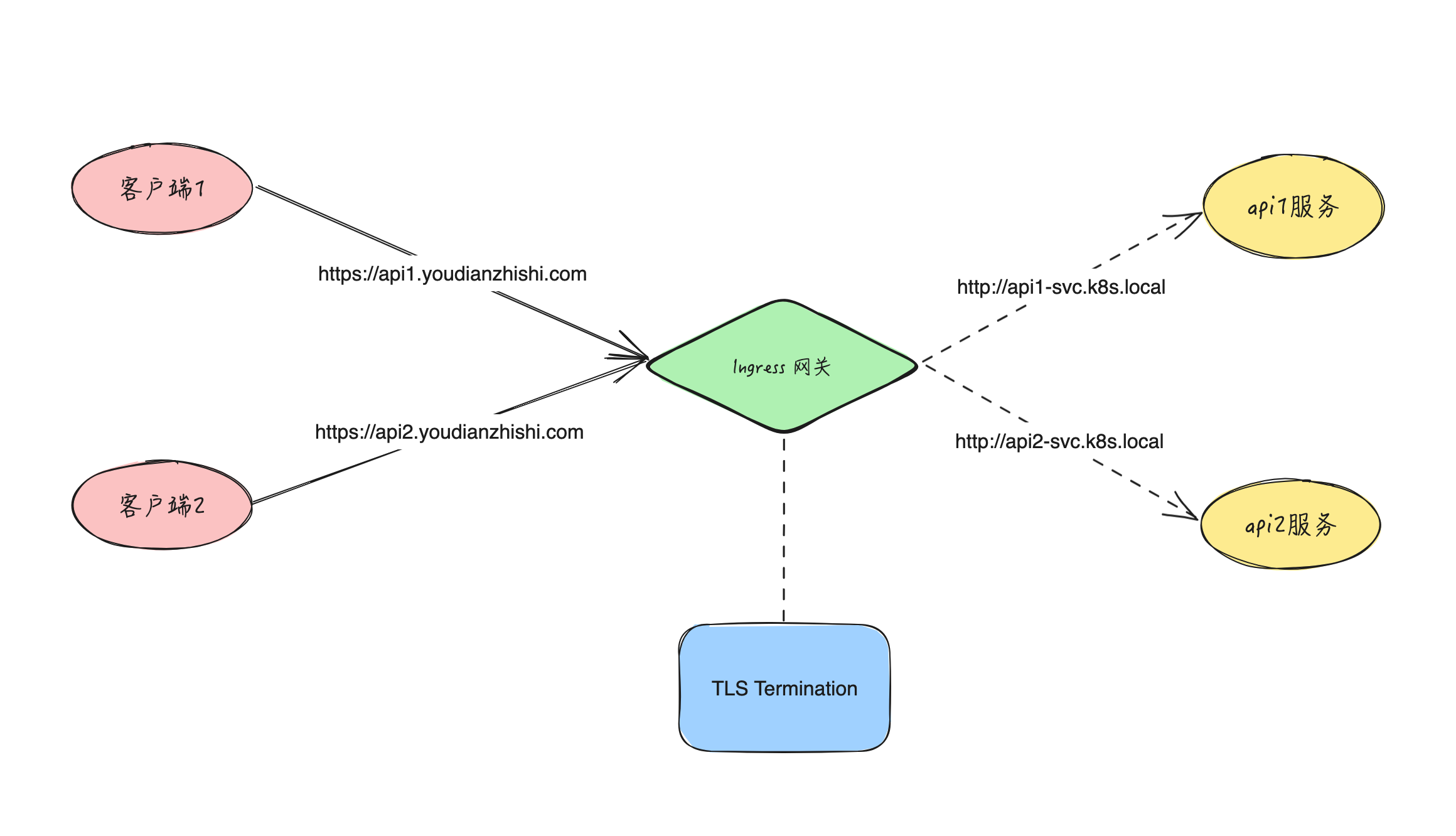
在实际应用中,内部的服务通常是以 HTTP 明文的方式通信,然后通过一个边界入口网关(ingress gateway)统一处理所有的 TLS 流量。这样 TLS 对所有的内部服务都是透明的,无需对每个服务去配置证书和私钥。通过一个统一的入口配置,我们还可以做很多事情,如日志,路由,路由策略等。
当然,对于一些安全级别较高的内部服务来说,未加密的流量可能是不可接受的,我们也可以配置来将加密的流量透传到该服务中,也就是这里我们需要的 SNI 透传。
同样的如果反过来,就是 TLS Origination。
2.TLS Origination
作为一个代理服务器,接收内部服务的 HTTP 明文流量,然后将其加密,最后转发到一个 HTTPS 服务上,该服务既可以是内部,也可以是外部的,但看起来就像是一个内部的服务,流程如下,
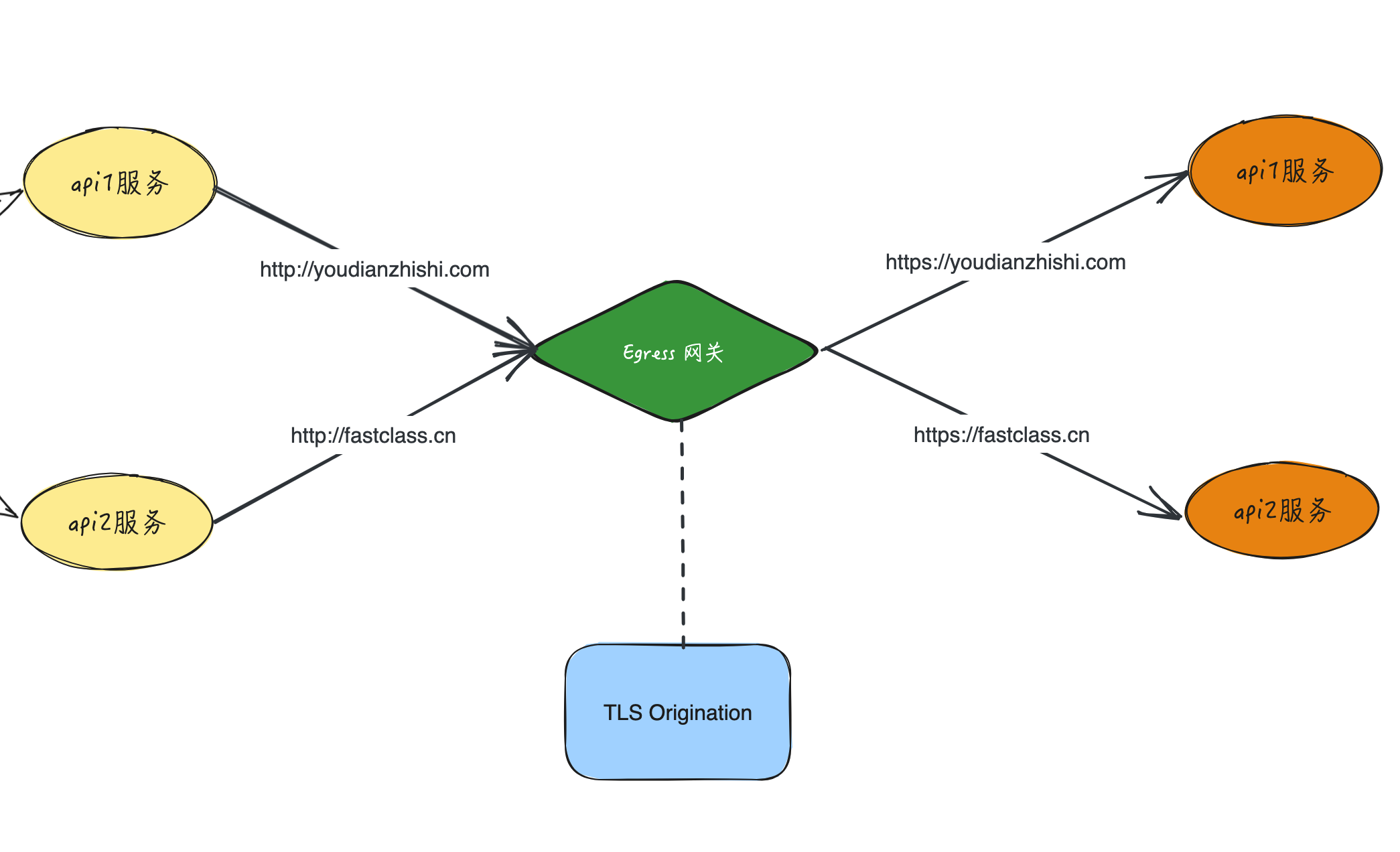
作为与边界入口网关对立的存在,出口网关也通常放置在网络的边界。所有的出口流量都被它接管,在这个节点上我们可以统一实施一些访问控制策略,或监控,或日志等,这和 Ingres Gateway 的功能其实是一样的,最大的不同在于将明文流量加密再转发。
3.TLS 透传
==🚩 实战:TLS 透传-2023.11.16(测试成功)==
实验环境:
1k8s v1.27.6(containerd://1.6.20)(cni:flannel:v0.22.2)
2
3[root@master1 ~]#istioctl version
4client version: 1.19.3
5control plane version: 1.19.3
6data plane version: 1.19.3 (8 proxies)
实验软件:
链接:https://pan.baidu.com/s/1tpP4vWjOUqNyW2rBLqzVZg?pwd=0l54
提取码:0l54
–来自百度网盘超级会员V8的分享
2023.11.16-实战:TLS 透传-2023.11.16(测试成功)
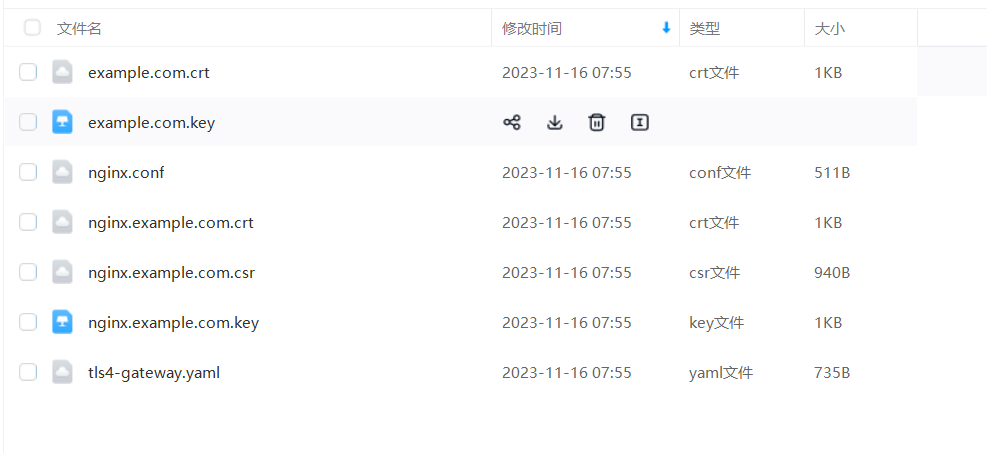
接下来我们用一个 NGINX 服务来演示下 TLS 透传的配置。首先在 Kubernetes 集群中创建一个 NGINX 服务,然后通过 Gateway 给这个服务配置一个域名是 nginx.example.com 的访问入口。
首先生成客户端和服务端的证书和密钥,同样我们这里使用 openssl 命令来生成。
- 创建根证书和私钥来为你的服务签名证书:
1openssl req -x509 -sha256 -nodes -days 365 -newkey rsa:2048 -subj '/O=example Inc./CN=example.com' -keyout example.com.key -out example.com.crt
- 为
nginx.example.com创建证书和私钥:
1openssl req -out nginx.example.com.csr -newkey rsa:2048 -nodes -keyout nginx.example.com.key -subj "/CN=nginx.example.com/O=some organization"
2
3openssl x509 -req -sha256 -days 365 -CA example.com.crt -CAkey example.com.key -set_serial 0 -in nginx.example.com.csr -out nginx.example.com.crt
查看:
1[root@master1 ~]#ll nginx.example.com.*
2-rw-r--r-- 1 root root 1050 Nov 16 07:24 nginx.example.com.crt
3-rw-r--r-- 1 root root  940 Nov 16 07:24 nginx.example.com.csr
4-rw-r--r-- 1 root root 1704 Nov 16 07:24 nginx.example.com.key
- 接着创建一个 Kubernetes 的 Secret 资源来保存服务的证书:
1kubectl create secret tls nginx-server-certs --key nginx.example.com.key --cert nginx.example.com.crt
- 为 NGINX 服务创建一个配置文件:
 1cat <<\EOF > ./nginx.conf
 2events {
 3}
 4
 5http {
 6  log_format main '$remote_addr - $remote_user [$time_local]  $status '
 7  '"$request" $body_bytes_sent "$http_referer" '
 8  '"$http_user_agent" "$http_x_forwarded_for"';
 9  access_log /var/log/nginx/access.log main;
10  error_log  /var/log/nginx/error.log;
11
12  server {
13    listen 443 ssl;
14
15    root /usr/share/nginx/html;
16    index index.html;
17
18    server_name nginx.example.com;
19    ssl_certificate /etc/nginx-server-certs/tls.crt;
20    ssl_certificate_key /etc/nginx-server-certs/tls.key;
21  }
22}
23EOF
- 创建一个 Kubernetes 的 ConfigMap 资源来保存 NGINX 服务的配置:
1kubectl create configmap nginx-configmap --from-file=nginx.conf=./nginx.conf
- 部署 NGINX 服务
 1cat <<EOF | istioctl kube-inject -f - | kubectl apply -f -
 2apiVersion: v1
 3kind: Service
 4metadata:
 5  name: my-nginx
 6  labels:
 7    run: my-nginx
 8spec:
 9  ports:
10  - port: 443
11    protocol: TCP
12  selector:
13    run: my-nginx
14---
15apiVersion: apps/v1
16kind: Deployment
17metadata:
18  name: my-nginx
19spec:
20  selector:
21    matchLabels:
22      run: my-nginx
23  template:
24    metadata:
25      labels:
26        run: my-nginx
27    spec:
28      containers:
29      - name: my-nginx
30        image: nginx
31        ports:
32        - containerPort: 443
33        volumeMounts:
34        - name: nginx-config
35          mountPath: /etc/nginx
36          readOnly: true
37        - name: nginx-server-certs
38          mountPath: /etc/nginx-server-certs
39          readOnly: true
40      volumes:
41      - name: nginx-config
42        configMap:
43          name: nginx-configmap
44      - name: nginx-server-certs
45        secret:
46          secretName: nginx-server-certs
47EOF
- 要测试 NGINX 服务是否已成功部署,需要从其 Sidecar 代理发送请求,并忽略检查服务端的证书(使用
curl的-k选项)。确保正确打印服务端的证书,即common name (CN)等于nginx.example.com即可:
 1$ kubectl get pods -l run=my-nginx
 2NAME                        READY   STATUS    RESTARTS   AGE
 3my-nginx-74df679cd5-5g7ss   2/2     Running   0          5m47s
 4
 5$ kubectl exec "$(kubectl get pod  -l run=my-nginx -o jsonpath={.items..metadata.name})" -c istio-proxy -- curl -sS -v -k --resolve nginx.example.com:443:127.0.0.1 https://nginx.example.com
 6# ......
 7* SSL connection using TLSv1.2 / ECDHE-RSA-AES256-GCM-SHA384
 8* ALPN, server accepted to use http/1.1
 9* Server certificate:
10*  subject: CN=nginx.example.com; O=some organization
11*  start date: Nov 13 08:27:26 2023 GMT
12*  expire date: Nov 12 08:27:26 2024 GMT
13*  issuer: O=example Inc.; CN=example.com
14*  SSL certificate verify result: unable to get local issuer certificate (20), continuing anyway.
15* TLSv1.2 (OUT), TLS header, Supplemental data (23):
16} [5 bytes data]
17
18> GET / HTTP/1.1
19> User-Agent: curl/7.58.0
20> Host: nginx.example.com
21# ......
22<!DOCTYPE html>
23<html>
24<head>
25<title>Welcome to nginx!</title>
26<style>
27html { color-scheme: light dark; }
28body { width: 35em; margin: 0 auto;
29font-family: Tahoma, Verdana, Arial, sans-serif; }
30</style>
31</head>
32# ......
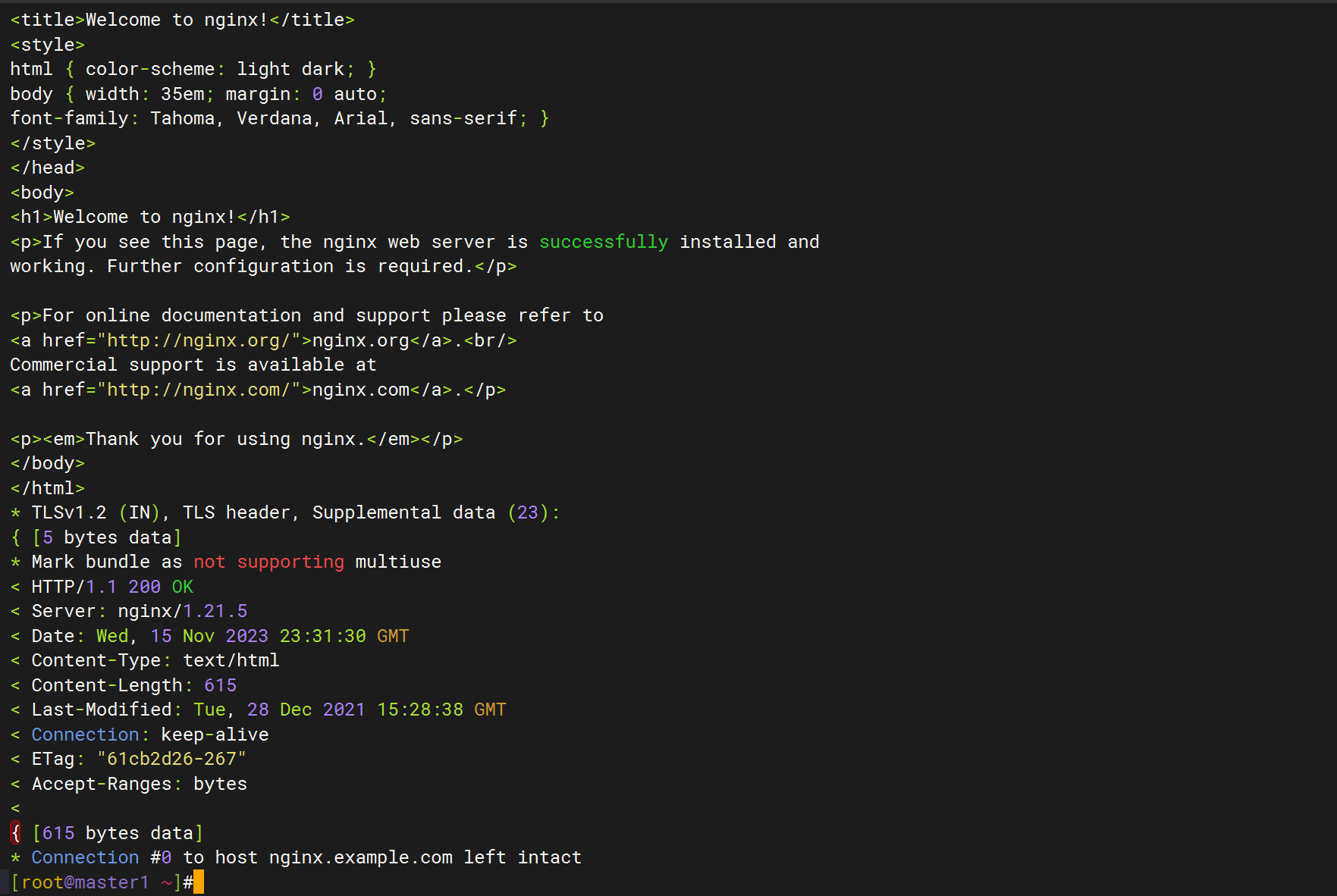
到这里我们的 HTTPS 服务就准备好了。
- 接下来我们就可以配置 Ingress Gateway 来将流量透传到 NGINX 服务中了,在
Gateway对象中定义 443 端口的网关,需要注意的是将 TLS 模式设置为PASSTHROUGH,该模式指示Gateway以透传方式传递入口流量,而不终止 TLS,内容如下所示:
 1#tls4-gateway.yaml
 2apiVersion: networking.istio.io/v1alpha3
 3kind: Gateway
 4metadata:
 5  name: mygateway
 6spec:
 7  selector:
 8    istio: ingressgateway # use istio default ingress gateway
 9  servers:
10    - port:
11        number: 443
12        name: https
13        protocol: HTTPS
14      tls:
15        mode: PASSTHROUGH
16      hosts:
17        - nginx.example.com
- 然后为通过
Gateway进入的流量配置路由规则:
 1#tls4-gateway.yaml
 2apiVersion: networking.istio.io/v1alpha3
 3kind: VirtualService
 4metadata:
 5  name: nginx
 6spec:
 7  hosts:
 8    - nginx.example.com
 9  gateways:
10    - mygateway
11  tls:
12    - match:
13        - port: 443
14          sniHosts: # 指定 SNI 主机名
15            - nginx.example.com
16      route:
17        - destination:
18            host: my-nginx
19            port:
20              number: 443
需要注意的是,这里的 VirtualService 对象中我们配置的 tls 字段了,描述了用于路由未终止的 TLS 流量(TLS/HTTPS)的匹配条件和动作。它通过 sniHosts 指定了 SNI 主机名,以便 Gateway 可以将流量路由到正确的 VirtualService。
- 部署资源
完整清单如下:
 1#tls4-gateway.yaml
 2apiVersion: networking.istio.io/v1alpha3
 3kind: Gateway
 4metadata:
 5  name: mygateway
 6spec:
 7  selector:
 8    istio: ingressgateway # use istio default ingress gateway
 9  servers:
10    - port:
11        number: 443
12        name: https
13        protocol: HTTPS
14      tls:
15        mode: PASSTHROUGH
16      hosts:
17        - nginx.example.com
18
19---
20apiVersion: networking.istio.io/v1alpha3
21kind: VirtualService
22metadata:
23  name: nginx
24spec:
25  hosts:
26    - nginx.example.com
27  gateways:
28    - mygateway
29  tls:
30    - match:
31        - port: 443
32          sniHosts: # 指定 SNI 主机名
33            - nginx.example.com
34      route:
35        - destination:
36            host: my-nginx
37            port:
38              number: 443
部署:
1[root@master1 ~]#kubectl apply -f tls4-gateway.yaml
2gateway.networking.istio.io/mygateway created
3virtualservice.networking.istio.io/nginx created
- 应用上面的资源对象后,我们就可以向
nginx.example.com发送 HTTPS 请求了:
 1# 获取 Ingress Gateway 的地址和 HTTPS 端口
 2export INGRESS_HOST=$(kubectl get pod -l istio=ingressgateway -n istio-system -o jsonpath='{.items[0].status.hostIP}')
 3export SECURE_INGRESS_PORT=$(kubectl -n istio-system get service istio-ingressgateway -o jsonpath='{.spec.ports[?(@.name=="https")].nodePort}')
 4
 5
 6# 访问 nginx 服务
 7$ curl -v --resolve "nginx.example.com:$SECURE_INGRESS_PORT:$INGRESS_HOST" --cacert example.com.crt "https://nginx.example.com:$SECURE_INGRESS_PORT"
 8# ......
 9* SSL connection using TLS_ECDHE_RSA_WITH_AES_256_GCM_SHA384
10* Server certificate:
11*       subject: O=some organization,CN=nginx.example.com
12*       start date: Nov 13 08:27:26 2023 GMT
13*       expire date: Nov 12 08:27:26 2024 GMT
14*       common name: nginx.example.com
15*       issuer: CN=example.com,O=example Inc.
16> GET / HTTP/1.1
17> User-Agent: curl/7.29.0
18> Host: nginx.example.com:30808
19> Accept: */*
20>
21< HTTP/1.1 200 OK
22< Server: nginx/1.21.5
23< Date: Mon, 13 Nov 2023 08:50:27 GMT
24< Content-Type: text/html
25< Content-Length: 615
26< Last-Modified: Tue, 28 Dec 2021 15:28:38 GMT
27< Connection: keep-alive
28< ETag: "61cb2d26-267"
29< Accept-Ranges: bytes
30<
31<!DOCTYPE html>
32<html>
33<head>
34<title>Welcome to nginx!</title>
35<style>
36html { color-scheme: light dark; }
37body { width: 35em; margin: 0 auto;
38font-family: Tahoma, Verdana, Arial, sans-serif; }
39</style>
40</head>
41<body>
42<h1>Welcome to nginx!</h1>
43<p>If you see this page, the nginx web server is successfully installed and
44working. Further configuration is required.</p>
45
46<p>For online documentation and support please refer to
47<a href="http://nginx.org/">nginx.org</a>.<br/>
48Commercial support is available at
49<a href="http://nginx.com/">nginx.com</a>.</p>
50
51<p><em>Thank you for using nginx.</em></p>
52</body>
53</html>
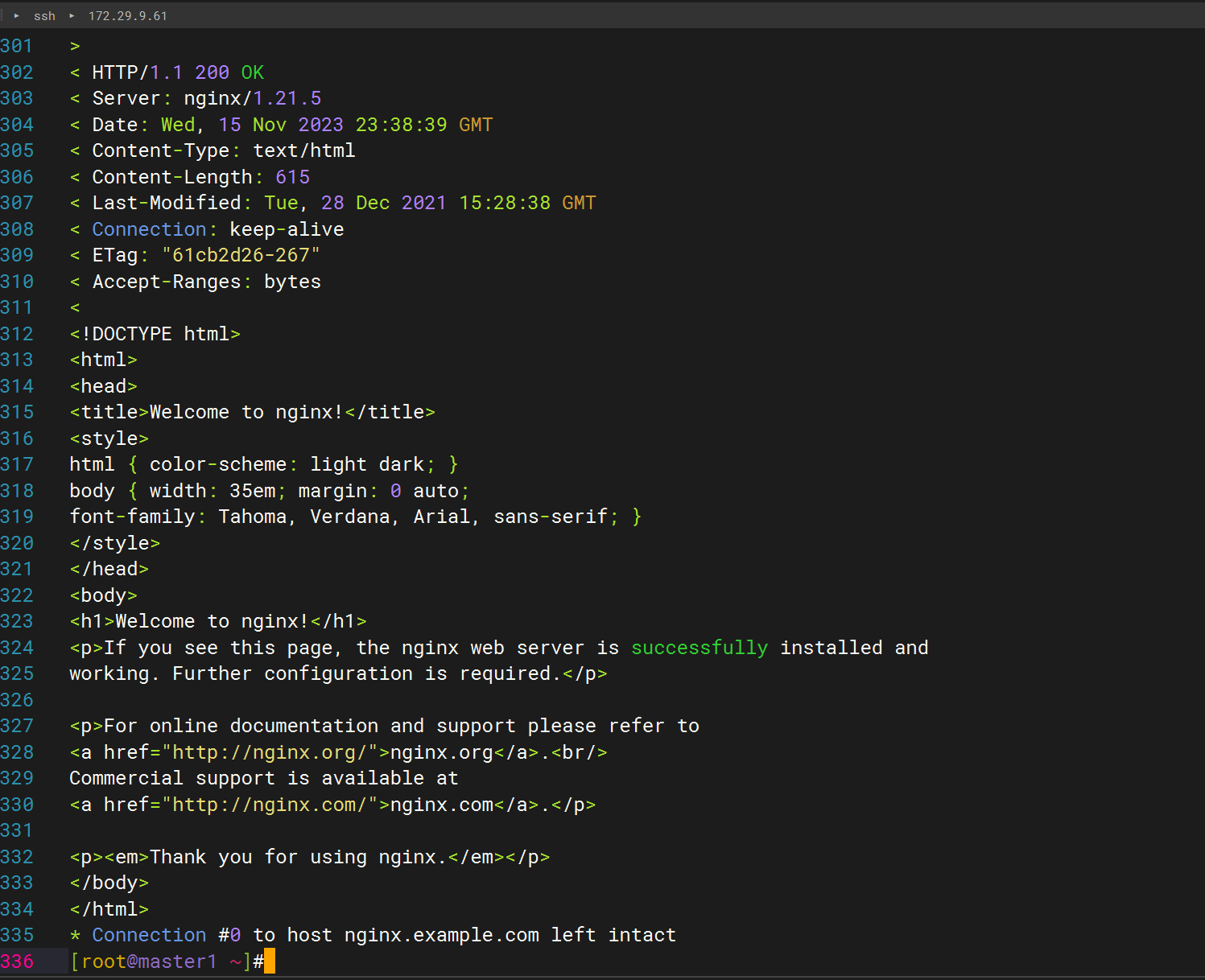
可以看到,我们成功访问了 NGINX 服务。
测试结束。😘
📡
推荐使用微信支付

推荐使用支付宝